Australians don’t need a visa to visit the UK, but you do need an Electronic Travel Authorisation (ETA), which isn’t a visa. It covers England, Scotland, Wales and Northern Ireland for holidays, visiting family and friends, business trips and short courses. You apply only in the official UK ETA app or on the UK government’s website, GOV.UK, and it costs £201 (about A$38). Smartraveller says the UK can refuse you entry without a visa or an ETA, and an ETA doesn’t guarantee entry.
This guide walks you through both ways to apply, screen by screen, and covers the cases people ask about most: stopovers, children, dual Australian-British citizens, permanent residents of Australia on another passport, and criminal records.
Not sure whether an ETA is enough for your trip? See UK visa for Australians.
Key facts
- Where to apply
- Only in the UK ETA app (App Store and Google Play) or on gov.uk/eta. You don’t go to an embassy or a visa application centre.
- Government fee
- £20 (about A$38) per person, including babies and children. It isn’t refunded, even if your application is refused.
- Processing time
- Usually within a day, up to 3 business days2. GOV.UK says you usually get a decision within a day.
- Validity
- 2 years, multiple entries2 (or until your passport expires, if that’s sooner). Each visit can last up to 6 months.
- Passport
- Your Australian passport, valid for your whole stay. The ETA is linked to the passport you apply with.
- At the border
- You only show your passport. With an Australian ePassport, you can usually use the eGates if you’re 10 or older.
UK ETA for Australians: do you need one?
Yes, if you’re travelling to the UK on an Australian passport for up to 6 months for a holiday, to visit family or friends, for a business trip or conference, or for a short course. Babies and children need their own ETA. The same ETA also covers Jersey, Guernsey and the Isle of Man.
Smartraveller says you need an ETA to visit the UK as a tourist or to transit, and that if you plan to stay longer than 6 months or for other reasons, you’ll likely need a visa (see Stopovers in the UK for when you don’t need an ETA in transit).
You don’t need an ETA if:
- You’re also a British or Irish citizen (see below).
- You have a UK visa or permission to live, work or study in the UK, including settled or pre-settled status or the right of abode.
- You have permission to live, work or study in Jersey, Guernsey or the Isle of Man.
- You’re changing planes in the UK without going through border control (airside transit). Check with your airline if you’re not sure.
- You live in Ireland and you’re travelling from Ireland, Guernsey, Jersey or the Isle of Man. If you’re 16 or older, bring an original Irish document that shows you live there, such as an Irish driving licence or an Irish Residence Permit.
If you’re on holiday in Dublin and then take the train or bus to Belfast, you need the ETA. The Ireland exemption applies only to people who live in Ireland.
Dual Australian-British or Australian-Irish citizens
If you’re also a British or Irish citizen, you can’t get an ETA or a visa. Travel on your British or Irish passport, or on your Australian passport with a certificate of entitlement to the right of abode in the UK. Smartraveller says the UK started enforcing this on 25 February 2026, and you may not be able to board your flight without one of these documents.
As a temporary measure, Smartraveller says airlines and ferry companies may accept dual Australian-British citizens who don’t have a valid British passport if they have an expired British passport issued in 1989 or later and a valid Australian passport, with matching personal details. You may have to go through extra identity checks when you arrive. Check with your airline before you travel. If you’ve had a British passport before and need to travel urgently, you can apply for an emergency travel document.
You may be British without knowing it. GOV.UK says you may have British citizenship automatically if you were born in the UK or have a British parent, and it has a tool to check if you’re a British citizen.
Living in Australia on another passport
What you need depends on the nationality on the passport you travel with, not on where you live. Being a permanent resident of Australia doesn’t exempt you from the ETA. If your passport is from a country on GOV.UK’s list of ETA nationalities, you apply for an ETA. If it isn’t, you may need a visa. Check with GOV.UK’s visa tool before you book.
What you can and can’t do with an ETA
You can enter the UK as many times as you want while your ETA is valid, for up to 6 months each time. You can:
- travel for a holiday and visit family or friends;
- go on a business trip, for example to meetings or a conference;
- take a course of up to 6 months, such as a language course;
- do certain arts or sports work for up to 3 months under the Creative Worker visa concession;
- take part in a permitted paid engagement, such as a talk you’ve been invited to give;
- transit through a UK airport when you go through border control.
You can’t do paid or unpaid work for a UK company or as a self-employed person (other than the activities above), stay longer than 6 months, live in the UK through frequent or back-to-back visits, claim public funds (benefits), or get married or register a civil partnership. To get married in the UK, you need a Marriage Visitor visa.
Before you start
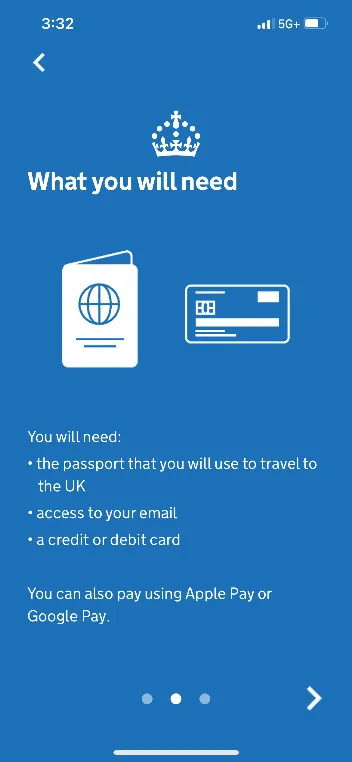
Have these ready:
- The passport you’ll travel with, the original: not a photocopy or a digital passport. It must be valid for your whole stay in the UK.
- An email address you check often. Your security code and your decision go there.
- A way to pay: a credit or debit card, Apple Pay or Google Pay.
- Your home address, details about your job, and details of any criminal convictions.
Three things to know first:
- Apply early. You usually get a decision within a day, but GOV.UK says to allow up to 3 business days. Apply before you book anything you can’t change.
- One ETA per person, including babies and children, and only one application per person. If you submit it twice, you pay twice. You can apply for other people. In the app, they need to be with you, because the app scans their face. If they aren’t, use the website. For anyone under 18, you’re asked for the contact details of someone with parental responsibility.
- If you have a criminal record or you’ve been refused entry to the UK before, read If your ETA is refused first. You may be better off applying for a Standard Visitor visa from the start.
Watch out for copycat websites. Other websites may charge more for the same application, and GOV.UK says you can’t get a faster decision through another website or app. Smartraveller warns that travellers have been scammed by private online visa services and travel agents. The official ETA costs £20 (about A$38). The official online form starts at gov.uk/eta and then continues on a homeoffice.gov.uk web address.
UK ETA app or website?
Both cost the same, ask the same questions and get you the same ETA. The difference is the photos.
| UK ETA app | Website (GOV.UK) | |
|---|---|---|
| Device | iPhone 7 or newer with iOS 16 or later, or an Android phone with Android 12 or later and NFC | Computer, tablet or phone |
| Passport | Photo of the photo page, then the app reads the chip | Photo of the photo page |
| Face | Live face scan (age 10 and up) and a photo | Upload a photo that meets the rules |
| Applying for others | Only if they’re with you | Even if they’re not with you |
If your Android phone can make contactless payments, it has NFC. The app is only available in English. If it doesn’t work on your phone, apply on the website.
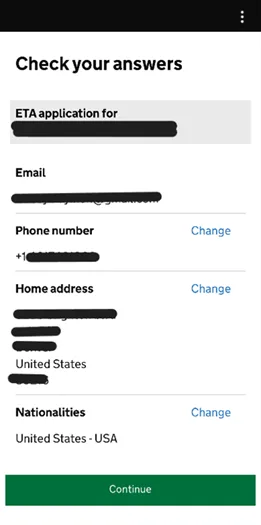
About the screenshots. They were taken in May 2026, when the fee was £10, and the applicant in them travels on a US passport: that’s why they show the United States as the nationality and country, a +1 phone number and payment in US dollars. With an Australian passport, the app and the website read Australia from your passport, and you choose Australia where the screenshots show the United States. The government fee is now £20 (about A$38).
Video: how to apply
The UK’s Home Office has published an official video on how to apply.
How to apply in the UK ETA app, step by step
1. Open the app and accept the terms
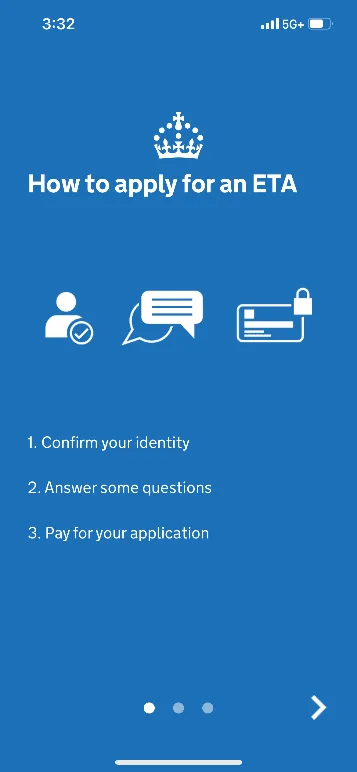
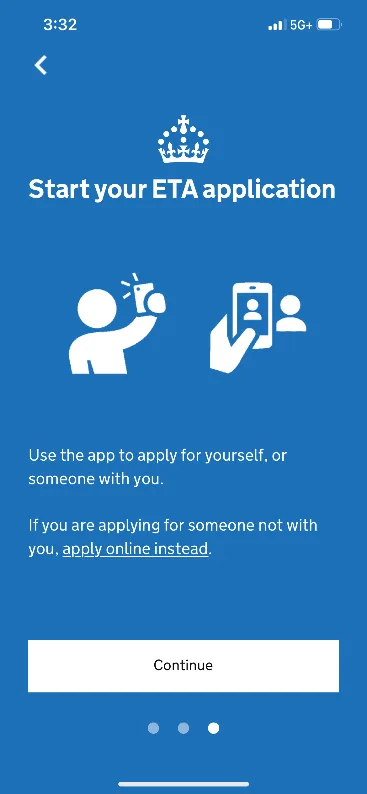
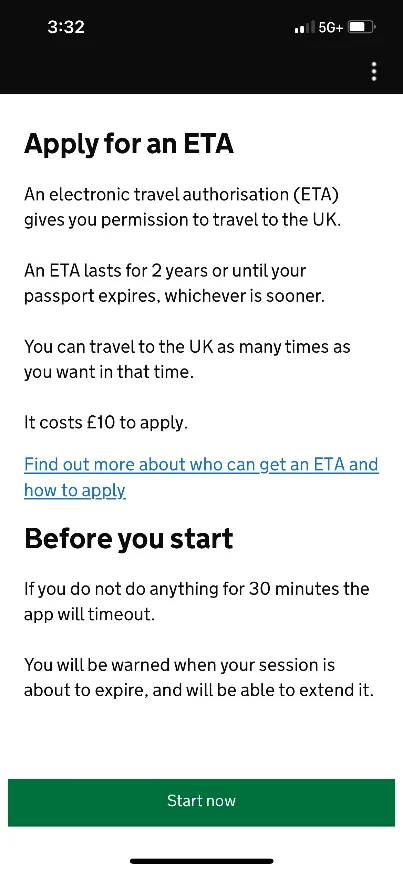
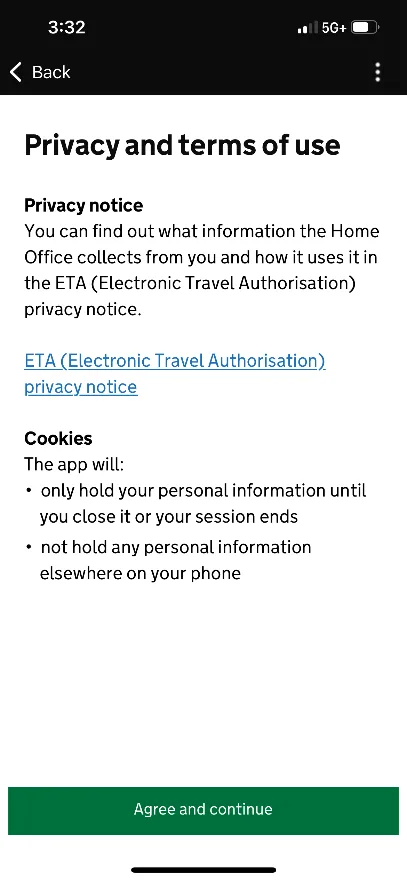
Download the Home Office’s official UK ETA app from the App Store or Google Play. Open it, go through the information screens, tap Start now and accept the terms with Agree and continue.
2. Email address and phone number
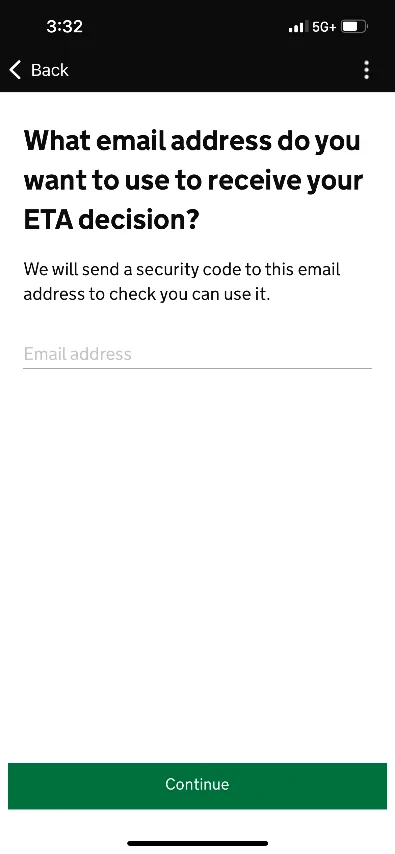
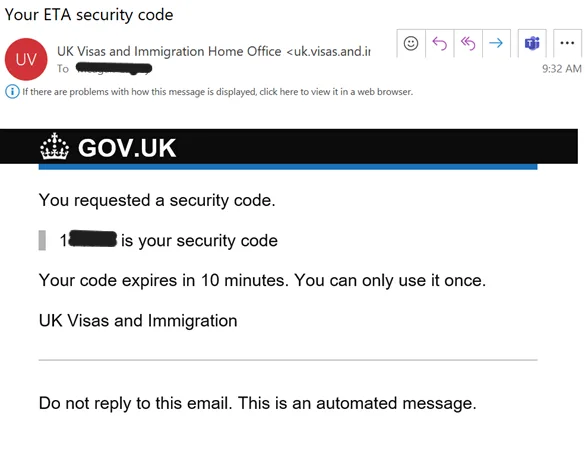
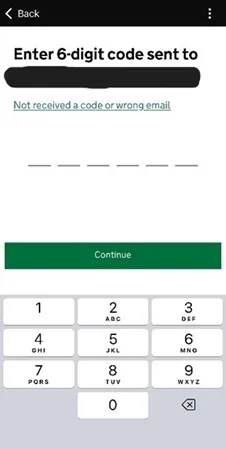
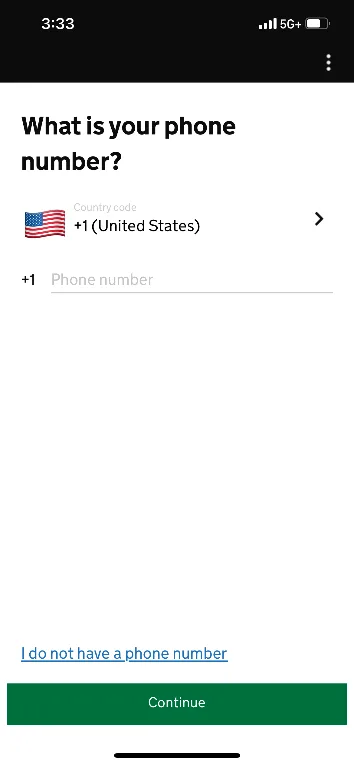
Enter your email address, open the message with the security code, and type the 6-digit code into the app. Then enter your phone number: in the screenshot, the country code is +1 for the United States; for an Australian mobile, it’s +61. Double-check the email address: your code and your decision are sent there.
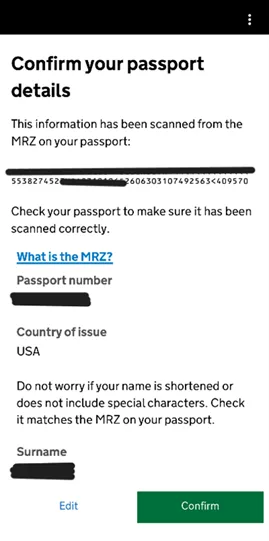
3. Passport photo and chip
Take a photo of your passport’s photo page, with the whole page in the frame and in focus. If it doesn’t work, try holding the phone at arm’s length.
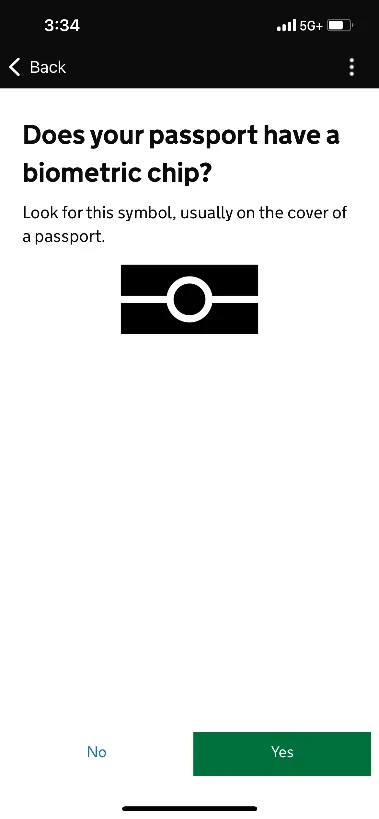
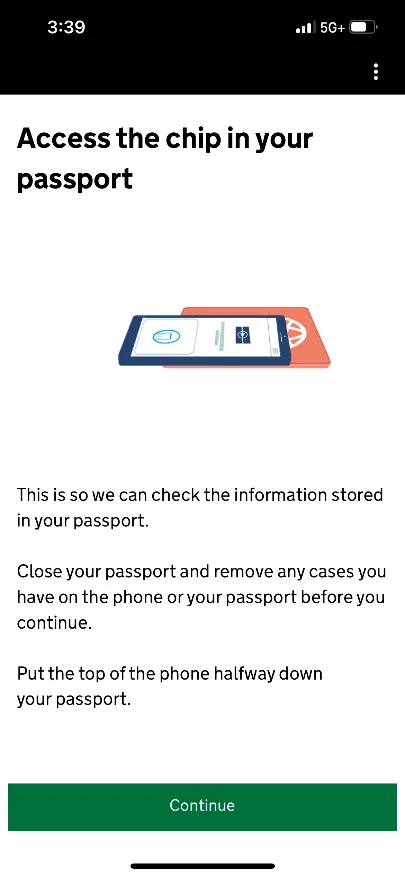
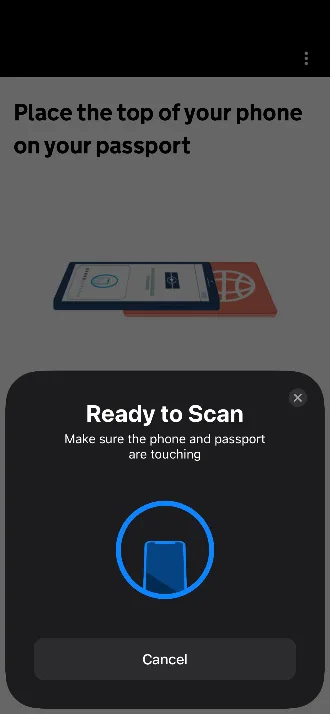
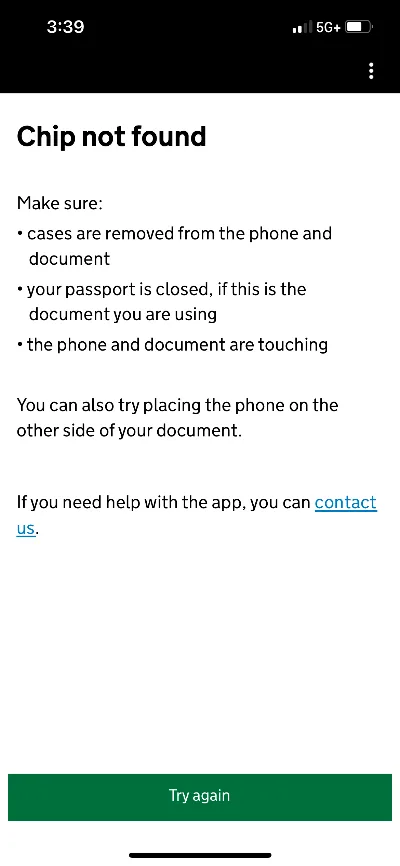
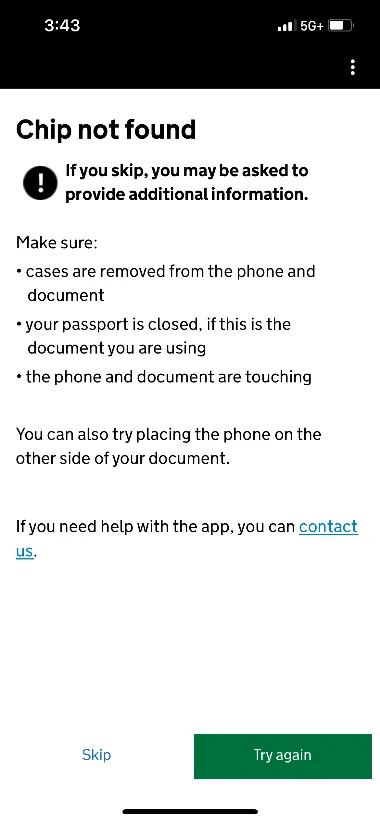
Next, the app reads the chip in your passport (Australian ePassports have the biometric symbol on the cover). Allow NFC access, take the passport and phone out of any cases or covers, and place the phone on the passport, with the top of the phone at the middle of the passport. If your volume is up, you’ll hear a beep when the chip is found. If it isn’t found, slowly move the phone around the passport.
If it still doesn’t work, you can continue without the chip. UK Visas and Immigration (UKVI) says this won’t affect the outcome of your application. The app then uses the details from the photo of the photo page. Check each detail: if any don’t match your passport, your application will be delayed or refused.
4. Face scan and photo
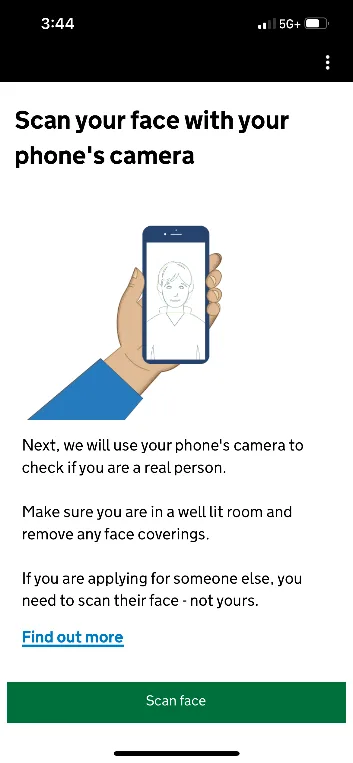
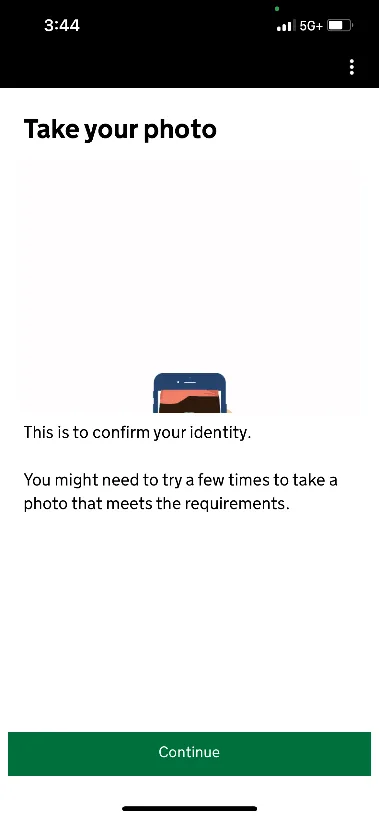
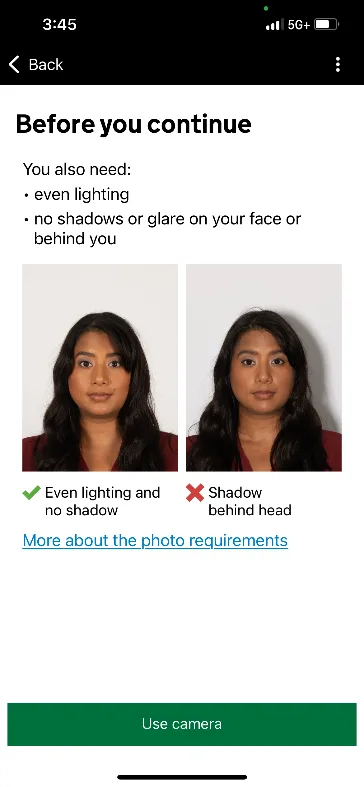
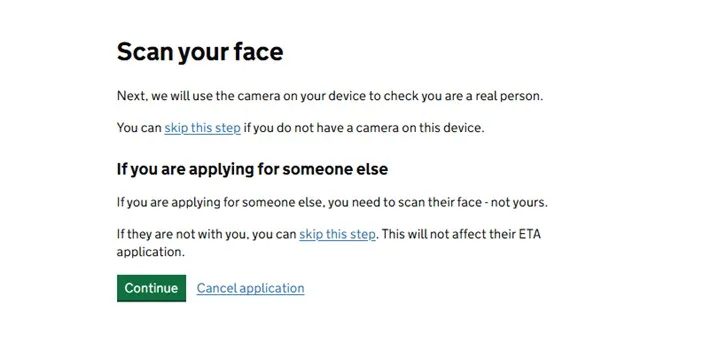
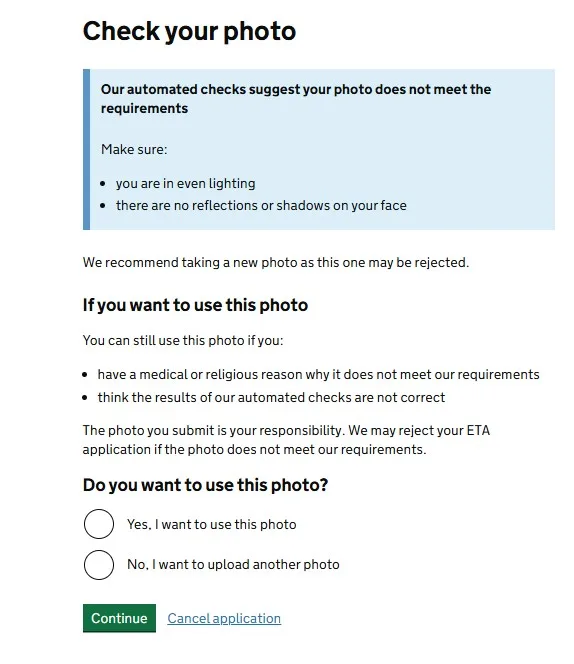
First, the app scans your face with the front camera to check that you’re a real person. Children aged 9 or younger skip this step. Then it takes a photo. If the photo doesn’t meet the rules, the app tells you, and you can retake it before you submit.
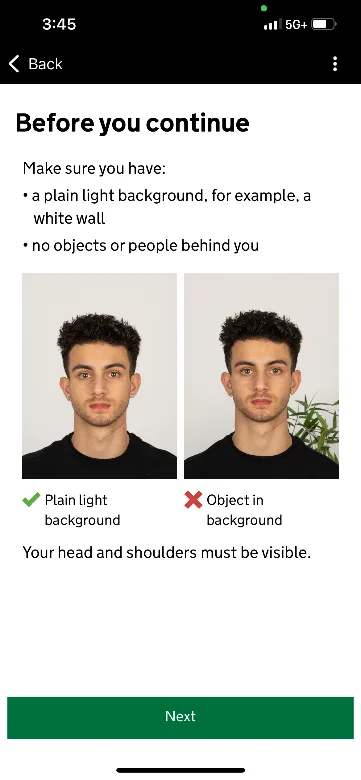
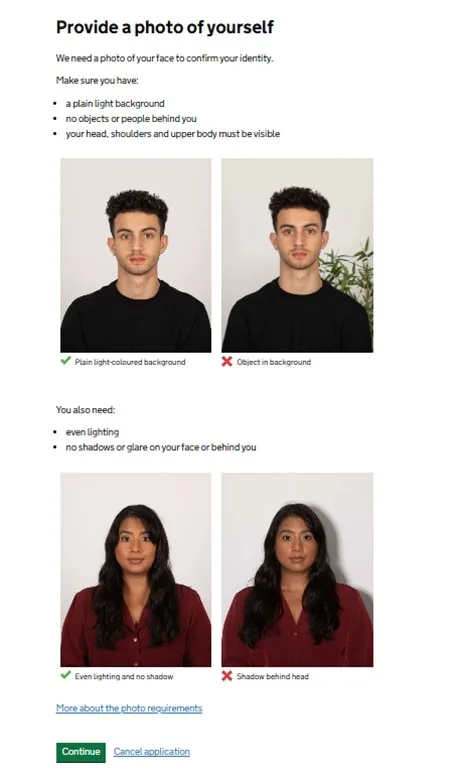
To get it right the first time: even light, no shadows or glare, a plain light background, nothing and nobody behind you, look straight at the camera, and keep your head and shoulders visible. You can wear a head covering for religious or medical reasons.
5. Address, nationality and questions
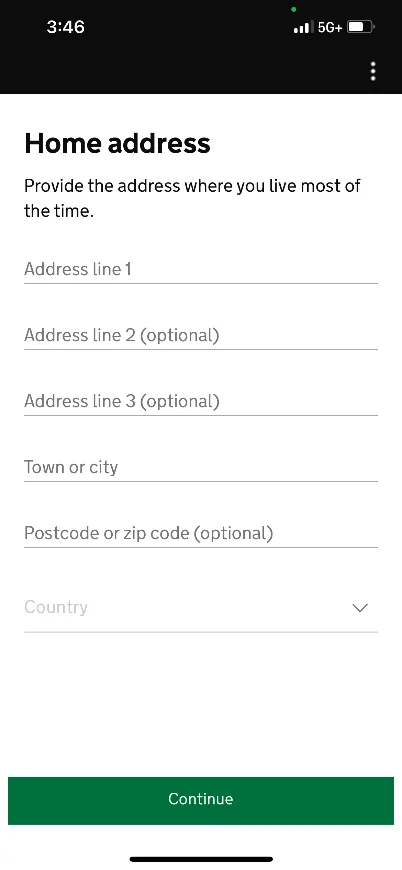
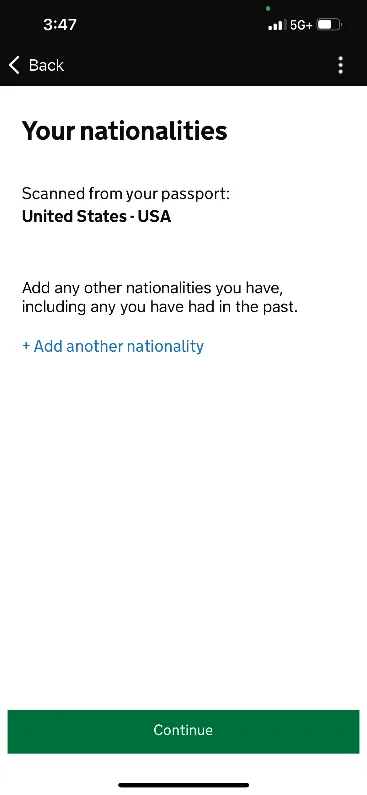
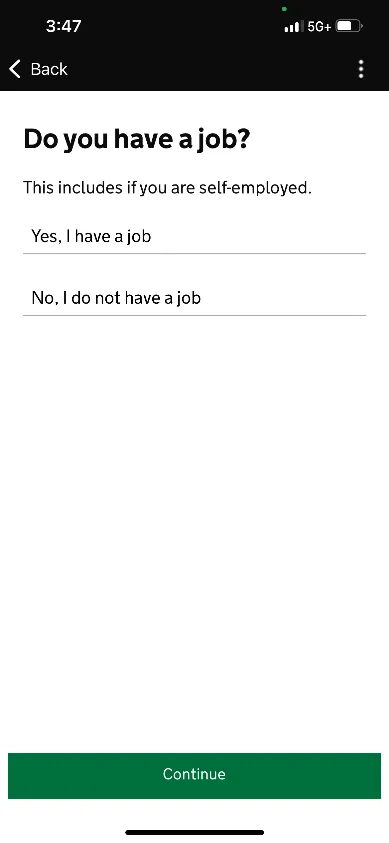
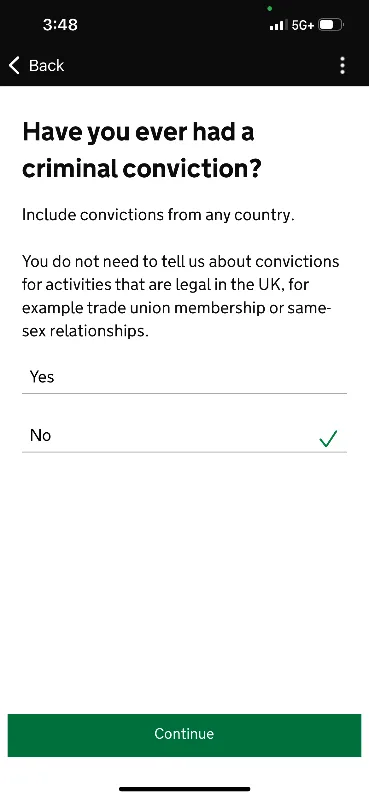
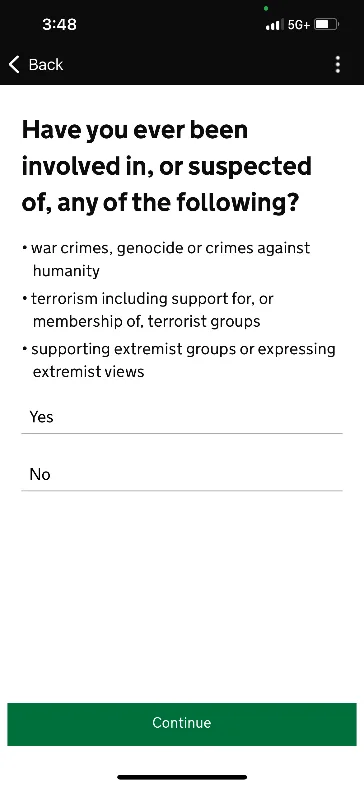
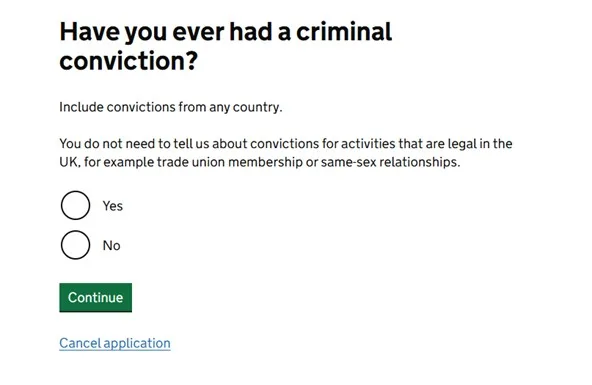
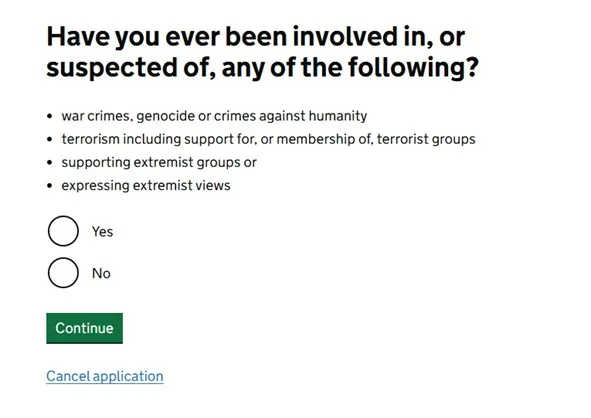
Enter your home address and check your nationality, which the app reads from your passport. In the screenshot, it shows the United States; with an Australian passport, it shows Australia. Then answer the questions about any other nationalities, your job, criminal convictions, and war crimes, terrorism and extremism. Answer truthfully: a false answer or a missing detail is grounds for refusal, now or on a future application. If you’ve been convicted, give the details: the type of offence (for example, theft, assault or fraud), the date of conviction and the sentence.
6. Review, declaration and payment
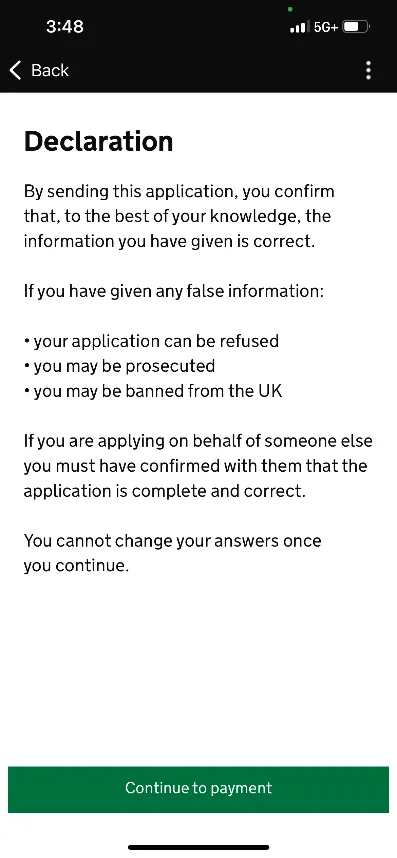
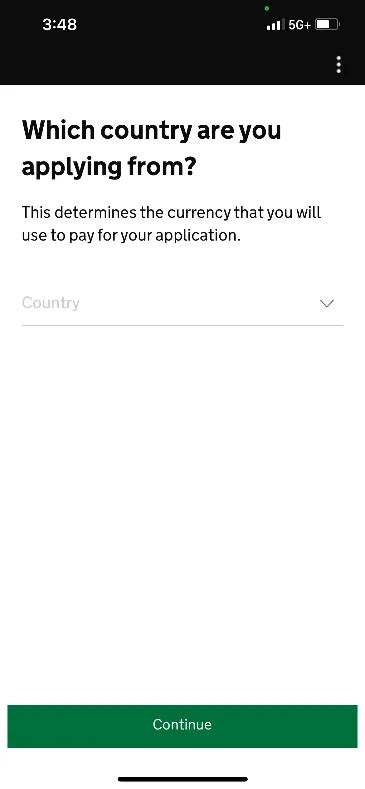
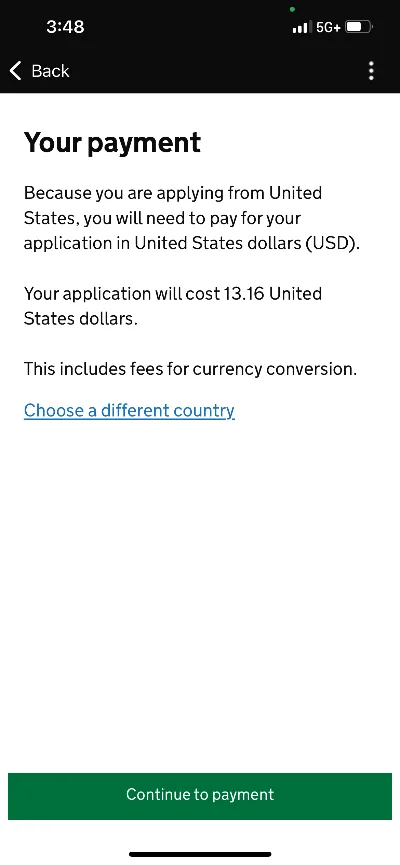
Read through your whole application again, especially your passport number, name and email address. Then confirm the declaration and go to payment. The app asks which country you’re applying from, which sets the currency you pay in: in the screenshots, the applicant chose the United States, so the price is in US dollars and includes currency conversion fees. GOV.UK says the app shows the price in the local currency for your country, and you can change the currency. Pay with Apple Pay, Google Pay or a card (American Express, JCB, Mastercard or Visa). Depending on your bank, you may need to enter a security code or approve the payment in your banking app.
7. Application submitted
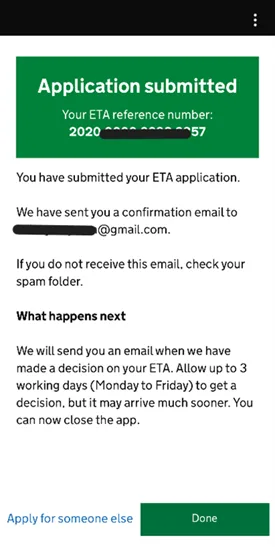
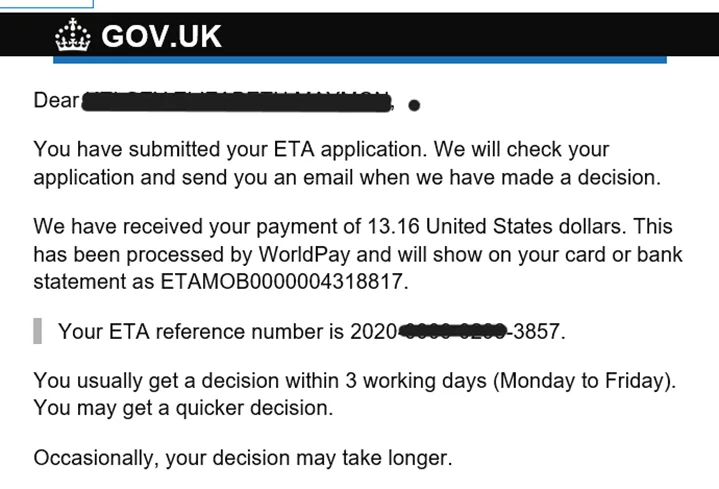
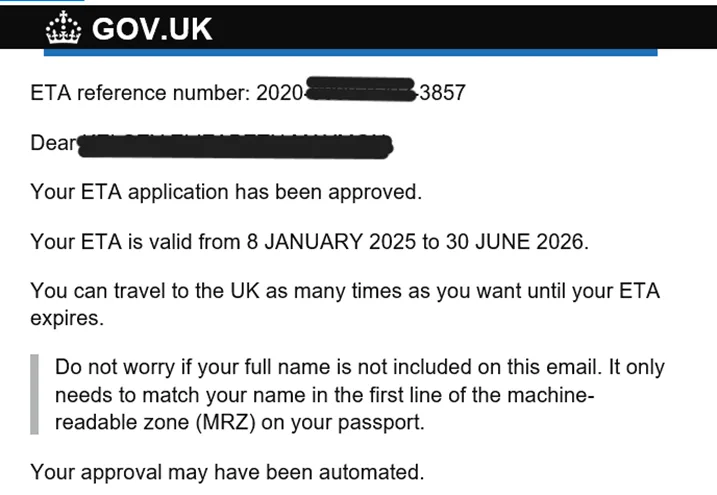
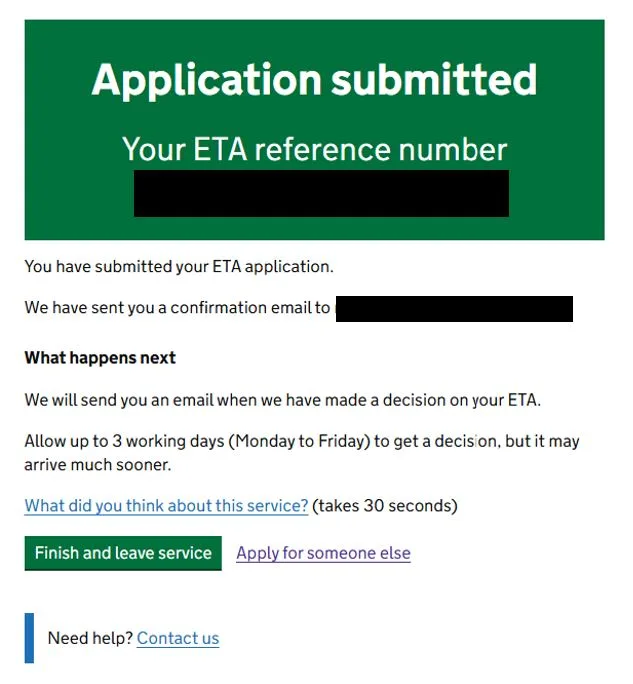
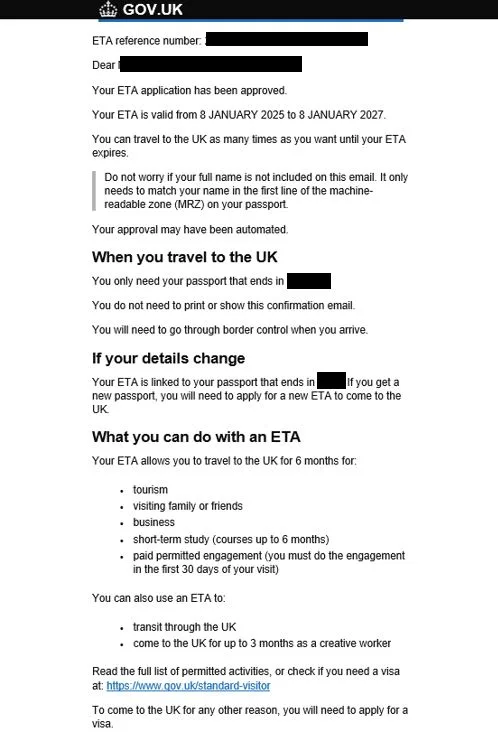
The app shows a confirmation, and you get a first email saying your application has been submitted, with your 16-digit ETA reference number. When a decision is made, you get a second email, which GOV.UK says also includes your reference number. You can delete the app once you’ve finished applying.
How to apply for a UK ETA on GOV.UK, step by step
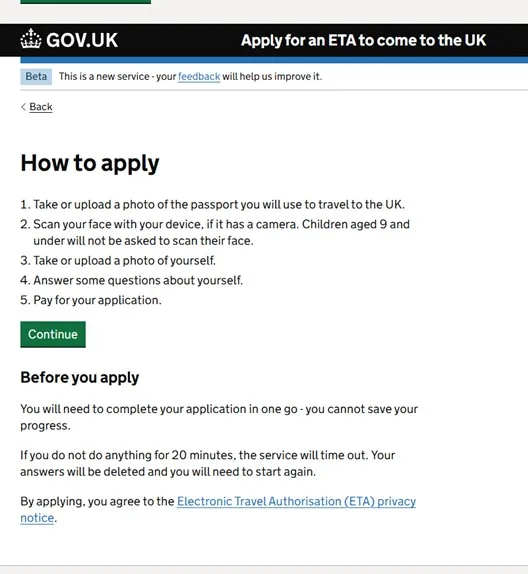
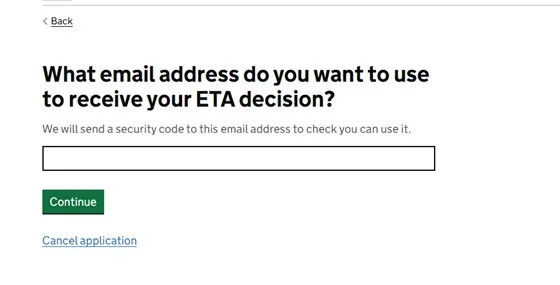
1. Open the website and confirm your email
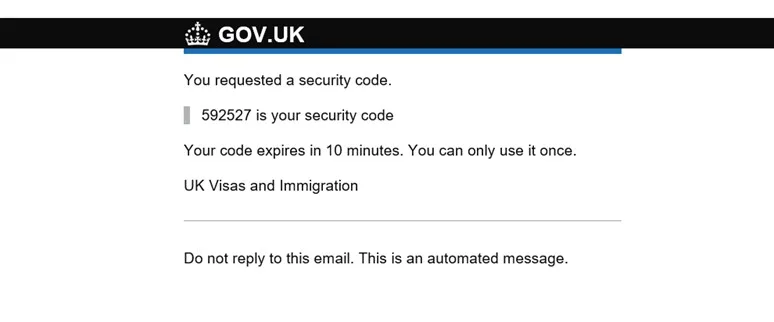
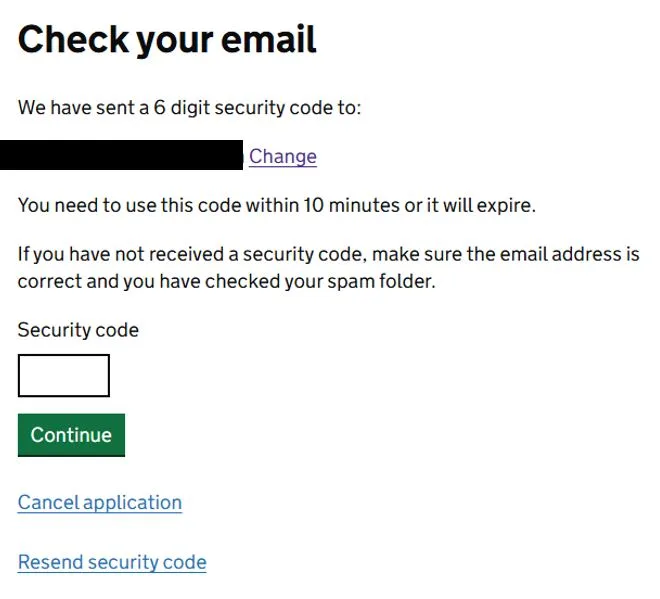
Go to gov.uk/eta, click Start now further down the page, enter your email address and then enter the code from the email.
2. Upload a photo of your passport
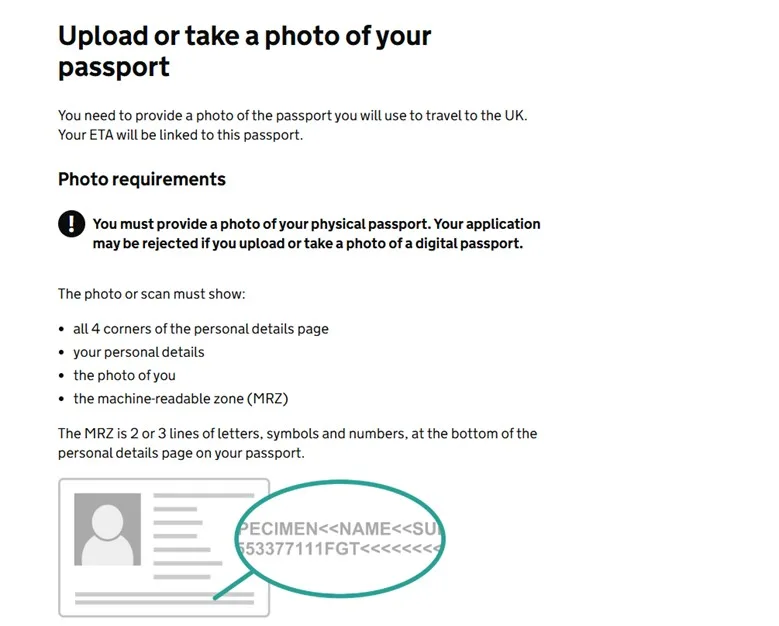
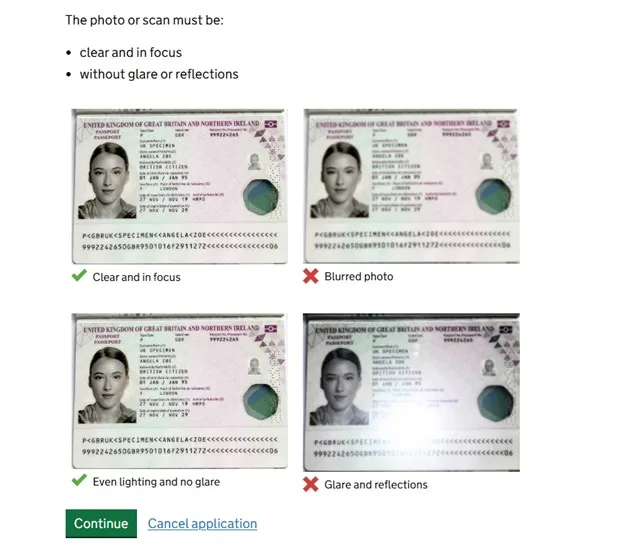
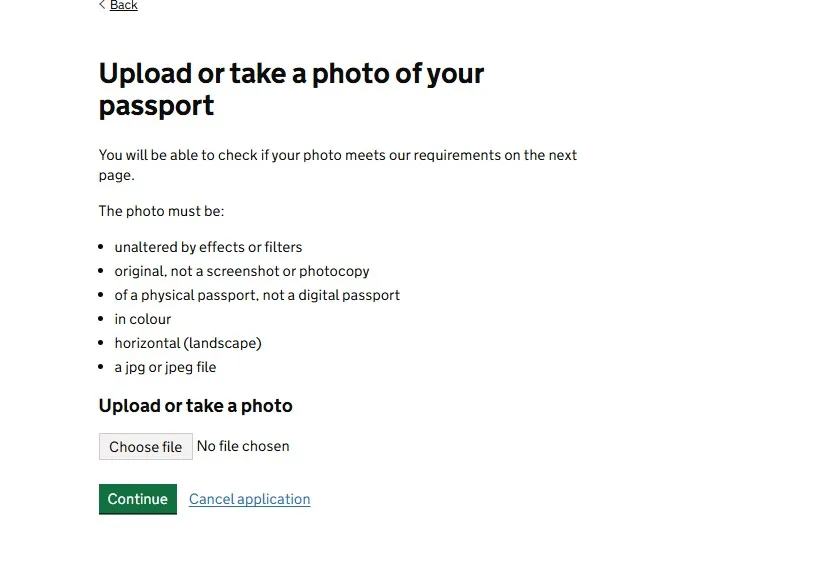
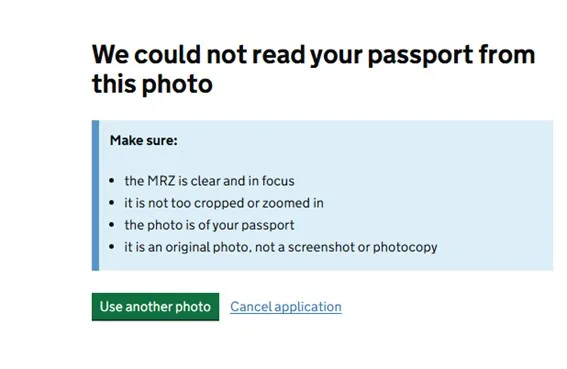
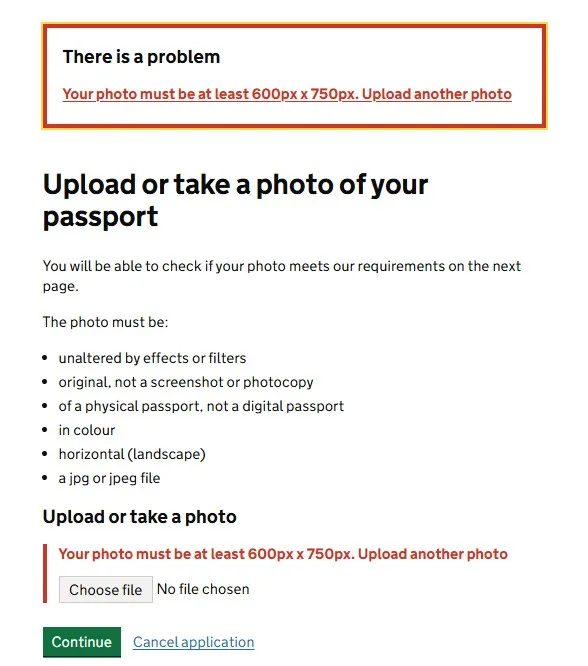
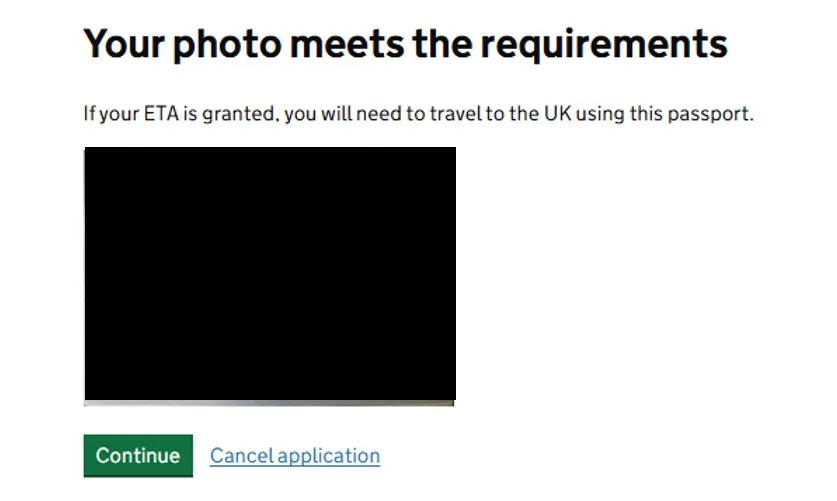
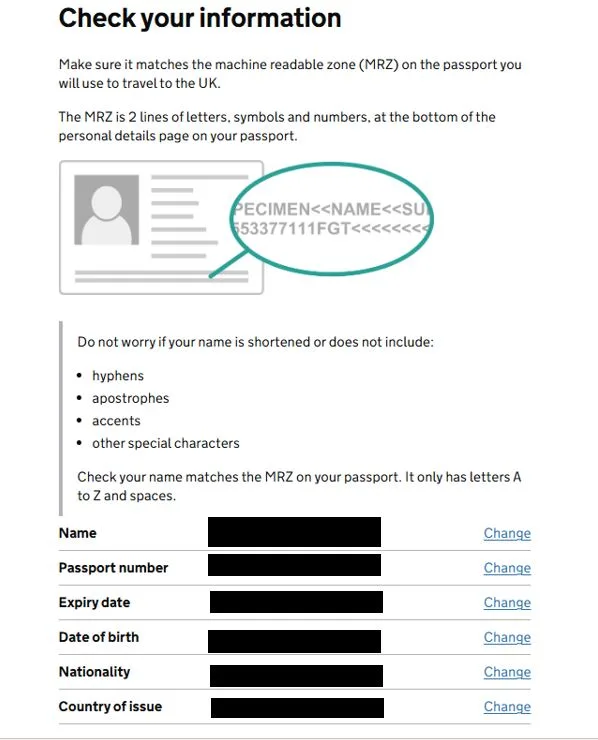
Take a photo of your passport’s photo page, with the whole page in the frame, in focus and without glare, and upload it. If the website says it can’t read it or it’s too small, retake it in better light or from closer up. Once it’s accepted, check the details it read. As the screen explains, it’s fine if your name is shortened or missing hyphens, apostrophes or accents: it needs to match the two lines at the bottom of the photo page (the machine-readable zone), which use only the letters A to Z.
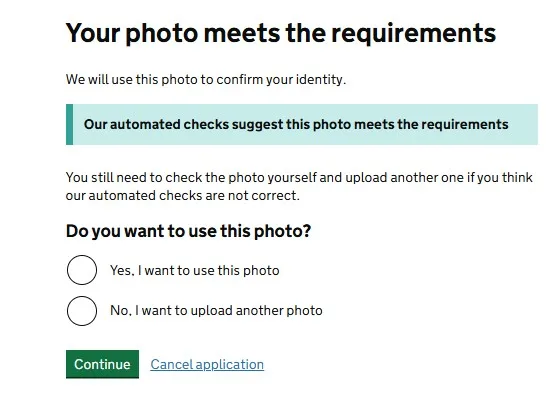
3. Upload a photo of your face
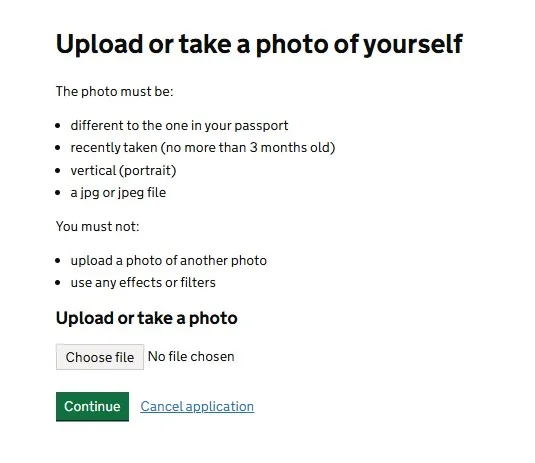
On a computer, there’s no live face scan. The website lets you skip that step and asks you to upload a photo of your face. If it doesn’t meet the rules, your application may be delayed or refused. GOV.UK’s rules:
| Rule | |
|---|---|
| File | JPG, at least 600 × 750 pixels, between 50 KB and 6 MB, portrait orientation |
| Background | Plain and light-coloured, with no other people or objects |
| Face | Facing forward, looking at the camera, mouth closed, eyes open, no hair over your eyes, no shadows |
| Framing | Head, shoulders and upper body |
| Glasses | Better without; never sunglasses or glare that hides your eyes |
| Not allowed | Edited photos or filters, mirrored images, a photo of a printed photo, or your passport photo |
It’s easiest if someone else takes the photo. Children must be alone in the photo, with no dummy or toys. Children under 6 don’t have to look straight at the camera, and babies under 1 can have their eyes closed. Lay them on a plain light-coloured sheet and take the photo from above.
4. Phone number, address and questions
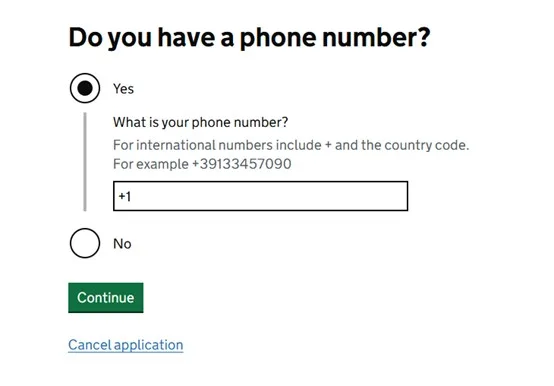
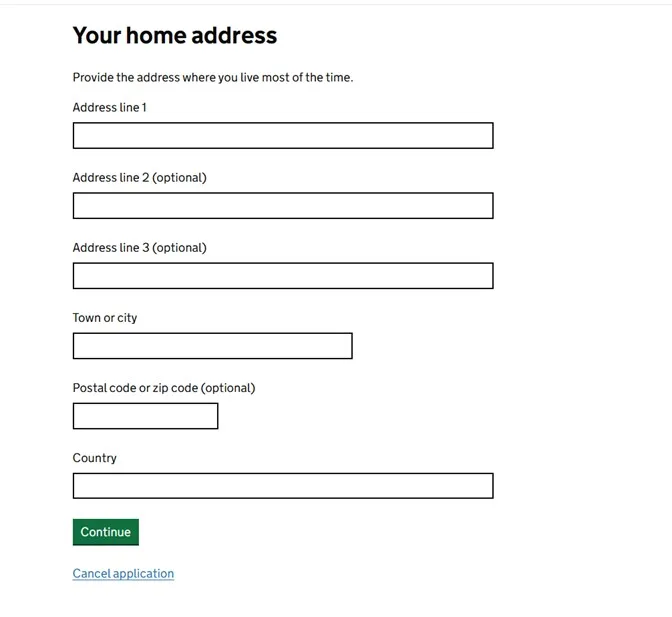
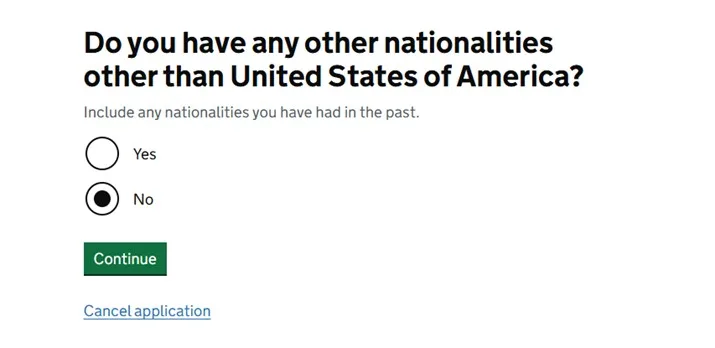
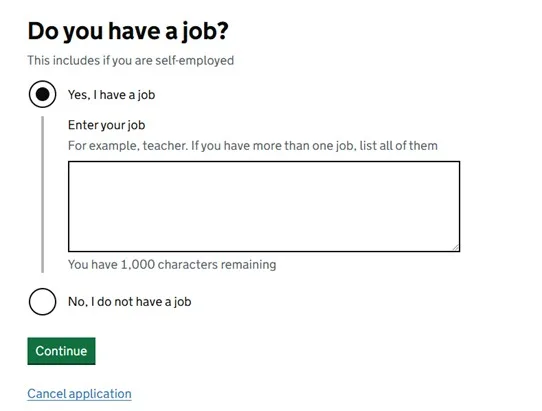
Enter your phone number and home address, and answer the questions about other nationalities, your job and criminal convictions, as in the app: truthfully, and with the offence, date and sentence if you’ve been convicted.
5. Review and pay
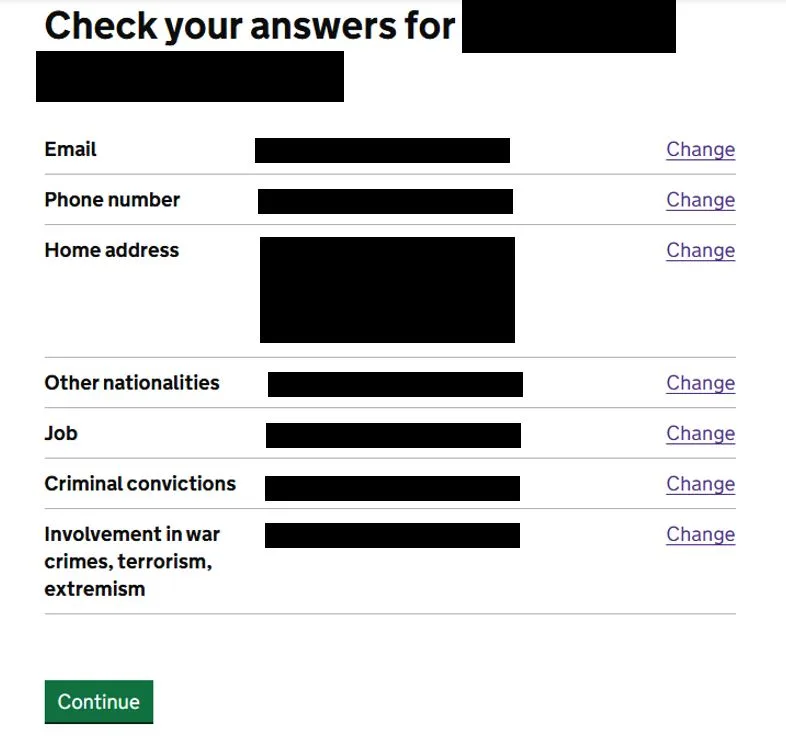
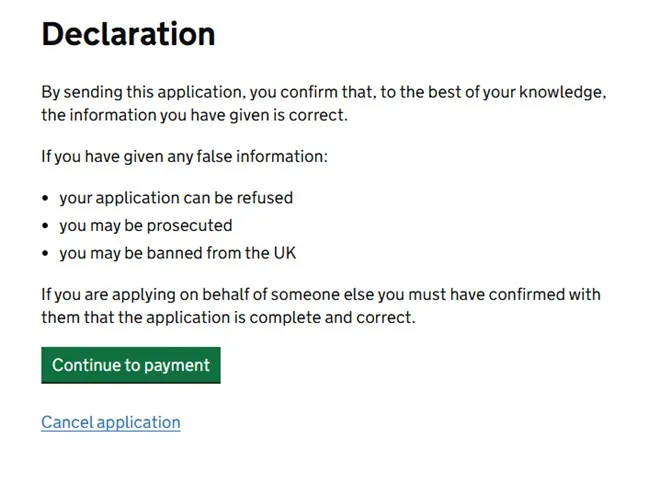
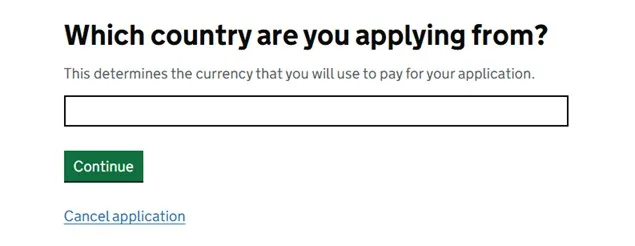
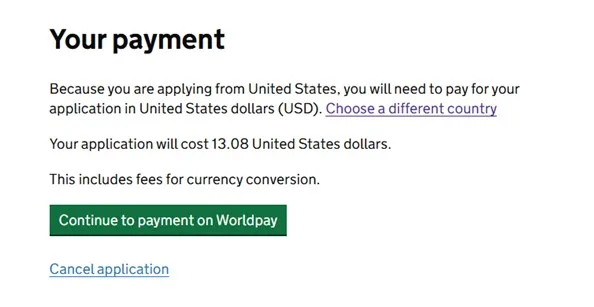
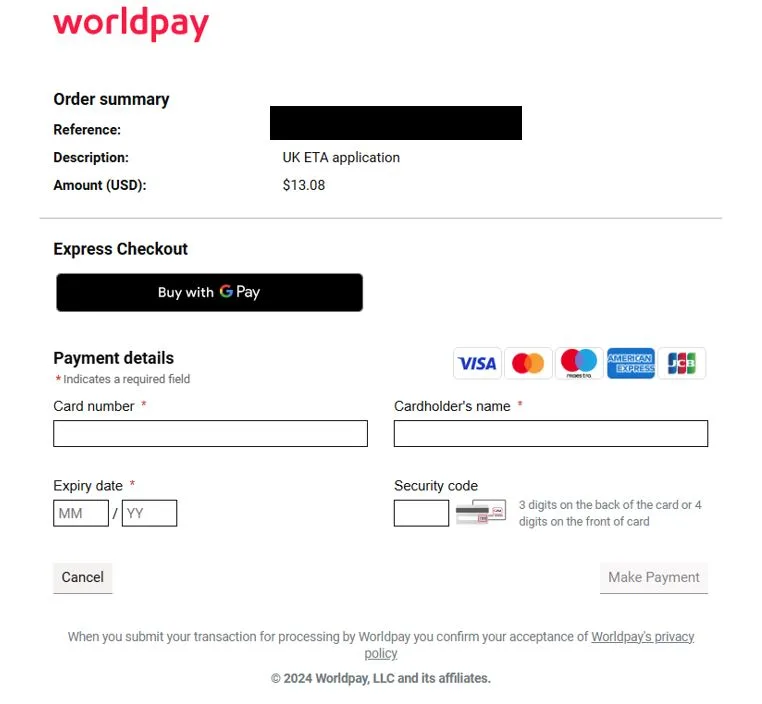
Read through your whole application again, confirm the declaration, choose the country you’re applying from (it sets the currency) and check the amount: it’s now £20 (about A$38) (the screenshot still shows the old fee, in US dollars). Enter your card details and confirm.
6. Application submitted
The confirmation appears on screen. Once your ETA is approved, you get the email with your ETA reference number.
After you apply
- Wait for the approval email before you travel. Applying isn’t enough: GOV.UK says you must wait until you get an email confirming you have an ETA.
- No answer after 3 business days? Check your spam or junk folder. If it isn’t there, contact UKVI through its webchat with the 16-digit number from your confirmation email. If you applied for several people, the decisions may come at different times.
- Keep the email with your 16-digit number. You don’t need to print anything: the ETA is linked to your passport digitally, and at the border you only show your passport.
- Travel with the passport you applied with. If you get a new passport, including after a loss, you need a new ETA.
Check your ETA and when it expires
GOV.UK’s ETA checker shows whether you have an ETA and when it expires. You need the passport you applied with. It doesn’t show the status of an application that’s still pending. If you applied through another website, you can use it to check that an ETA was actually issued to you.
If you made a mistake
You can’t correct an application once it’s submitted. You need to apply again and pay again. Do it as soon as you notice, especially if the mistake is in your passport number, name or date of birth.
If your ETA is refused
The fee isn’t refunded, and GOV.UK says you’ll need to apply again (and pay again). If nothing has changed, your new application will probably be refused too. Your other option is the Standard Visitor visa, which costs £1351 (about A$257) and is a separate application. A refused ETA isn’t a ban on entering the UK.
Under the UK’s Immigration Rules, an ETA is refused if, among other reasons, you:
- were convicted of an offence and sentenced to 12 months or more in prison, including a suspended sentence;
- were convicted of any offence in the last 12 months;
- overstayed or broke the conditions of a previous visit as an adult (unless you overstayed by 30 days or less and left voluntarily);
- gave false information or left something out, in this or a previous application;
- were refused a visa or entry as a visitor before, unless you’ve been granted another permission since;
- are subject to a deportation order or an entry ban.
That’s why GOV.UK suggests applying for a Standard Visitor visa from the start if you have a criminal record or have been refused entry to the UK before.
An approved ETA can also be cancelled for the same reasons, or if you owe the UK’s National Health Service (NHS) £500 or more.
Stopovers in the UK
- If you go through border control (for example, to collect your bags and check them in again), you need an ETA.
- If you stay airside, you don’t.
- If you’re not sure, ask your airline. It decides whether you can board.
When you arrive in the UK
- Show your passport. You don’t need anything else to prove you have an ETA, and you don’t need to fill in a landing card.
- Use the eGates. Smartraveller says you can usually use them free of charge if you’re 10 or older and have an Australian ePassport. Children aged 10 to 17 must be with an adult.
- Be ready to answer questions. GOV.UK says border officers may ask you to show that you’re visiting for tourism, can support yourself during your trip, have arranged somewhere to stay, can pay for your return or onward journey and will leave at the end of your visit.
- Under 18 and travelling alone? You may need a letter from a parent or guardian with their contact details and consent to the trip, and the name, date of birth, address and relationship to you of the person you’re staying with.
Problems and help
- The app won’t scan your face or passport: continue without that step. UKVI says it won’t affect the outcome. If the app still doesn’t work, apply on the website.
- Your payment won’t go through: contact UKVI through its webchat. UKVI can’t help with ETA enquiries over the phone.
- You applied on another website and didn’t get anything: contact that website, not the UK government. Use the ETA checker to see whether an ETA exists in your name.
- Help from the Australian Government: Smartraveller says Australian Government officials can’t help you change your UK visa status, speed up a UK visa application or facilitate your entry into the UK.
Do it yourself or use a visa agency?
You can do it yourself: the app and the website are in English and take about the same time as any online form. A visa agency fills in or checks the application for you, for its own fee on top of the government fee, and it won’t get you a faster decision. Here’s what the online visa agencies in our directory charge for the UK ETA:
- Official website (no agency)£201 (about A$38) government fee
- Sherpa· OnlineUK ETA (2 years, multiple entry)A$67.50
- Atlys· OnlineUK ETA (2 years, multiple entry)A$88.23
- VisaHQ· OnlineUK ETA (2 years, multiple entry)A$131.11
- iVisa· OnlineUK ETA (2 years, multiple entry)A$169.95
Total price per person shown by each agency on its website, government fee included, with standard processing, for an Australian passport; checked on 27 November 2026. Prices change, so check them before you pay. Each price and its source are on the agency’s page. Full entry requirements for the United Kingdom.
Common mistakes
- Travelling with a different passport from the one on your application, such as a new one. The ETA doesn’t transfer to the new passport.
- Boarding without a decision. Applying isn’t enough.
- Getting one ETA for the whole family. Each person needs their own, including babies.
- Submitting twice because the email hasn’t arrived. Check your spam or junk folder first.
- Unreadable photos. The passport photo must show the whole page, in focus and without glare. The photo of your face needs good light, a plain background and nothing covering your face.
- A typo in your email address. You won’t get the code or the decision.
- Leaving out a conviction. It’s grounds for refusal, now and on future applications.
- Applying when you’re also British or Irish. You can’t get an ETA.
- Working or staying longer than 6 months. For that, you need a visa.
- Paying on a copycat website you thought was the official one. If you’re charged more than £20 (about A$38), you’re not on GOV.UK or in the official app.
Frequently asked questions
Do Australians need a UK ETA?
Yes. Australian citizens need an ETA for holidays, family visits, business trips, conferences and short courses of up to 6 months, and to change planes in the UK if they go through border control. Smartraveller says the UK can refuse you entry without a visa or an ETA.
Is the UK ETA a visa?
No. It’s an electronic travel authorisation for visa-free visits, even though many people search for it as the ‘UK ETA visa’. To stay longer than 6 months, work in the UK or get married there, you need a visa.
What’s the official website for the UK ETA?
You can apply only on GOV.UK, the UK government’s website (gov.uk/eta), or in the Home Office’s UK ETA app. Any website that charges more isn’t the official one.
Is there an official UK ETA app?
Yes. The UK ETA app is the Home Office’s official app, free to download from the App Store and Google Play. You need an iPhone 7 or newer with iOS 16 or later, or an Android phone with Android 12 or later and NFC. If your phone can’t run it, apply on GOV.UK.
How much does the UK ETA cost for Australians?
£20 (about A$38) per person in the app or on GOV.UK, including for children. It isn’t refunded, even if your ETA is refused.
How much is that in Australian dollars?
£20 (about A$38), using the Reserve Bank of Australia’s exchange rates as a guide. What you actually pay depends on the currency you choose when you pay and on your card provider’s exchange rate and fees.
Why do some websites charge much more?
They’re private companies that add their own fee to the government fee, and they won’t get you a faster decision. GOV.UK says other websites may charge more and warns against websites that imitate government services. This guide shows you how to apply yourself.
How long does it take to get a UK ETA?
Usually within a day. GOV.UK says to allow up to 3 business days (Monday to Friday), but the decision often comes much sooner.
How long before my trip should I apply?
GOV.UK says to allow up to 3 business days for a decision, so apply at least that far ahead. If you fly out on a Monday, apply the week before.
How long is the UK ETA valid?
2 years, multiple entries. If your passport expires sooner, the ETA ends with it. While it’s valid, you can visit the UK for up to 6 months at a time.
What happens if I travel without an ETA?
GOV.UK says you must wait for the email confirming your ETA before you travel, and Smartraveller says the UK can refuse you entry without a visa or an ETA.
Do I need an ETA for a stopover in London?
Only if you go through UK border control, which you also have to do if you collect your bags and check them in again for your next flight. If you stay airside, you don’t. Ask your airline if you’re not sure.
Does the ETA cover Scotland, Northern Ireland or Ireland?
It covers the whole UK (England, Scotland, Wales and Northern Ireland), plus Jersey, Guernsey and the Isle of Man. It doesn’t cover Ireland, which isn’t part of the UK and has its own entry rules.
Do I need to print my ETA?
No. The ETA is linked to your passport. Keep the email with your 16-digit number, but at the border you only show your passport.
How do I check whether I have an ETA and when it expires, without the email?
Use GOV.UK’s ETA checker with the passport you applied with.
I got a new passport. Do I need a new ETA?
Yes. The ETA is linked to the passport on your application. With a new passport, you apply for a new ETA.
Do children and babies need a UK ETA?
Yes, each child needs their own. You can apply for your child in the app or on the website, with a photo of the child and the contact details of someone with parental responsibility.
Can I apply for an ETA for someone else?
Yes. In the app, the person needs to be with you, because the app scans their face. If they aren’t, apply on the website with a photo of their passport and a photo of their face.
I’m a dual Australian-British citizen. Do I need an ETA?
You can’t get one. Travel on your British passport, or on your Australian passport with a certificate of entitlement to the right of abode in the UK. The same goes for dual Australian-Irish citizens, who travel on their Irish passport. Smartraveller describes a temporary measure for dual Australian-British citizens with an expired British passport issued in 1989 or later: check with your airline.
I live in Australia but have another passport. Do I need a UK ETA?
It depends on the passport you travel with, not on where you live. If your nationality is on GOV.UK’s list, you need an ETA. If it isn’t, you may need a visa.
Can I work or study with a UK ETA?
You can’t do paid or unpaid work, except for what visitors are allowed to do, such as business meetings or a talk you’ve been invited to give. You can take a course of up to 6 months, such as a language course.
Can I get an ETA if I have a criminal record?
You can apply, but your ETA will be refused if you were sentenced to 12 months or more in prison, or if you were convicted of any offence in the last 12 months. In those cases, GOV.UK suggests applying for a Standard Visitor visa instead.
Does the ETA guarantee entry to the UK?
No. You still go through border control when you arrive, and border officers make the final decision on entry.
Do I need a visa agency?
No. You can apply directly in the app or on GOV.UK. A visa agency fills in the application for you, and its fee is extra. You can compare what visa agencies charge on the UK visa page.
Is Visania an official website?
No. Visania is an independent guide. The only official ways to apply for an ETA are GOV.UK and the UK government’s UK ETA app.
Apply yourself or use a visa service? Compare the government fee with what each visa service charges, online or in person, on the United Kingdom visa page.
Sources
Where the information in this guide comes from, with the date we last checked it: official websites for fees and rules, and each visa service’s website or Google Maps listing when we give its prices or reviews. The numbers match the superscript numbers in the text.
- 1.GOV.UK: Home Office immigration and nationality fees (8 October 2026). gov.uk · checked on 26 November 2026
- 2.GOV.UK: Apply for an ETA. gov.uk · checked on 26 November 2026
- 3.GOV.UK: Get an electronic travel authorisation (ETA) to visit the UK (who needs one, what it allows, fee, and after you apply). gov.uk · checked on 26 November 2026
- 4.GOV.UK: Using the UK ETA app. gov.uk · checked on 26 November 2026
- 5.GOV.UK: Check if you need a UK visa (Australian passport, tourism). gov.uk · checked on 26 November 2026
- 6.GOV.UK: Take a photo of your face for a visa application or permission (photo rules). gov.uk · checked on 16 November 2026
- 7.GOV.UK: Check your electronic travel authorisation (ETA). gov.uk · checked on 16 November 2026
- 8.GOV.UK: Contact UK Visas and Immigration, electronic travel authorisation (ETA). gov.uk · checked on 16 November 2026
- 9.GOV.UK: Check if you can get an electronic travel authorisation (ETA) (nationalities). gov.uk · checked on 16 November 2026
- 10.GOV.UK: Immigration Rules, Appendix Electronic Travel Authorisation (validity, refusal and cancellation). gov.uk · checked on 16 November 2026
- 11.Smartraveller: United Kingdom travel advice (Department of Foreign Affairs and Trade). smartraveller.gov.au · checked on 26 November 2026
- 12.Reserve Bank of Australia: exchange rates, table F11.1 (Australian dollar equivalents). rba.gov.au · checked on 26 November 2026