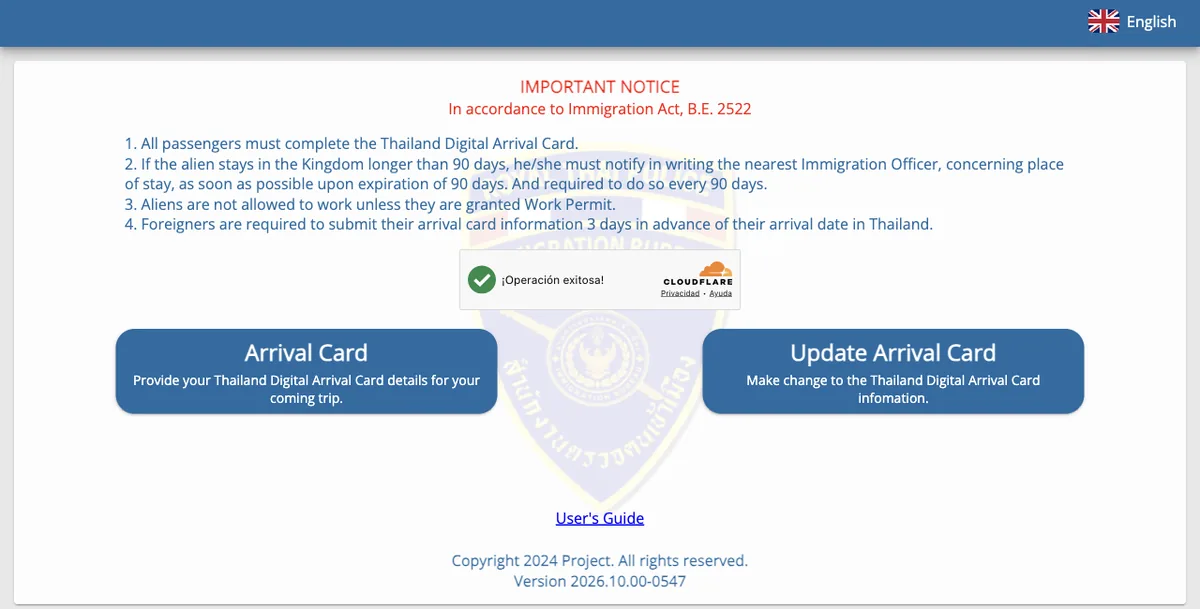
The TDAC (Thailand Digital Arrival Card) is the online arrival form that all foreign visitors to Thailand have had to fill in since 1 May 2025, whether they arrive by air, land or sea. It isn’t a visa. You do it online in the 3 days before you arrive, and it’s free on the official website of Thailand’s Immigration Bureau, tdac.immigration.go.th. This guide takes you through it screen by screen with a British passport, mostly using screenshots from November 2026.
Not sure whether you need a visa for Thailand or just your passport? See Thailand visa for UK citizens.
Key facts
- Where
- Only on tdac.immigration.go.th, the website of Thailand’s Immigration Bureau.
- When
- From 3 days before you arrive up to and including the day itself, going by the date in Thailand. Any earlier and the calendar won’t let you choose your date.
- Cost
- Free. If a website charges you for the TDAC, it isn’t the official one: it’s a private service filling it in for you.
- Who
- Every foreign traveller, children and babies included, each with their own card. The only exceptions are transit passengers who don’t go through immigration, crew, and people entering with a Border Pass.
- Time
- About 3 to 5 minutes per person with your details to hand, according to the Immigration Bureau.
- What you get
- A PDF with a QR code, which is also emailed to you. Showing it on your phone is enough. It’s valid for one entry.
Do you need one?
Yes, if you’re not Thai and you’re entering Thailand: on holiday, for work, to live there or on a stopover where you leave the airport. It doesn’t matter whether you enter visa-free or with a visa: the Royal Thai Embassy in London says all travellers must complete the TDAC, including those entering under the visa exemption scheme, and that you need one for every entry. Children and babies need one too, and so do people arriving by land or sea.
You don’t need one if you’re changing planes in Thailand without going through immigration (you stay in the transit area until your next flight), if you’re crew, or if you enter with a Border Pass (the border crossing pass for neighbouring countries). If you leave the airport during your stopover, even for a few hours, you do need one.
One entry, one TDAC. Each card covers a single trip, the one with the arrival date you enter. If you pop over to Cambodia, Laos or Malaysia and come back into Thailand, you’ll need to fill in another one.
The TDAC isn’t a visa. With a British citizen passport, you can visit Thailand visa-free for tourism and stay for up to 30 days1. The FCDO says your passport must be valid for at least 6 months from the date you arrive and have at least 1 blank page, and that you may be asked for proof of onward or return travel and that you have enough money for your stay. British nationals have been refused entry without this evidence. For longer stays or business trips, see Thailand visa for UK citizens.
Entering over land from Cambodia? The FCDO advises against all but essential travel to areas within 20 km of the border with Cambodia, and says the land crossings between the two countries remain suspended (checked 16 November 2026).
Before you start
Have these ready:
- your passport;
- the number of the flight that lands in Thailand and your arrival date; if you already have it, your flight out too;
- the address where you’ll stay the first night (hotel, flat or someone’s home), with the province and district;
- the countries you’ve stayed in in the 2 weeks before you arrive;
- an email address to receive your TDAC.
Four things to know before you open the website:
- You can’t save it and come back later. You have to do it in one go.
- Letters A to Z only. Names can’t include apostrophes, hyphens or accents: copy them as they appear on the two lines with
<<at the bottom of your passport photo page (O’NEILL becomes ONEILL). - In the drop-down lists, type three letters. GBR for the UK, QAT for Qatar, BAN for Bangkok. Matching options appear and you pick yours.
- The 3-day window runs on Thai time. The calendar uses the date in Thailand, which is 7 hours ahead of the UK in winter and 6 hours ahead in summer.
Watch out for copycat websites. The only official TDAC website is tdac.immigration.go.th (the address ends in .go.th), and it’s free. Search for “TDAC” and you’ll find websites with similar names and designs that charge to fill it in or “check” it for you. That isn’t illegal, but you’d be paying for something you can do for free in five minutes.
The process on video
In this Visania video we fill in the whole TDAC on the official website with a British passport, field by field. If the website changes, go by what you see there.
Thailand’s Immigration Bureau also has this official video, linked from the user guide on the TDAC website:
Step 1: Go to the official website
Most of the screenshots in this guide were taken on the official website on 17 November 2026, while recording the video. The traveller in them is Sophie, who lives in Manchester and flies to Bangkok via Doha.
Go to tdac.immigration.go.th. First you’ll see a Cloudflare box (“Verify you are human”): click the box and wait for the green tick. Then click Arrival Card (on the home page shown at the top of this guide). The other button, Update Arrival Card, is for correcting a card you’ve already submitted.
If the Cloudflare check doesn’t work or the page stays blank, reload it or try another browser.
Step 2: Your personal details
The first screen, Personal Information, has two parts: your passport details and your personal details.
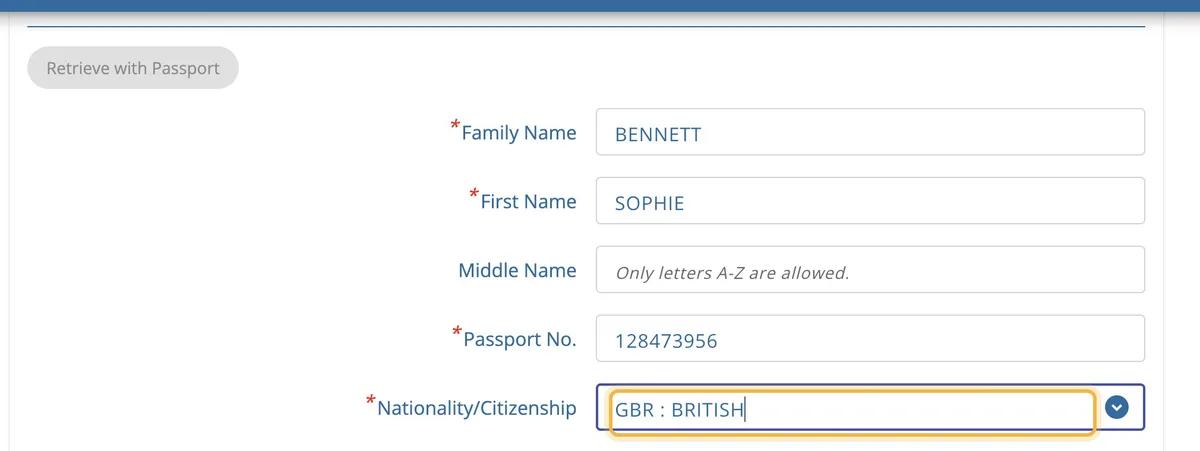
| Field | What to enter |
|---|---|
| Family Name | Your surname, as in your passport |
| First Name | Your first name |
| Middle Name | Your middle name, if your passport shows one. If not, leave it blank |
| Passport No. | Your passport number |
| Nationality/Citizenship | Type GBR and choose GBR : BRITISH. Not GBN : BRITISH NATIONAL (OVERSEAS), which is a different type of passport |
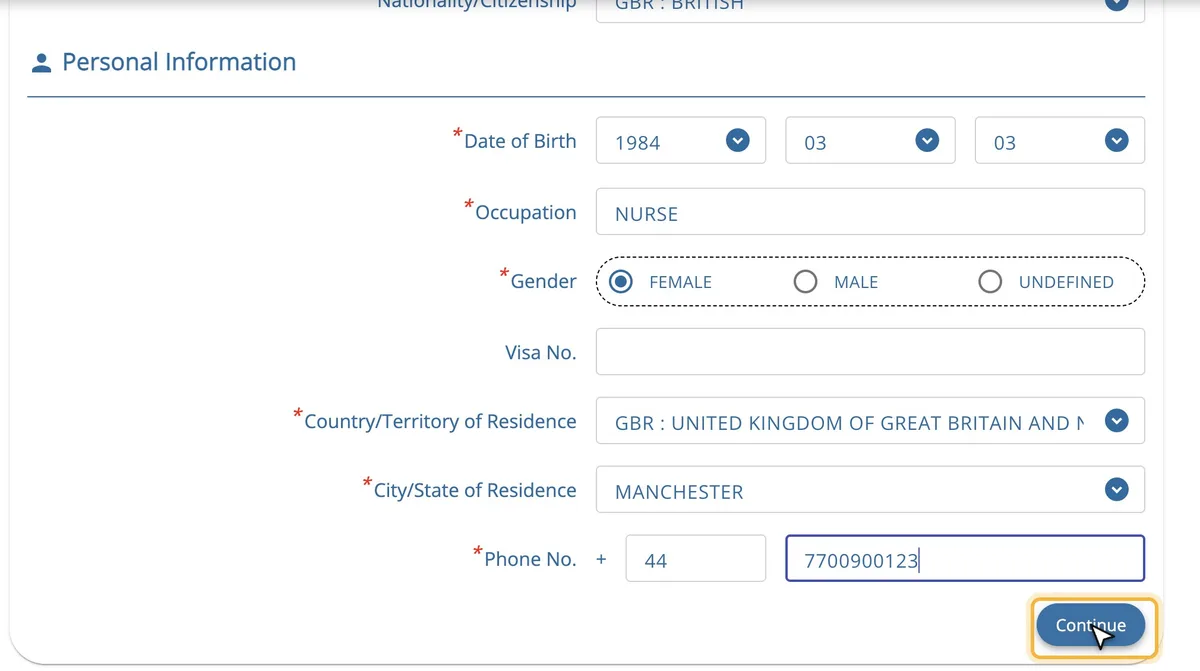
| Field | What to enter |
|---|---|
| Date of Birth | Year, month, then day, in three drop-down lists (the reverse of the usual UK order): 3 March 1984 is 1984 · 03 · 03 |
| Occupation | Your job in English: NURSE, TEACHER, ENGINEER, STUDENT, RETIRED… |
| Gender | FEMALE, MALE or UNDEFINED |
| Visa No. | Leave it blank if you’re entering visa-free. If you have a Thai visa (an e-Visa, for example), enter its number |
| Country/Territory of Residence | Type GBR and choose GBR : UNITED KINGDOM OF GREAT BRITAIN AND NORTHERN IRELAND |
| City/State of Residence | Your town, city or council area. Type the first letters and choose it from the list: MANCHESTER, a London borough… |
| Phone No. | The 44 code is filled in automatically when you choose the UK as your country of residence. Then enter your mobile number without the first 0 or any spaces: 07700 900123 is 7700900123 |
Fill in the phone number last: if you change the country of residence afterwards, the number is deleted.
According to the official guide, the Retrieve with Passport button reads your details from the machine-readable zone of your passport, either by scanning it or from a photo. When we tried it on a computer, it wasn’t available. If you use it, check every field afterwards.
Click Continue.
Step 3: Your trip
The second screen, Trip & Accommodation Information, starts with your arrival.
Date of Arrival. Open the calendar and choose the day you land. You can only choose today’s date in Thailand and the next 3 days: in the screenshot, taken on the morning of 17 November in the UK (the afternoon in Thailand), the dates available were 17 to 20 November. If your date is greyed out, it’s still too early.
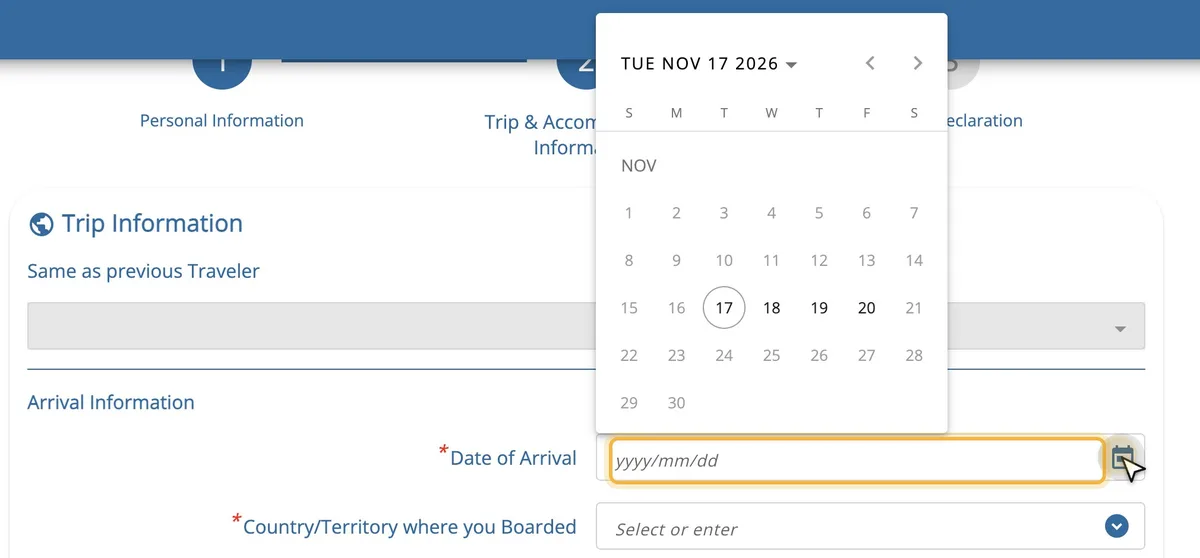
Remember that it’s the day you land. Overnight flights from the UK usually arrive the day after they leave.
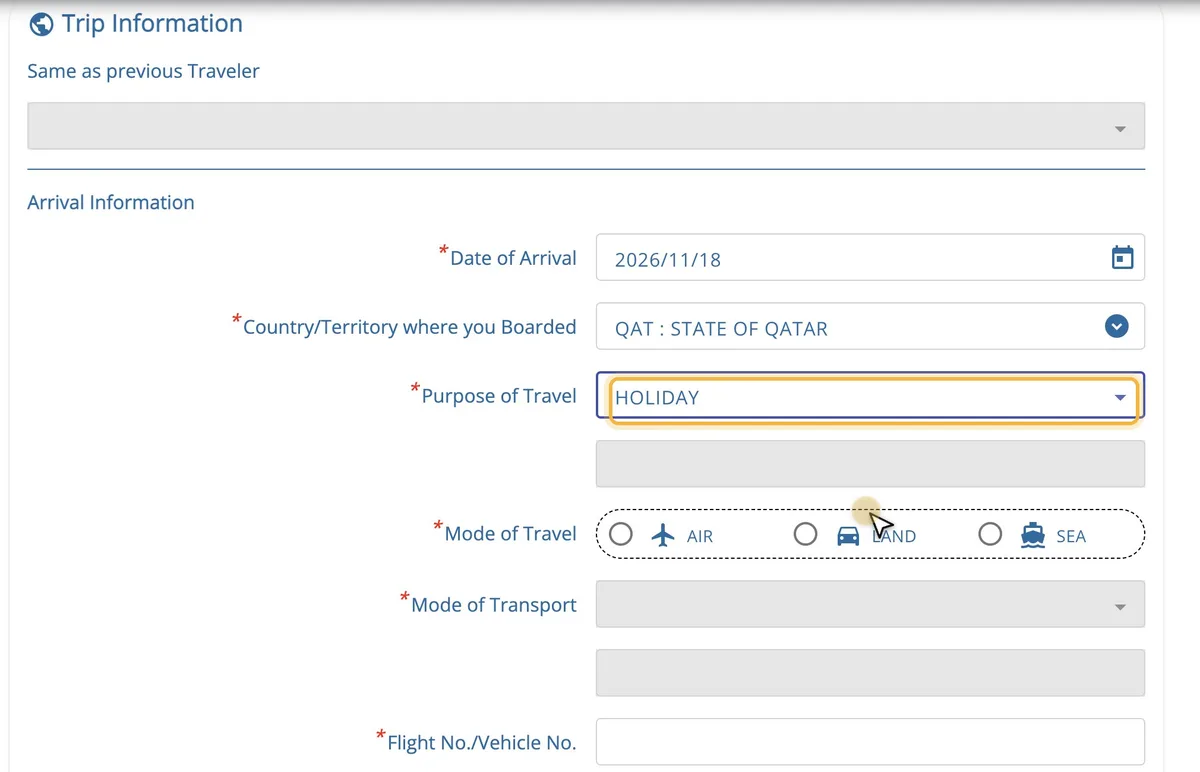
| Field | What to enter |
|---|---|
| Country/Territory where you Boarded | The country where you get on the plane that lands in Thailand. If you fly Manchester–Doha–Bangkok, it’s Qatar, not the UK |
| Purpose of Travel | HOLIDAY for a holiday. There are also MEETING, SPORTS, BUSINESS, EDUCATION, MEDICAL & WELLNESS, EMPLOYMENT and others |
| Mode of Travel | AIR, LAND or SEA |
| Mode of Transport | COMMERCIAL FLIGHT (a scheduled flight) by air; CAR or TRAIN by land; CRUISE or COMMERCIAL VESSEL by sea |
| Flight No./Vehicle No. | The number of the flight that lands in Thailand, as on your boarding pass: QR836 |
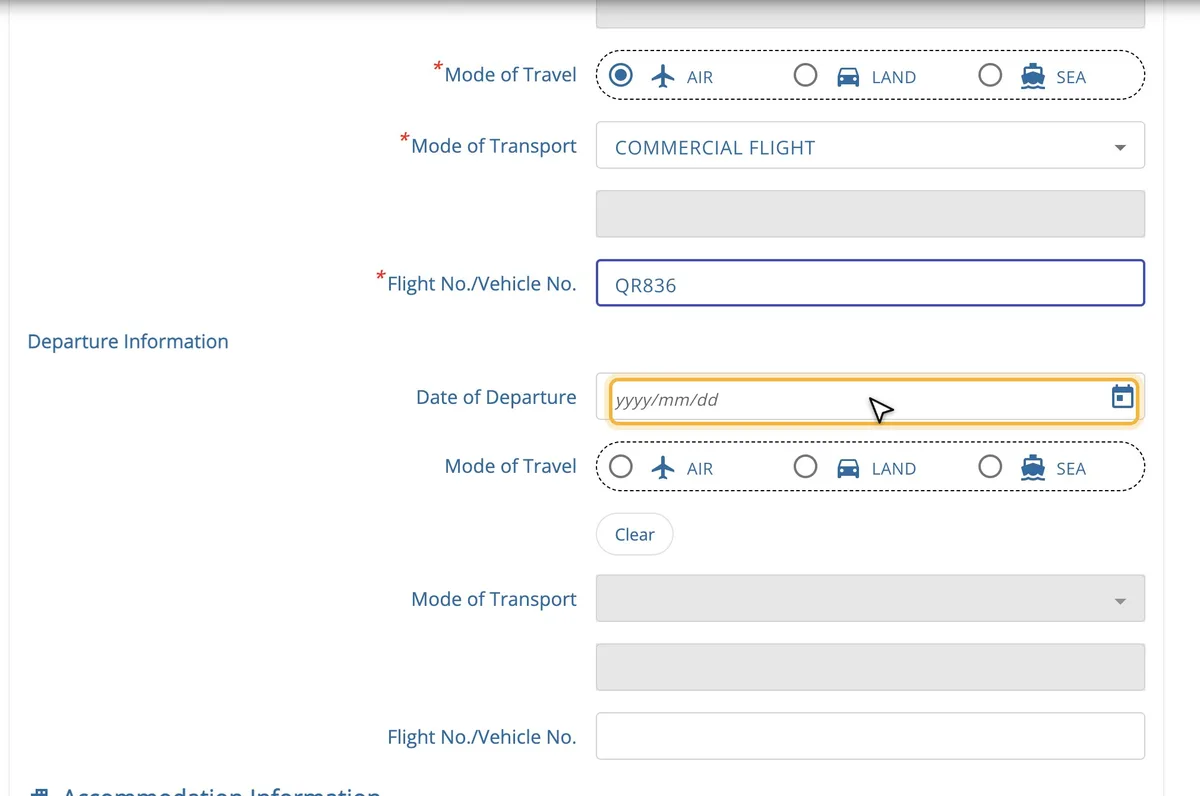
Departure Information (when you leave Thailand) is optional: date, mode of travel and flight number. If you’ve already booked your flight home, you can add it. If you choose the wrong mode, the Clear button erases it.
Step 4: Where you’re staying
Below that, on the same screen, comes Accommodation Information.
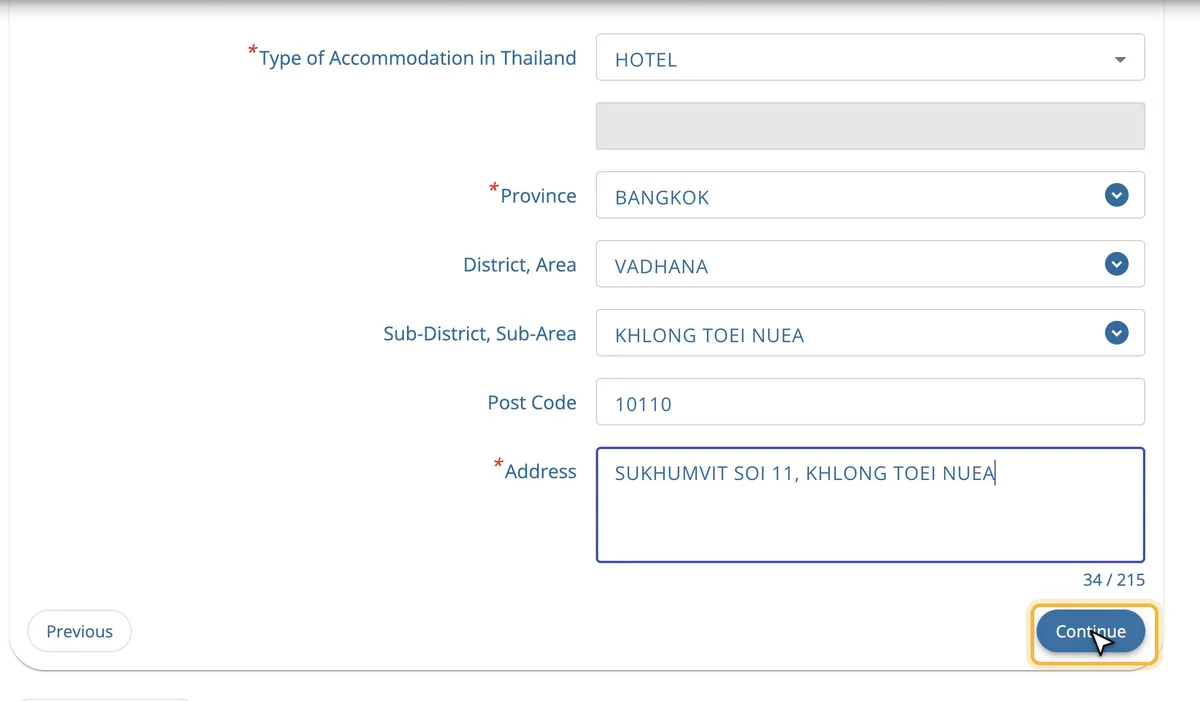
| Field | What to enter |
|---|---|
| Type of Accommodation | HOTEL, YOUTH HOSTEL, GUEST HOUSE, FRIEND’S HOUSE, APARTMENT or OTHERS |
| Province | The province: BANGKOK, PHUKET, CHIANG MAI… Type three letters |
| District, Area | The district. Type three letters and choose it from the list. Names use the official spelling: Watthana is listed as VADHANA |
| Sub-District, Sub-Area | The sub-district, chosen the same way |
| Post Code | Filled in automatically when you choose the sub-district |
| Address | The address, in English (up to 215 characters). You can start with the name of the hotel |
The form only takes one place to stay: enter where you’ll spend the first night. Your booking confirmation usually shows the address and district; if not, look them up on Google Maps.
The tick box I am a transit passenger, I don’t stay in Thailand is for people who go through immigration but don’t spend the night in Thailand. It was disabled when we tried it, so we can’t say when it can be used. If you’re changing planes without leaving the airport, remember you don’t need a TDAC.
One more thing: if you change the departure date after filling in where you’re staying, check that your accommodation details are still there. Ours were deleted once.
Click Continue.
Step 5: Health declaration
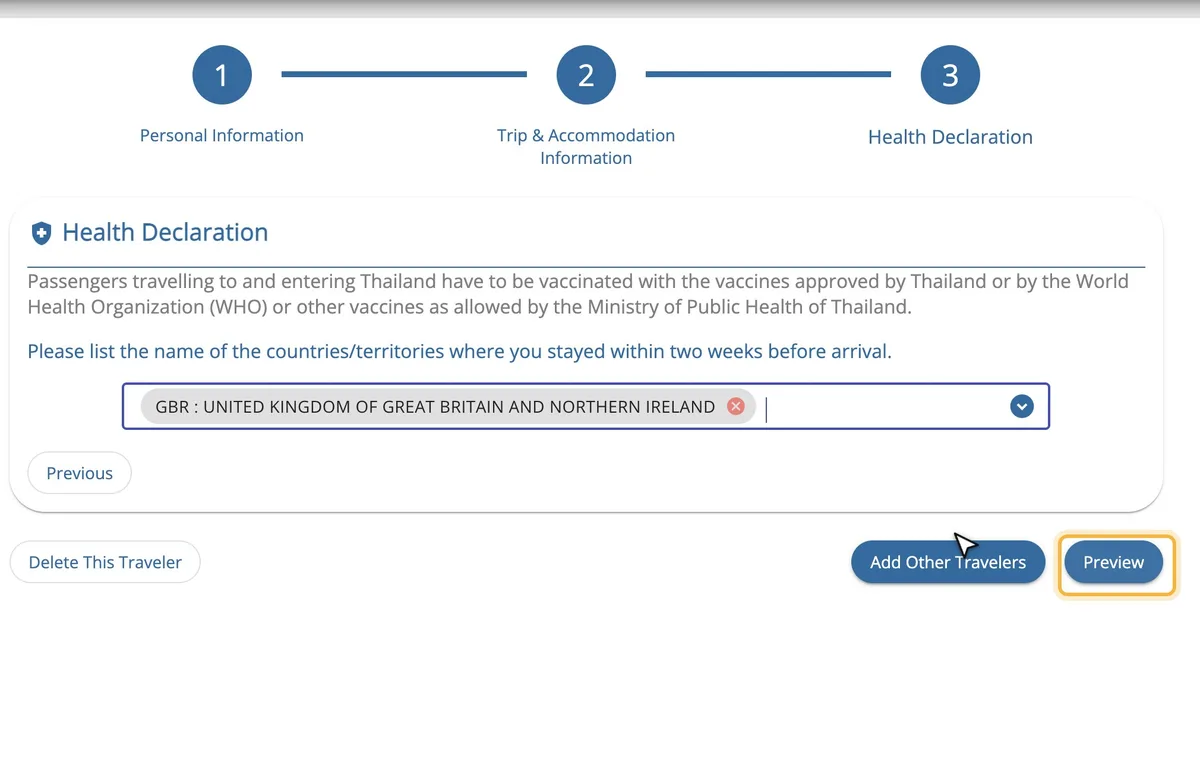
In Health Declaration, add the countries where you’ve stayed in the 2 weeks before you arrive (GBR for the UK).
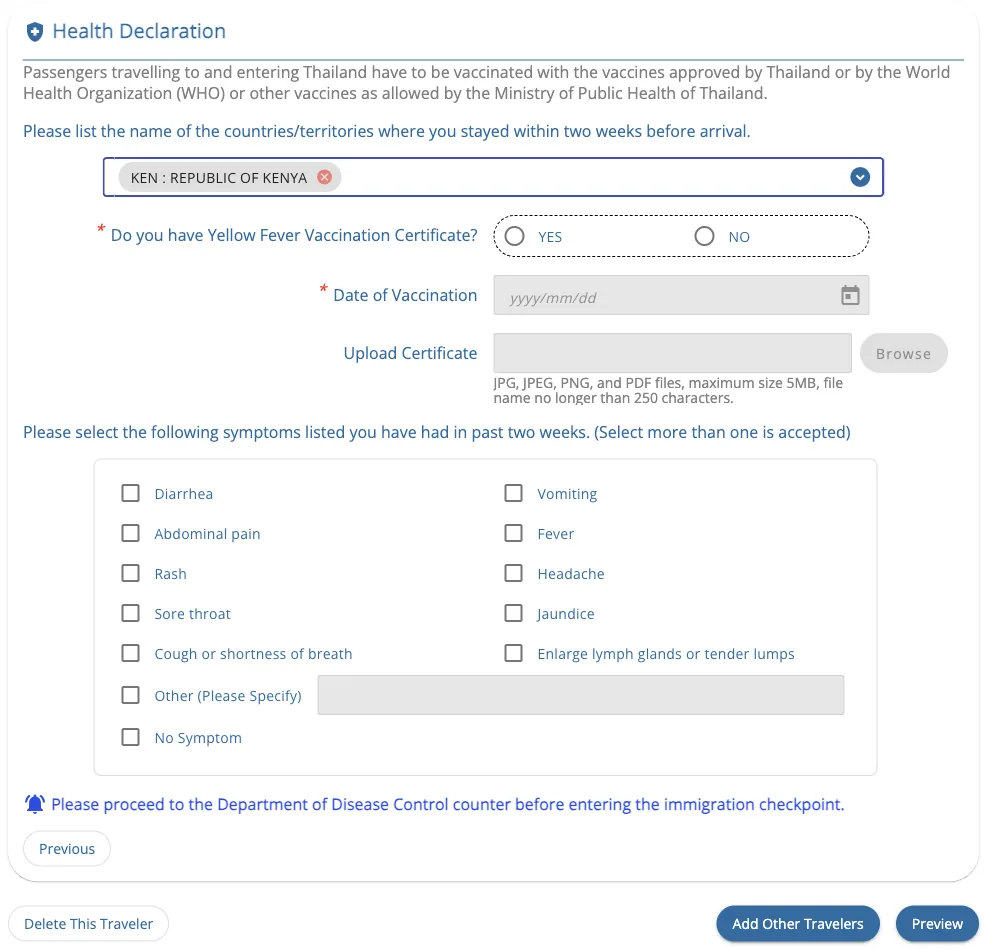
If one of those countries is on the Thai Ministry of Public Health’s yellow fever list, the form asks for more: whether you have a vaccination certificate, the date of the vaccination (you can upload the certificate) and whether you’ve had symptoms. When you land, you’ll have to go to the Disease Control desk before immigration. Here’s what it looks like if you enter Kenya (screenshot from October 2026):
Travelling alone? Click Preview. Travelling with others? Click Add Other Travelers (see Families and groups below).
Step 6: Review and submit
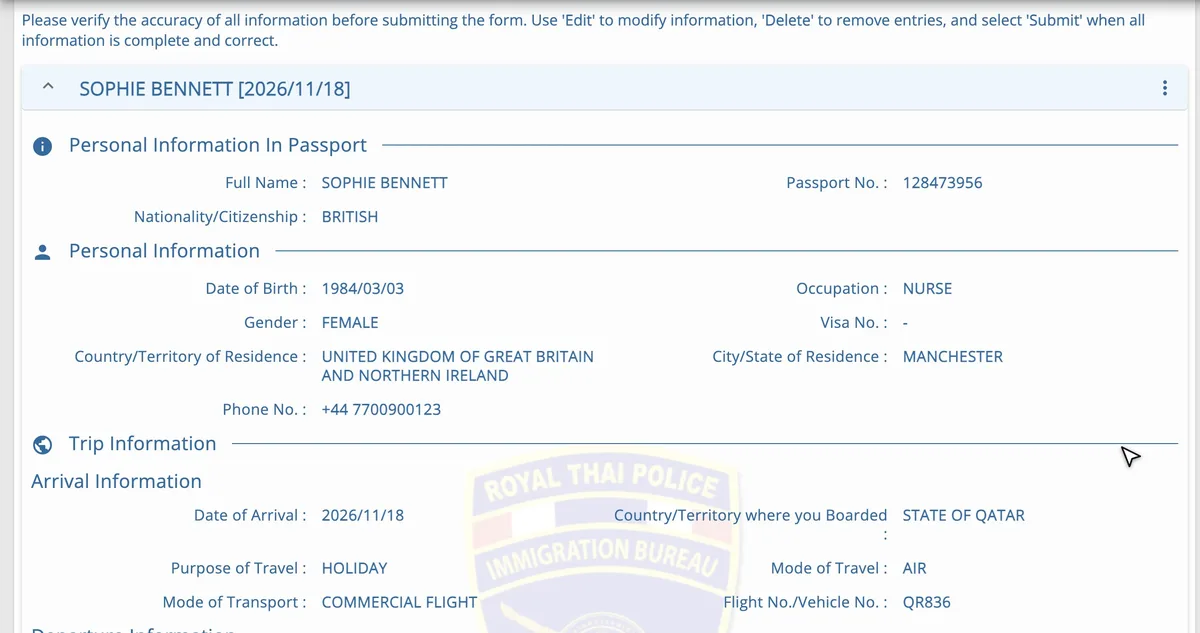
The preview shows everything you’ve entered. Check it carefully, especially your name, passport number and arrival date. If something’s wrong, click Edit.
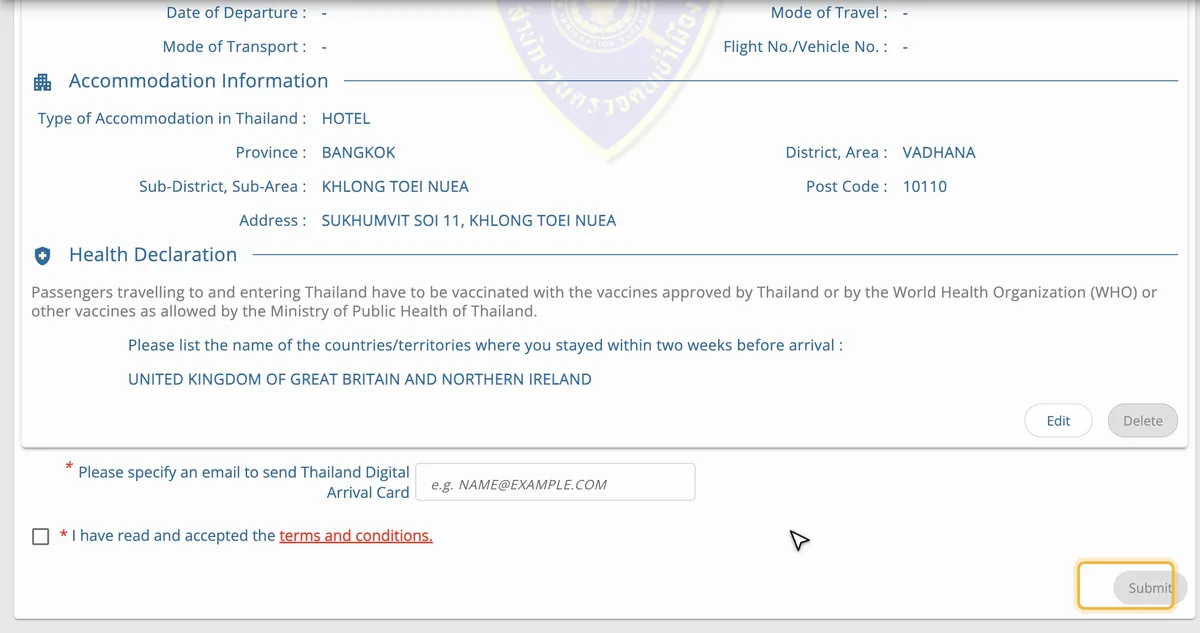
At the bottom, enter the email address where you want to receive your TDAC and tick the box for the terms and conditions. The link opens the terms, in which you confirm that your details are true, that you can be held responsible for false information and that you agree to your details being shared with the Immigration Bureau and other Thai agencies. Click Agree, then Submit.
After you submit
Once you’ve clicked Submit, you can download your TDAC as a PDF, with a QR code and your card number. The same card is sent to the email address you entered, and you can download or print it from there at any time during your trip.
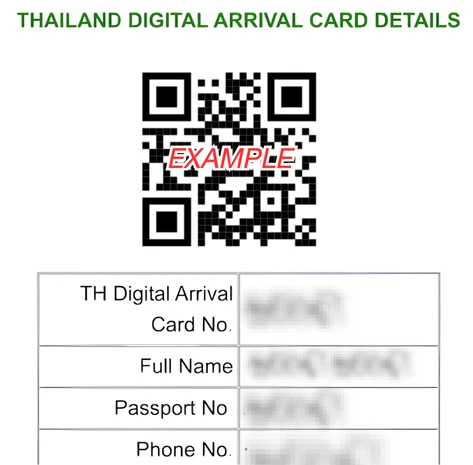
- You don’t need to print it. Showing it on your phone is enough. If you won’t have a phone with you, print it.
- The email tells you whether you can use the automated gates. Since the website update of 15 October 2026, if it says AUTOMATED BORDER CONTROL - ELIGIBLE in green, you can go through the automated passport gates. If it says IMMIGRATION COUNTER - MANUAL PROCESSING, go to the immigration counters.
- It’s valid for one entry only, until you enter Thailand.
- There are no reminders. The website won’t contact you before your trip.
- Keep your TDAC number. You need it to make changes.
If the email doesn’t arrive, check your junk folder. If it isn’t there, the Immigration Bureau says you should tell the immigration officer when you arrive.
Families and groups
Every traveller needs their own TDAC, children and babies included, but you can submit them together: up to 10 people at a time.
- Fill in the three screens for the first traveller.
- On the health declaration, click Add Other Travelers.
- Fill in the next person’s personal details. For the trip and accommodation, the Same as previous Traveler drop-down copies the previous traveller’s details if they’re the same.
- Repeat for each person, then click Preview. In the preview, Delete removes a traveller.
Each person gets their own card. You can fill one in for someone else (your children, your parents, a friend), and a travel agent or tour leader can submit them for their clients if authorised.
How to correct your TDAC
On the home page, click Update Arrival Card. To find your TDAC, it asks for the card number, your date of birth, your arrival date and your nationality (screenshot from October 2026).
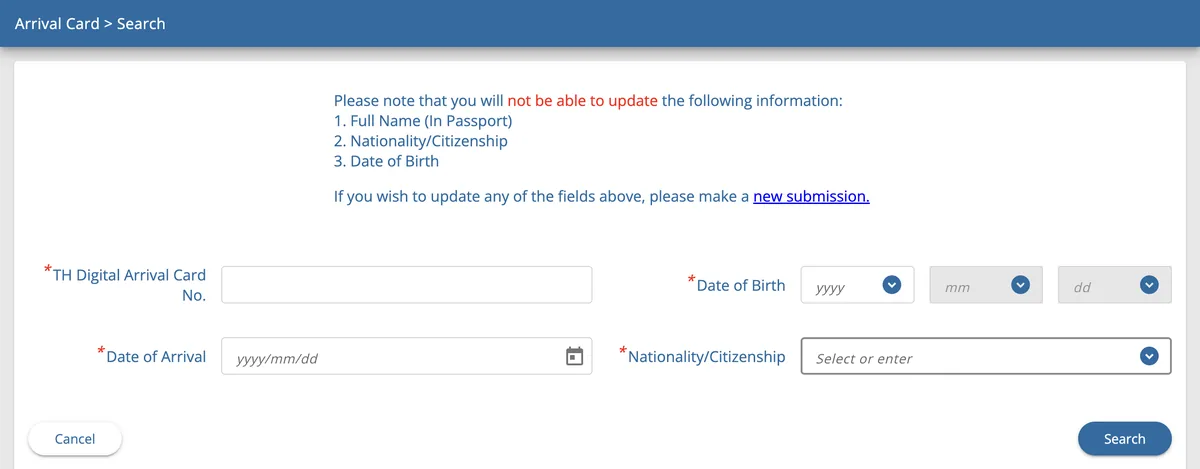
You can change your flight, dates, accommodation and almost everything else, and the corrected card is emailed to you again. You can’t change your full name, nationality or date of birth: if one of them is wrong, submit a new TDAC with the right details. The latest one you submit is the one that counts.
The passport number is less clear: the correction screen doesn’t list it among the details you can’t change, but the official FAQ does. If you got it wrong, the safest option is to submit a new card.
If your flight or hotel changes, correct your TDAC before you arrive. If your flight is delayed until the next day, change the arrival date too.
Problems and help
- Error “429” when you submit (Http failure response… 429): the website is overloaded. Reload the page and try again.
- Error “0 Unknown Error”: usually your connection. Check that you’re online.
- The website isn’t working: take a screenshot of the error and show it to airport or immigration staff when you arrive.
- No phone or no internet: Suvarnabhumi and Don Mueang airports (Bangkok), Phuket, Chiang Mai and Hat Yai have kiosks where you can fill it in, and free Wi-Fi. If you fill it in at a kiosk, it’s only sent by email, so take a photo of the QR code on the screen.
- Contact: you can email the Immigration Bureau at contact@tdac.immigration.go.th.
Common mistakes
- Paying for it on a website you thought was official. The official one is tdac.immigration.go.th, and it’s free.
- Trying to do it too early. More than 3 days before you arrive, you can’t choose your date.
- Leaving it for the airport. There are kiosks, but also queues and stress: it’s easier from home or during your stopover.
- Choosing British National (Overseas) instead of British for your nationality.
- Writing your date of birth day first. On the TDAC it’s year, month, day.
- Entering the UK as the country where you boarded when you change planes. It’s the country your last flight leaves from.
- Mixing up your arrival date with the day you leave the UK. Overnight flights land the next day.
- Getting the flight number wrong: it’s the number of the flight that lands in Thailand, not your first flight.
- Forgetting the children. Every traveller, babies included, needs a TDAC.
- Thinking it covers your whole trip. If you leave Thailand and come back, you need another one.
- A typo in your email address. That’s where your card is sent: check it in the preview.
- Confusing it with a visa. The TDAC doesn’t change how long you can stay in Thailand.
Frequently asked questions
What is the TDAC?
It’s the Thailand Digital Arrival Card, the online form that replaced the old paper arrival card (the TM6) you used to fill in on the plane. It’s run by Thailand’s Immigration Bureau and has been mandatory for all foreign travellers since 1 May 2025.
Is the TDAC free?
Yes. It’s free on the official website. If a website charges you, it’s a private service filling it in for you.
How many days before can I fill in the TDAC?
From 3 days before you arrive up to and including your arrival day. If you land on the 20th, you can do it from the 17th (Thailand time) to the 20th. It’s easiest to do it a day or two before, once your flight is confirmed.
Do I need a TDAC with a British passport?
Yes. Every non-Thai traveller needs one, whether you enter visa-free or with a visa. The only exceptions are transit passengers who don’t go through immigration, crew and Border Pass holders.
What happens if I don’t fill in my Thailand arrival card?
Don’t count on getting in without it. If you arrive without one, you can fill it in at the kiosks at Suvarnabhumi, Don Mueang, Phuket, Chiang Mai and Hat Yai airports, which have free Wi-Fi. The Immigration Bureau warns that incorrect information can lead to you being refused entry.
Which country do I enter in “Country/Territory where you Boarded” if I change planes?
The country where you board the plane that lands in Thailand. London–Doha–Bangkok is Qatar; Manchester–Dubai–Bangkok is the United Arab Emirates; a direct flight from the UK is the UK. The flight number you enter is also the one for that last flight.
Do I need a TDAC if I’m only changing planes in Thailand?
Not if you stay in the transit area without going through immigration. If you leave the airport, even for a few hours, or change airports (from Suvarnabhumi to Don Mueang), you do.
Do children need a TDAC?
Yes, every child and baby needs their own. You can fill them all in yourself and submit them together (up to 10 people) with Add Other Travelers.
Do I need a visa for Thailand with a British passport?
Not for tourism: you can enter visa-free and stay for up to 30 days1. You still have to fill in the TDAC. Business trips need a visa. All the options are on Thailand visa for UK citizens.
Do I really need 20,000 baht to enter Thailand?
Immigration officers can ask you to show that you have enough money for your stay. The FCDO says at least 10,000 baht per person or 20,000 baht per family, and that British nationals have been refused entry without this evidence. The Royal Thai Embassy in London says officers may ask for proof of 20,000 baht per person. The TDAC itself doesn’t ask about money.
Do I need to print the TDAC?
No. Showing the PDF or the email with the QR code on your phone is enough. If you won’t have a phone with you, print it.
How long is the TDAC valid?
From the moment you submit it until you enter Thailand, for one entry. It has nothing to do with how long you can stay: that depends on whether you enter visa-free or with a visa.
I’m going to Cambodia, Laos or Malaysia and coming back to Thailand. Do I need another one?
Yes. Every entry into Thailand needs its own TDAC, filled in in the 3 days before that entry. Bear in mind that, according to the FCDO, visa-free entry over land is normally limited to 2 entries per calendar year.
My flight or hotel has changed. What do I do?
Correct it with Update Arrival Card before you arrive. If that detail can’t be changed, submit a new one: the latest one counts.
I’ve made a mistake in my name or passport number. What do I do?
Your name, nationality and date of birth can’t be changed: submit a new TDAC with the right details. For the passport number, submitting a new one is also the safest option. The latest one you submit is the one that counts.
I haven’t received the email with my TDAC. What do I do?
Check your junk and promotions folders. If you downloaded it when you submitted it, you already have it. If it doesn’t turn up, the Immigration Bureau says you should tell the immigration officer when you arrive. You can also submit another one with the right details: the latest one counts.
Can a travel agent fill it in for me?
Yes, if you authorise them and give them your details, according to the Immigration Bureau. But it’s free and takes five minutes: using an agency only makes sense if it’s also getting a visa for you.
What do I enter if I’m staying in several hotels?
The form only takes one place to stay: enter where you’ll stay the first night. If that changes before you arrive, correct it with Update Arrival Card.
Is my data safe?
The Immigration Bureau says the TDAC complies with Thailand’s data protection law (PDPA), that only immigration and border authorities can access it, and that the data isn’t shared with other countries. When you submit it, you agree to it being shared with the Immigration Bureau and other Thai agencies.
Apply yourself or use a visa service? Compare the government fee with what each visa service charges, online or in person, on the Thailand visa page.
Sources
Where the information in this guide comes from, with the date we last checked it: official websites for fees and rules, and each visa service’s website or Google Maps listing when we give its prices or reviews. The numbers match the superscript numbers in the text.
- 1.Royal Thai Embassy, London: Visa exemption and visa on arrival schemes (TDAC). london.thaiembassy.org · checked on 17 November 2026
- 2.Thailand’s Immigration Bureau: official TDAC website. tdac.immigration.go.th · checked on 17 November 2026
- 3.Thailand’s Immigration Bureau: TDAC User’s Guide. tdac.immigration.go.th · checked on 23 October 2026
- 4.Thailand’s Immigration Bureau: TDAC frequently asked questions. tdac.immigration.go.th · checked on 12 November 2026
- 5.Royal Thai Embassy in France: TDAC (exemptions for transit passengers and Border Pass holders). thaiembassy.fr · checked on 17 October 2026
- 6.FCDO: Thailand travel advice (GOV.UK). gov.uk · checked on 16 November 2026