Visit Japan Web is the official website where you fill in Japan’s immigration and customs forms before you land. At the airport, you show a QR code on your phone instead of handing over paper forms. It’s run by Japan’s Digital Agency, it’s free and it’s optional. This guide takes you through it screen by screen with a British passport, using screenshots from the official website taken in November 2026.
It isn’t a visa. With a British citizen passport, you don’t need one for Japan for stays of up to 90 days (up to 6 months with an extension)1. The details are on Japan visa for UK citizens.
Key facts
- Where
- Only on vjw.digital.go.jp, the website of Japan’s Digital Agency. There’s nothing to download: it works in the browser on your phone or computer.
- Cost
- Free. The Digital Agency says it never asks Visit Japan Web users to pay any fee.
- Compulsory?
- No. It’s optional, but it speeds up immigration and customs. Japan Customs recommends declaring electronically through Visit Japan Web.
- What it covers
- Immigration (the arrival card for foreign visitors) and customs (declaring what you’re bringing in), in one QR code.
- You need
- Your passport, your flight to Japan, an email address and the address and phone number of where you’re staying. You also need a smartphone or tablet to show the QR code when you land.
- Languages
- English, Japanese, Chinese (simplified and traditional), Korean, Vietnamese, Thai, German and French.
Watch out for copycat websites and apps. The official portal is vjw.digital.go.jp (the address ends in .go.jp, a Japanese government domain). The Digital Agency has warned about a website that charged Visit Japan Web users an “application fee” and about suspicious apps such as “Visit Japan Web Info”. If something asks you to pay, it isn’t the official service.
Do you need Visit Japan Web?
No, it’s not compulsory. You can still enter Japan without it: the customs declaration form is also available on the plane or at customs. But if you register before you fly, you show one QR code at the immigration counter and again at customs, and you can use the electronic customs gates. If you’re travelling with family, one account covers everyone (see Families and groups).
It doesn’t replace the passport check. You still go through immigration in person, and your passport must be valid for your whole stay. The FCDO says you get permission to stay for up to 90 days on arrival, for tourism or business, and that you can apply for an extension of another 90 days at an immigration office in Japan. The UK is one of the countries whose agreement with Japan allows stays of up to 6 months, so apply for the extension before your first 90 days are up.
Before you start
Have these ready:
- your passport;
- your flight to Japan: the airline, the flight number and the date you land;
- where you’re staying: the postcode, address and phone number of your hotel (or wherever you’ll stay first);
- an email address you can check straight away;
- your phone, to show the QR code at the airport.
You can fill it in on a computer, but you need a smartphone or tablet to show the code when you arrive.
When to do it: the official website doesn’t set a deadline. Do it before you fly, once you know your flight and where you’re staying, so the code is ready when you land.
The process on video
In this Visania video, we go through the whole of Visit Japan Web on the official website with a British passport, from creating the account to the QR code. If the website has changed since, go by what you see there.
Step 1: Create your account
The screenshots in this guide were taken on the official website on 17 November 2026, while recording the video. The traveller in them is Sophie, who lives in Manchester and flies from London to Tokyo.
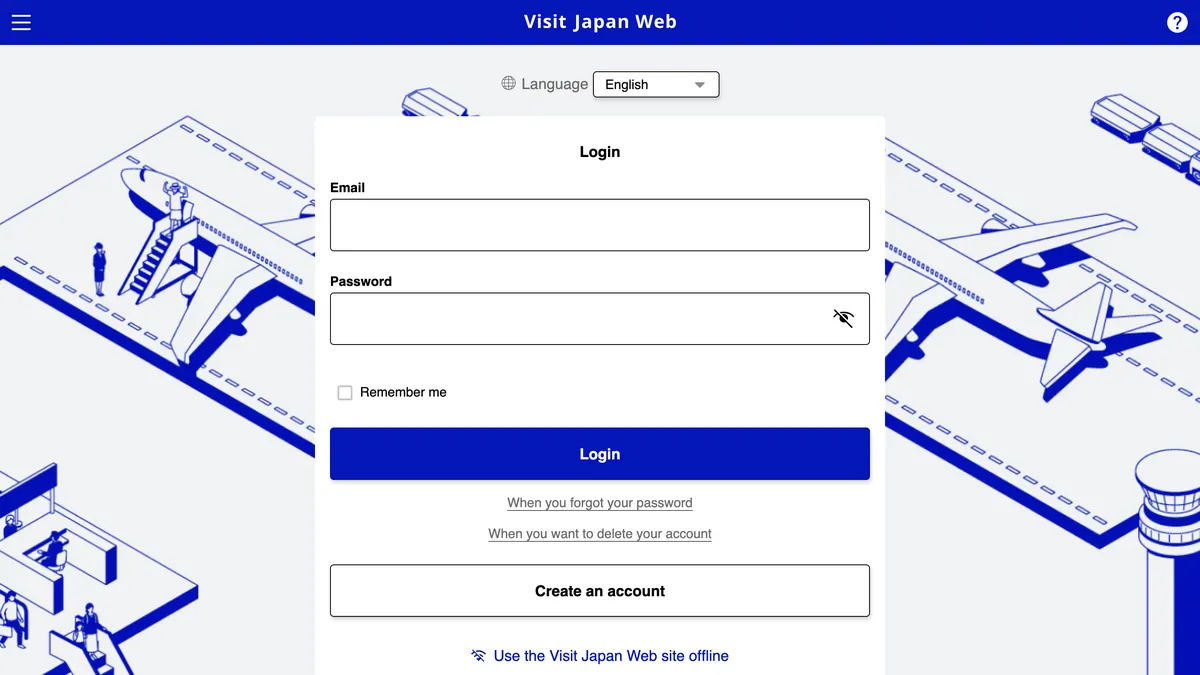
Go to vjw.digital.go.jp and choose English in the language menu if it isn’t already selected. Click Create an account (on the login page shown at the top of this guide), then tick the two boxes to accept the Terms of Use and the Privacy Policy, and click Next.
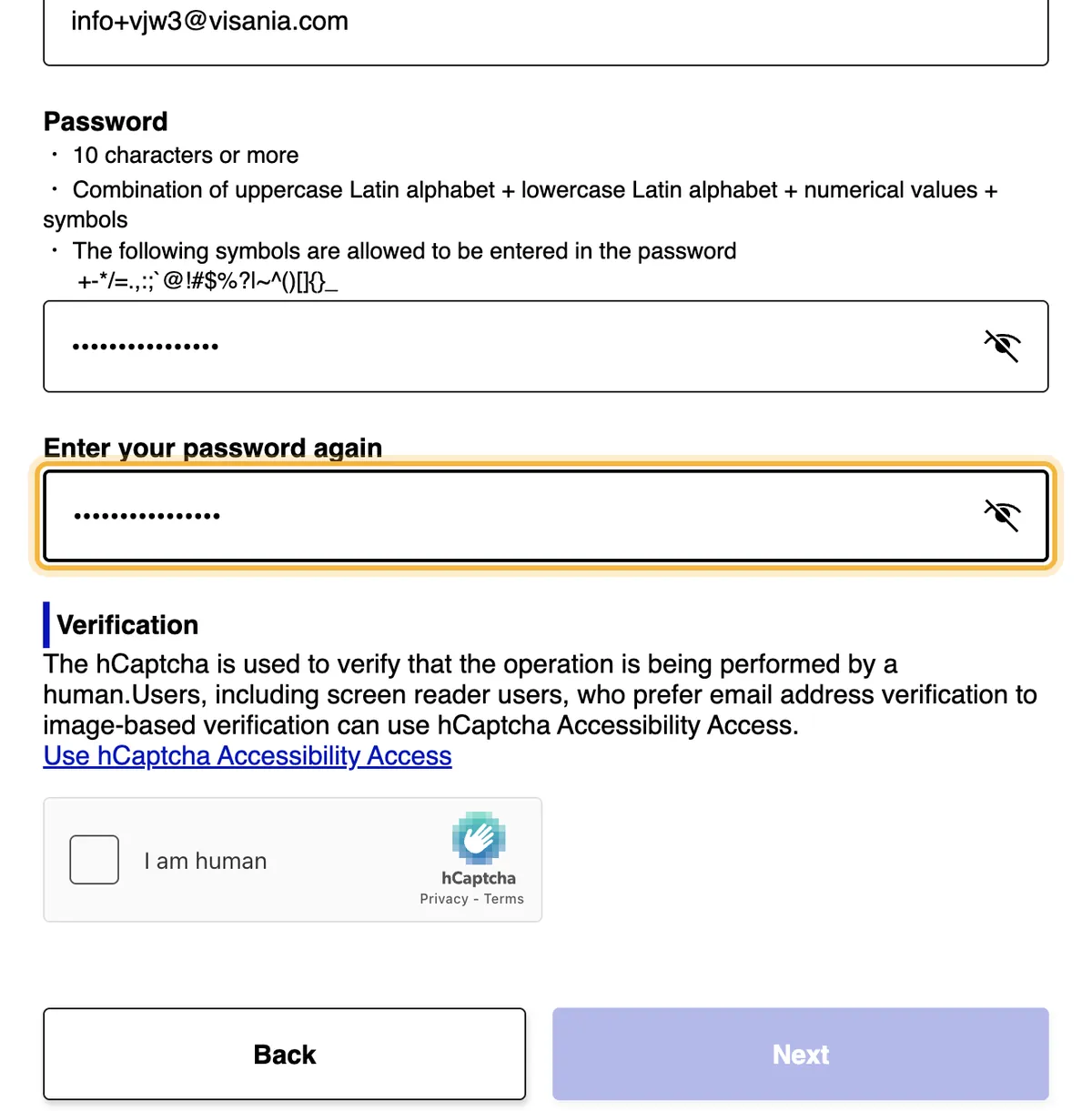
Enter your email address, then type a password twice. The password needs at least 10 characters, including capital and lower-case letters, numbers and symbols. Then there’s a human check (hCaptcha): click the box and solve the picture puzzle if one appears. Click Next.
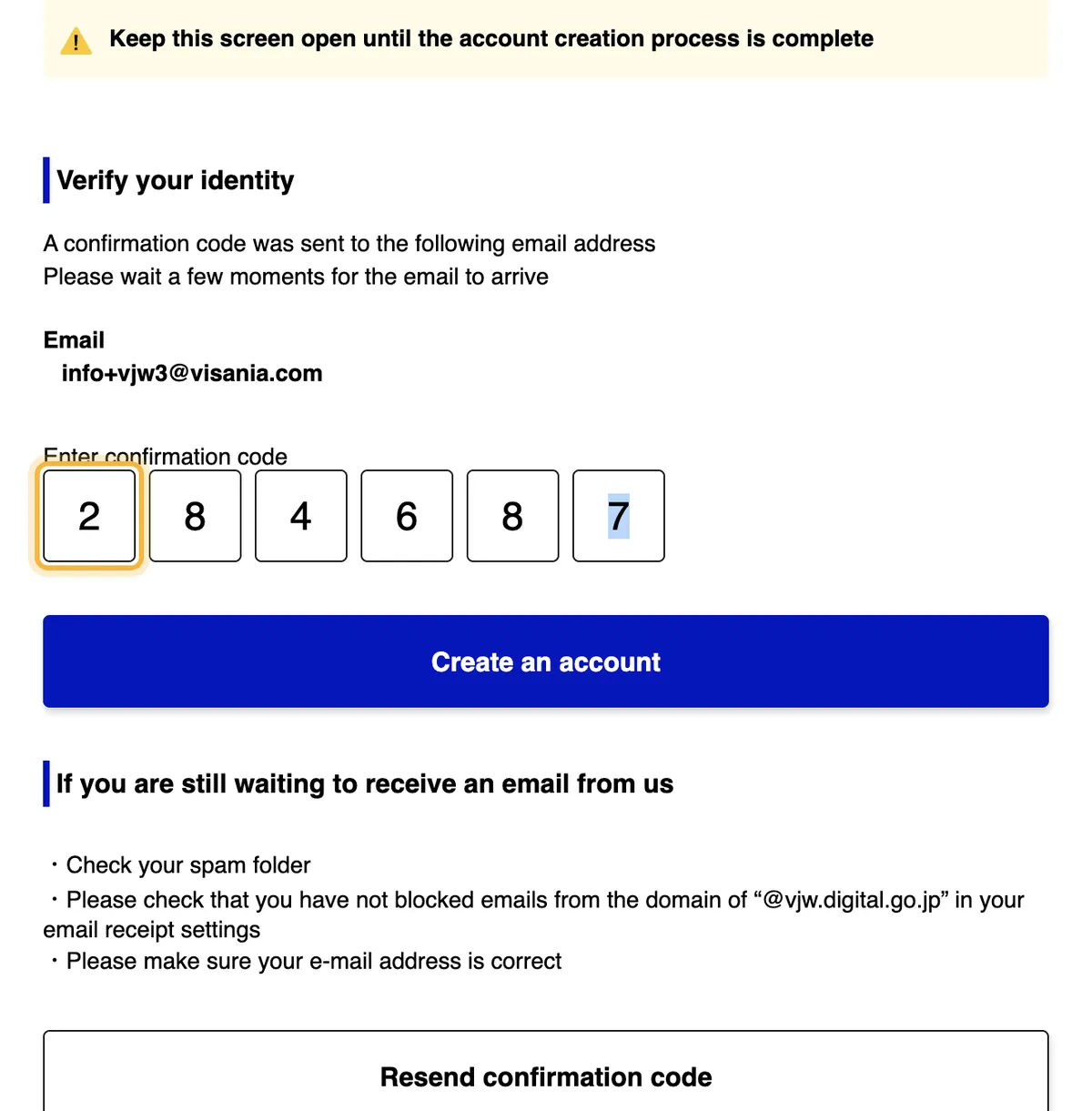
The website emails you a 6-digit confirmation code. Keep the page open: the website warns you to leave it open until your account has been created. Type the code and click Create an account. If it doesn’t arrive, check your junk folder and make sure emails from @vjw.digital.go.jp aren’t blocked. There’s also a Resend confirmation code button.
Then log in with your email address and password. The website asks whether you want to set up multi-factor authentication with an authenticator app. It’s optional: answer No if you don’t want it.
Step 2: Your details
On the home screen, click Your details. The first question asks whether you have a Japanese passport: answer No. Then choose how to enter your passport details:
- Scan with camera: reads your passport with your phone’s camera (the website recommends it);
- Enter information yourself: you type it in.
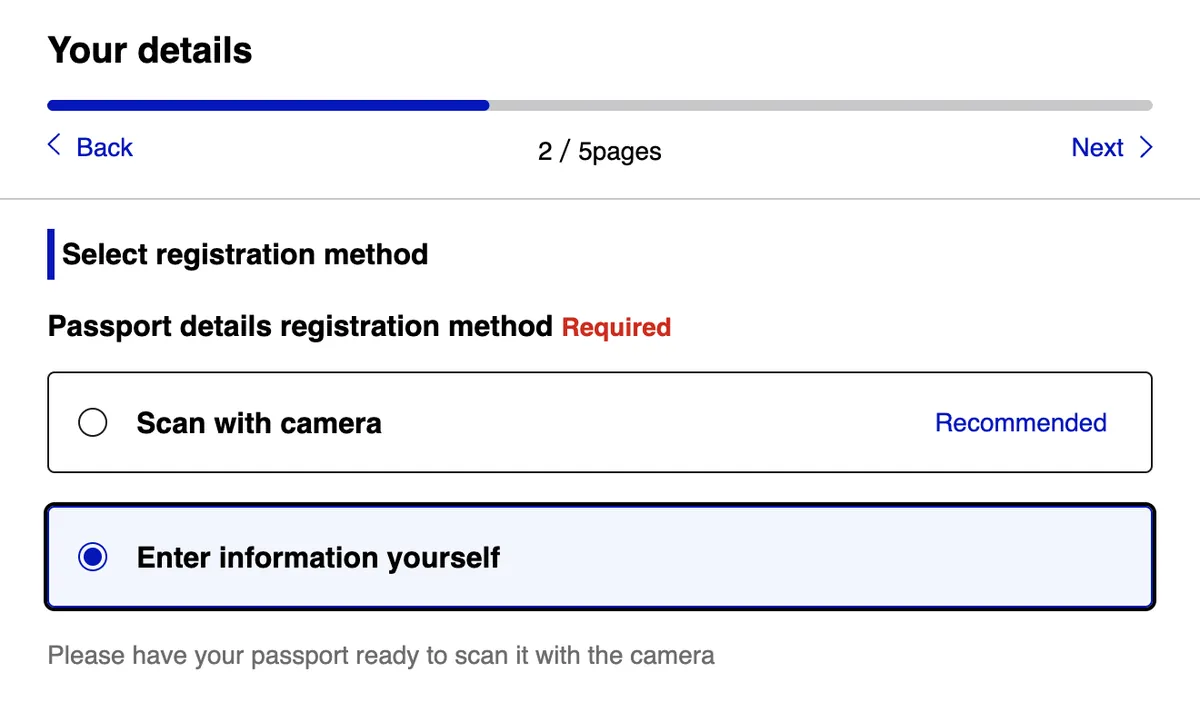
If you enter it yourself, type your passport number, your surname and your given names (all your first names), as they appear in your passport.
Nationality: choose “United Kingdom”. The list also has other British options, such as British National (Overseas). With a British citizen passport, the right one is United Kingdom.
Then your date of birth and your passport’s date of expiry. Each date has three drop-down lists in the order year, month, day, the other way round from how we write dates in the UK. A date of birth of 3 March 1984 is 1984 · 3 · 3, and an expiry date of 27 September 2033 is 2033 · 9 · 27.
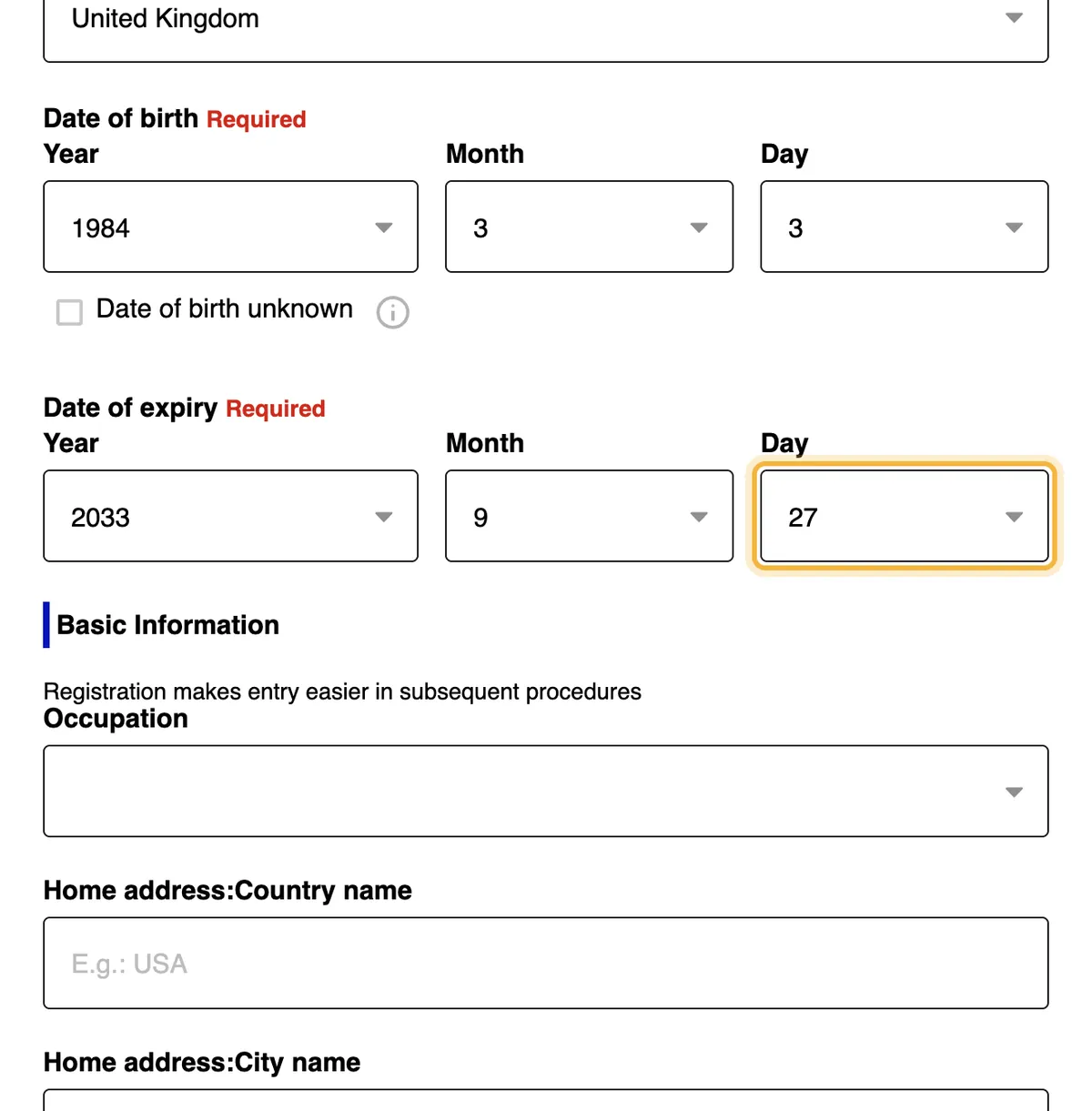
Basic Information is optional. It asks for your occupation (pick it from the list, or choose Other if yours isn’t there) and the country and city where you live. It’s worth filling in, because it’s copied into your arrival card later and saves you typing. Click Next, check your details and click Register.
Visit Japan Web then offers to check whether you need a visa. With a British citizen passport you don’t need one for a short trip, so answer No. The website then simply links to the visa page of Japan’s Ministry of Foreign Affairs. Click Back to Home.
Step 3: Your trip
Click Register new planned entry/return. If it asks whether to copy details from a visa, choose not to copy them.
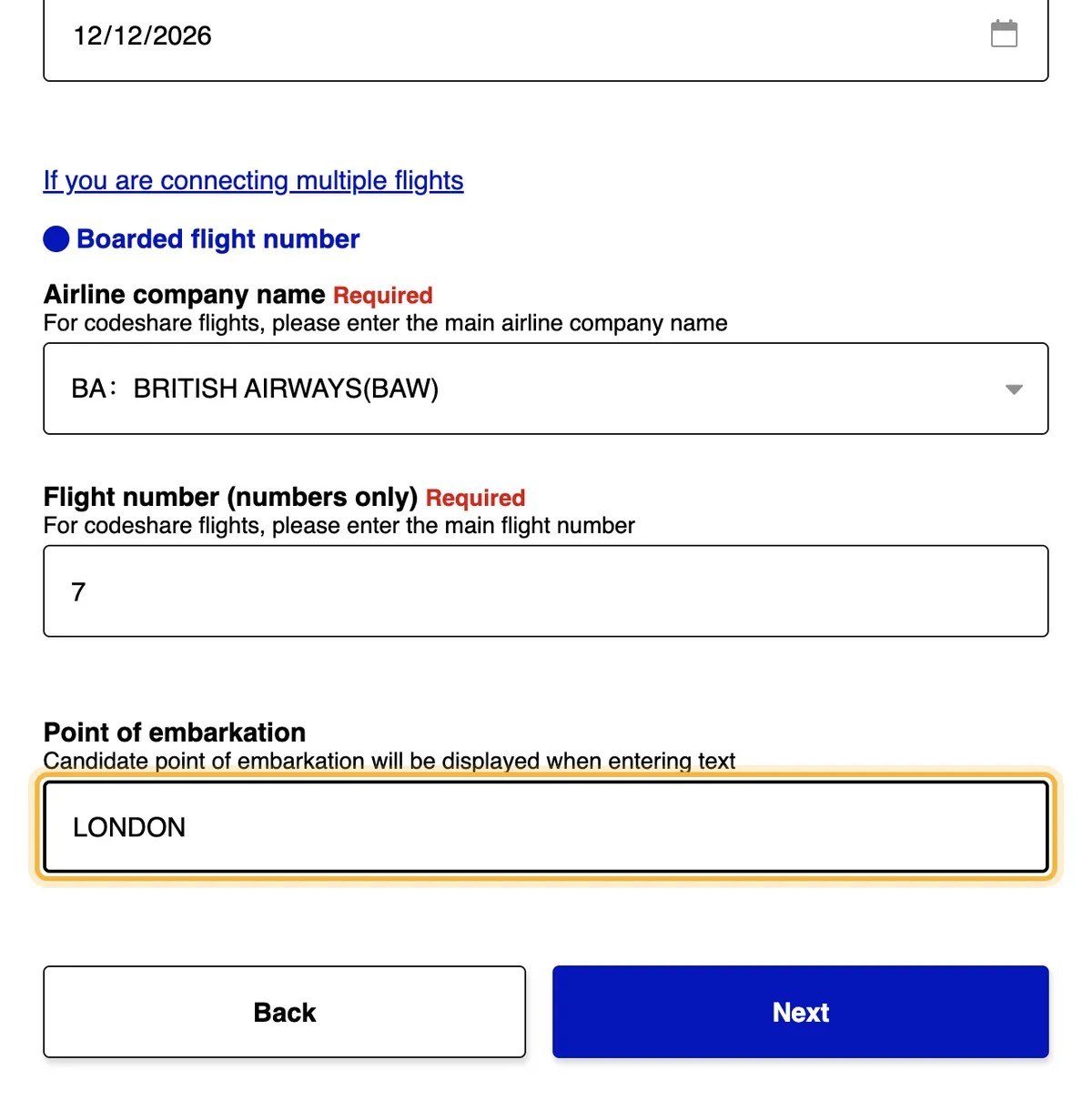
Arrival date. Enter the day you land in Japan, not the day you leave the UK. With the time difference, flights from the UK usually arrive the day after they leave. The date field uses your browser’s date format: pick the date from the calendar so you don’t swap the day and the month.
Then your flight:
| Field | What to enter |
|---|---|
| Airline company name | Start typing and pick your airline from the list. For codeshare flights, the website asks for the main airline (the one operating the flight) |
| Flight number (numbers only) | Only the digits: BA7 is 7 |
| Point of embarkation | The airport where you board the flight to Japan. Start typing and pick it from the list |
If you have connecting flights, use the If you are connecting multiple flights link.
Step 4: Where you’re staying
Enter the postcode of where you’ll stay, without the hyphen (〒160-0021 is 1600021), and click Enter automatically using postal code. The prefecture and city are filled in automatically. If they don’t, pick them from the lists.
Then add the rest of the address (the part after the city), the hotel name and its phone number. The website says you don’t need hyphens. We entered it in international format: 81 (Japan’s country code) and the number without the leading 0, so 03-6833-1111 became 81368331111.
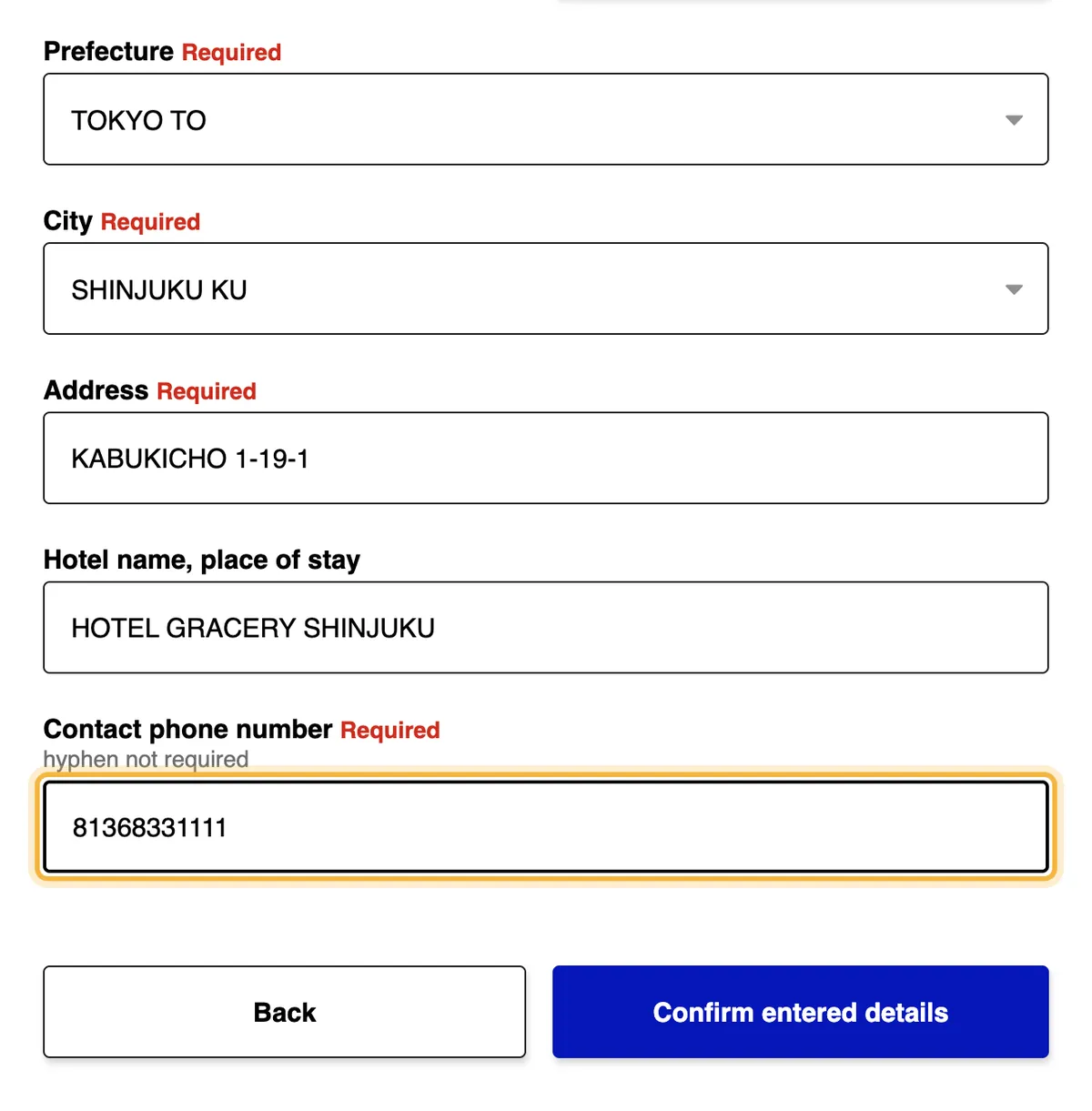
Click Confirm entered details, check everything and click Register plan.
Step 5: Immigration
Click To entry/return procedure, then Immigration clearance and Customs declaration. A window explains how the QR code is used: click Next. Most of the arrival card is already filled in with what you entered before (your occupation, address, flight and hotel). Check it and carry on.
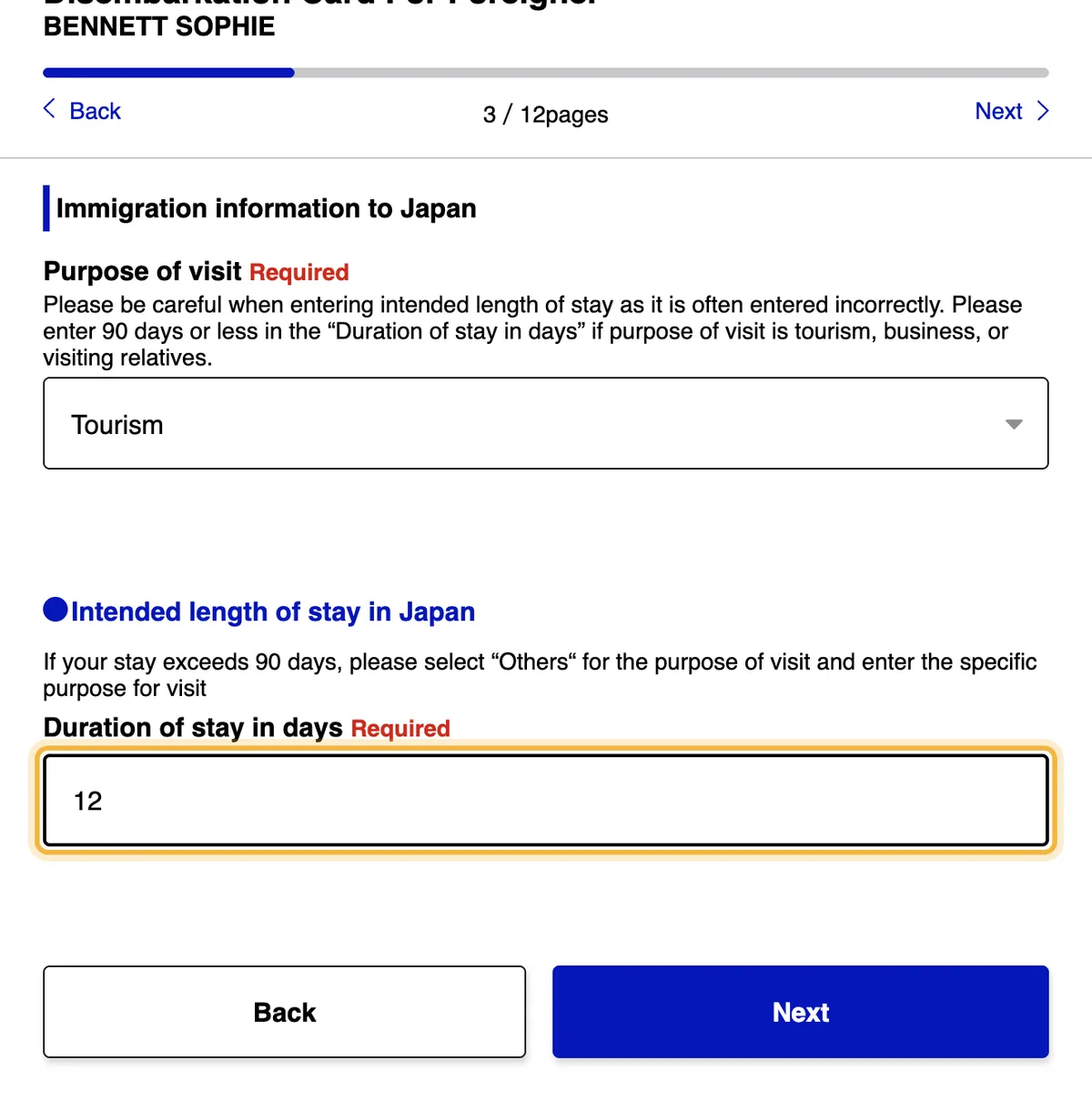
Then choose your purpose of visit (Tourism, Business, Visiting relatives or Others) and enter the duration of stay in days.
The website warns that this field is often entered incorrectly. It’s a number of days, not a date: for a 12-day trip, type 12. For tourism, business or visiting relatives, it must be 90 days or less. If your stay is longer, the website asks you to choose Others as the purpose and give the reason.
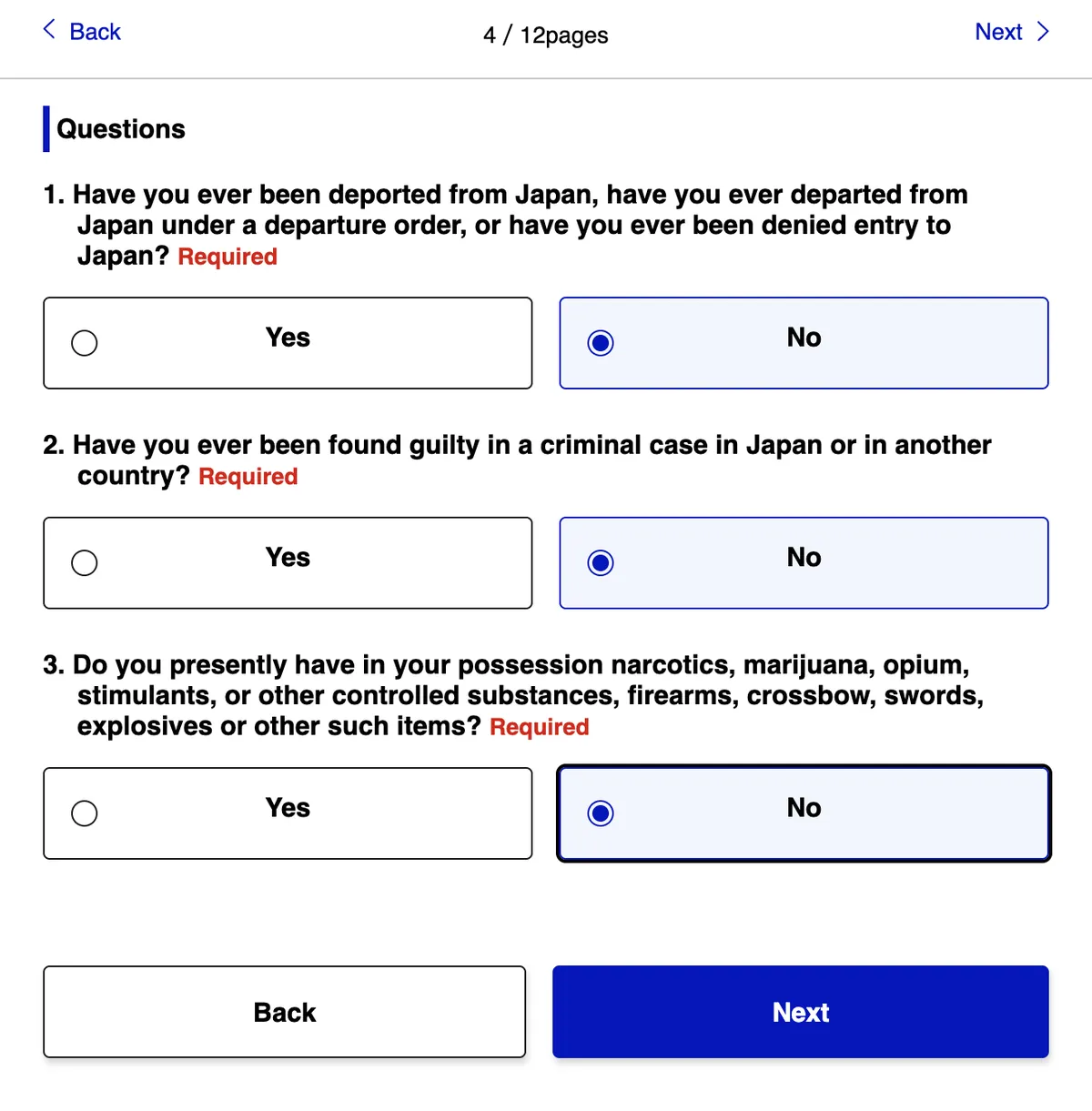
Next come three yes-or-no questions: whether you’ve ever been deported from or refused entry to Japan, whether you’ve been convicted of a criminal offence in Japan or any other country, and whether you’re carrying drugs, firearms, swords, explosives or similar items. Answer them truthfully.
Step 6: Customs
The customs declaration has five short screens. They ask whether you’re bringing in:
- prohibited items;
- restricted items, such as meat products (including sausages and ham), fruit, plants or animals;
- gold bullion or gold products;
- goods over the duty-free allowance (see below);
- commercial goods or samples, or anything someone else asked you to bring into Japan.
The FCDO warns that it’s illegal to bring meat products, including sausages, bacon and ham, into Japan without permission from the Animal Quarantine Service.
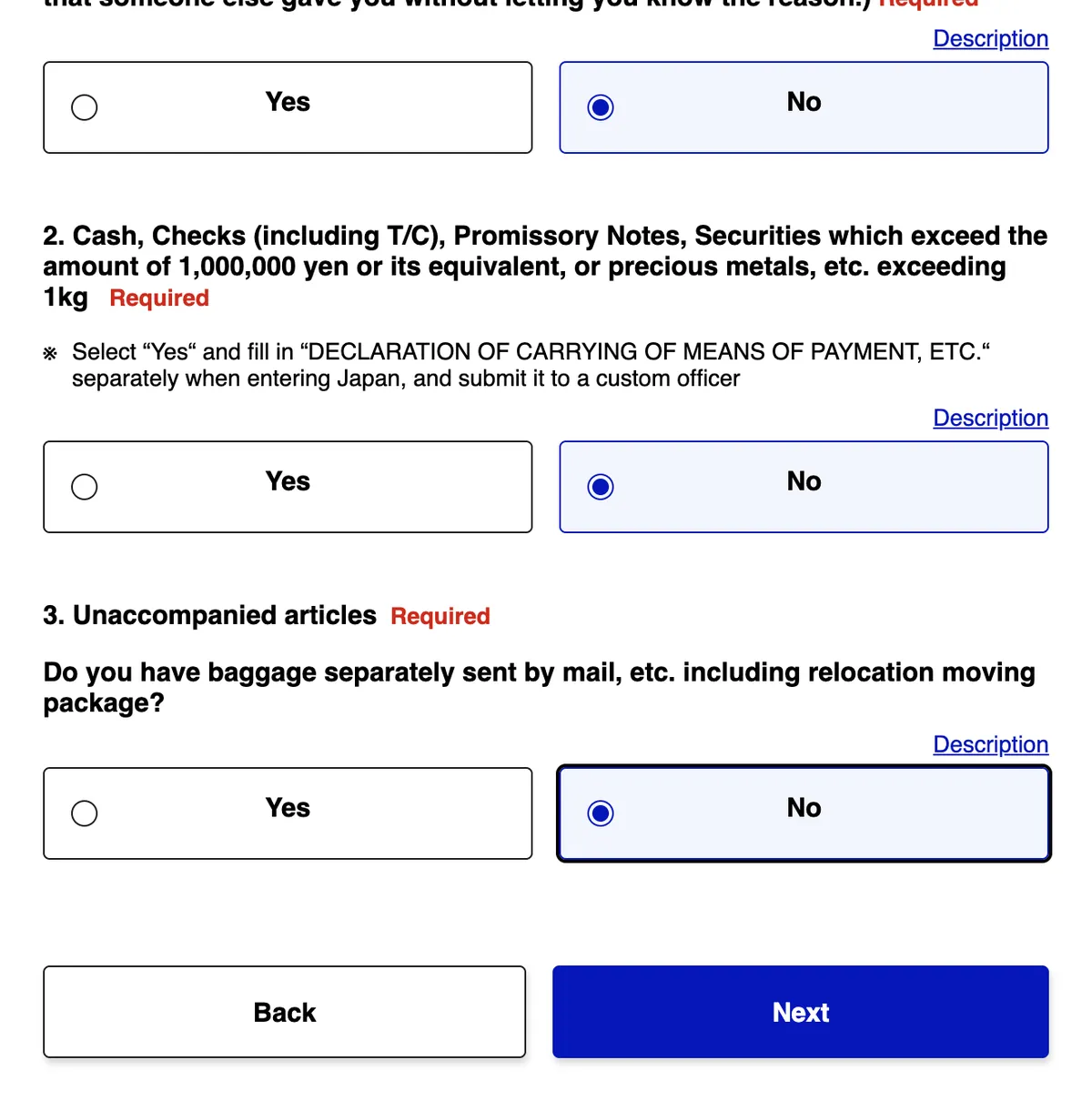
The last screen also asks about cash: if you’re carrying cash, cheques or securities worth more than ¥1,000,000, or precious metals over 1 kg, answer Yes. The website tells you to also fill in a separate paper form when you arrive (Declaration of Carrying of Means of Payment, etc.) and hand it to a customs officer. It also asks about unaccompanied baggage: anything you’ve sent separately, by post or with a removal company.
Japan’s duty-free allowance (per adult, according to Japan Customs):
| Item | Allowance |
|---|---|
| Alcohol | 3 bottles (about 760 ml each) |
| Cigarettes | 200 (or 50 cigars; the limits for other tobacco are on the Japan Customs website) |
| Perfume | 2 ounces (about 56 ml) |
| Everything else | Up to ¥200,000 in total, at its overseas market value. Items worth under ¥10,000 each don’t count towards the total |
Step 7: Review and get your QR code
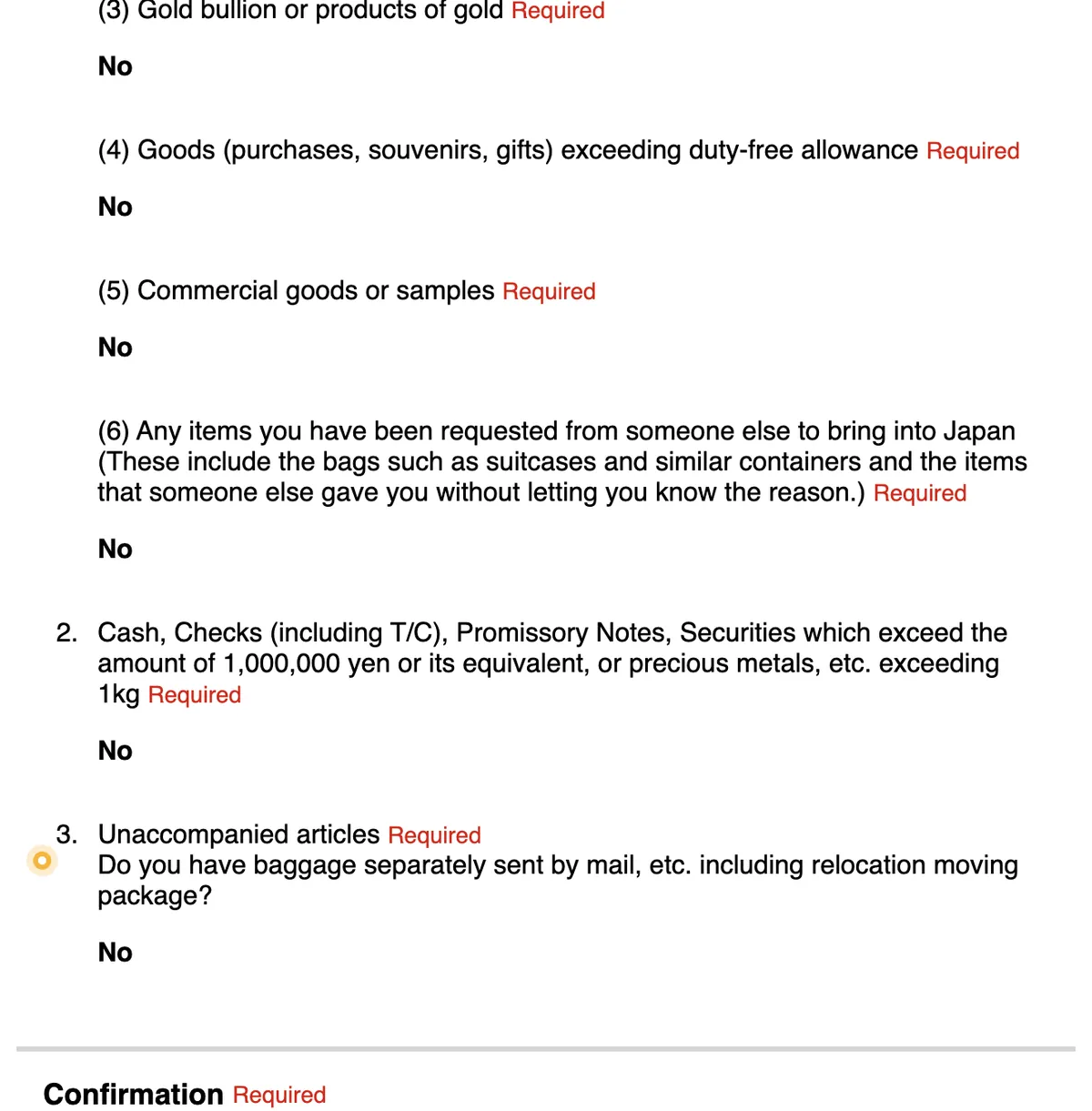
The last page shows everything you’ve entered. Check your passport number and name, your arrival date and flight, and the number of days. If something’s wrong, click Edit. At the bottom, tick The above entry is true and correct and click Register.
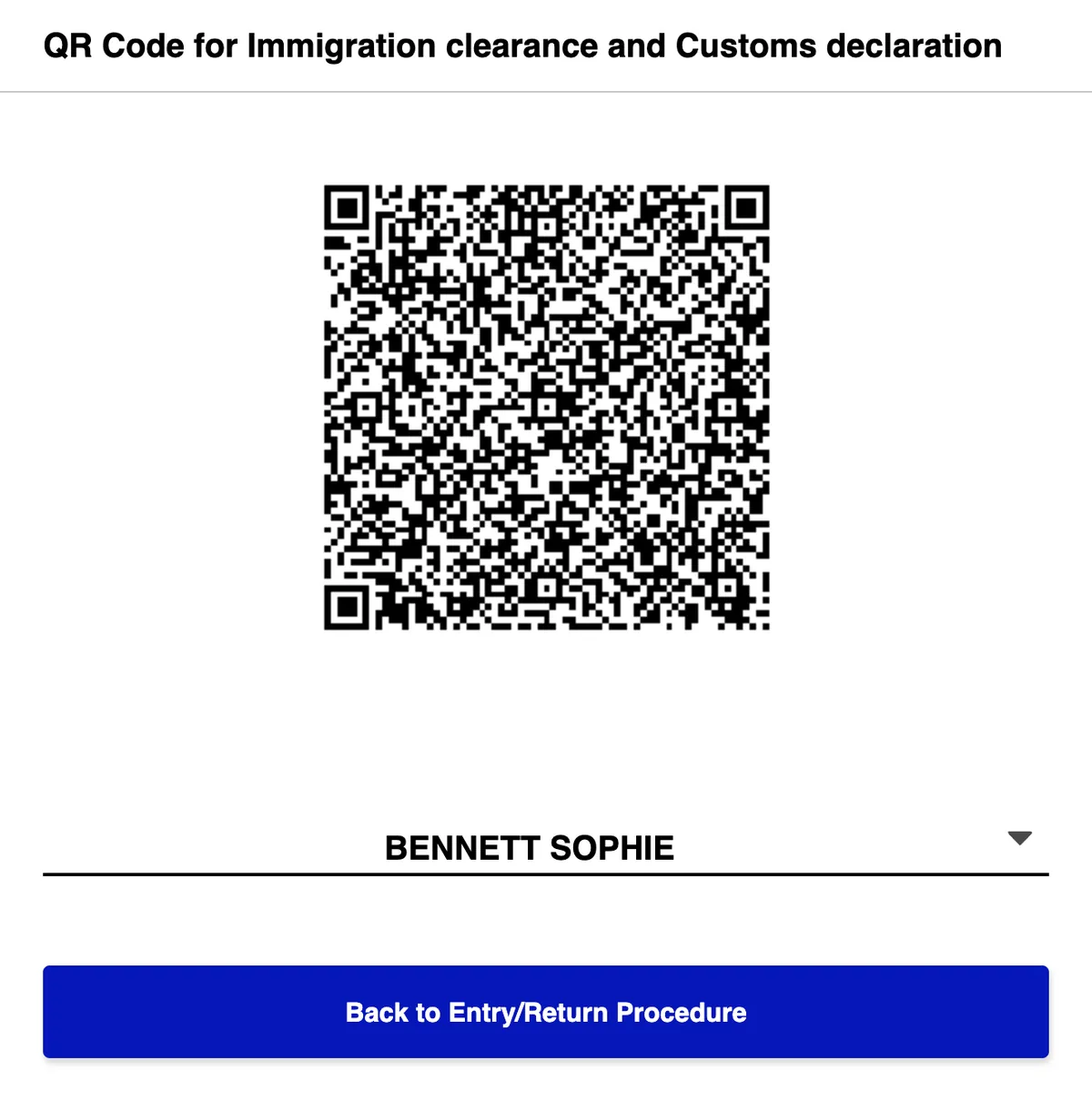
Go back to the procedure page and click Display QR Code. A window explains the procedure. By showing the code, you confirm that your answers are true. Click Agree and display the QR Code.
At the airport
- Show the QR code at the immigration counter and again at customs (at the electronic declaration terminal or the inspection table). Once it’s been scanned at the customs terminal, you can use the electronic declaration gate.
- A screenshot works. The website says a screenshot of the QR code is also accepted, so take one in case you have no signal when you land. Visit Japan Web also has an offline mode, but you need to have logged in online first.
- Changed something? Make a new code. If you edit your details after displaying the QR code, display it again and take a new screenshot.
- One QR code per person. If you’ve registered family members, switch between them in the drop-down list under the code.
The QR code for tax-free shopping is a separate one that you register after you arrive, and the Digital Agency says you can’t use a screenshot of it.
Families and groups
You can register up to 10 family members travelling with you in your account, as long as they go through immigration at the same time as you. On the home screen, click Details of family members traveling with you and add each person’s passport details, one at a time. Then fill in the immigration and customs section for each of them. Each person gets their own QR code.
How to change or delete your details
- To change your answers, open Immigration clearance and Customs declaration on the procedure page and click Edit. Then display the QR code again.
- To delete your account, click When you want to delete your account on the login page. The Digital Agency says that deleting your account doesn’t delete what you’ve already submitted to each government agency.
Common mistakes
- Using a copycat website or app that charges a fee. The official one is vjw.digital.go.jp, and it’s free.
- Choosing British National (Overseas) or another British option instead of United Kingdom.
- Entering dates day first. Your date of birth and passport expiry date go year, month, day.
- Entering the day you leave the UK as your arrival date. It’s the day you land in Japan.
- Typing letters in the flight number. Numbers only: BA7 is 7.
- Typing a date as the length of stay. It’s a number of days, and it must be 90 or less for tourism, even if you plan to extend your stay later.
- Closing the page before you enter the confirmation code from the email. The website warns you to keep it open until your account has been created.
- Not taking a screenshot of the QR code before you fly.
- Forgetting to make a new QR code after changing something.
Frequently asked questions
What is Visit Japan Web?
It’s the official online service of Japan’s Digital Agency for immigration clearance and customs declarations. You register your information before you arrive and show a QR code at the airport. Foreign visitors can also use it for tax-free shopping during their stay.
Do I need to fill in a Japan arrival card?
Not on paper if you use Visit Japan Web: it includes the arrival card and the customs declaration. Visit Japan Web is optional, though. If you don’t use it, you fill in the forms on paper.
Is Visit Japan Web legit?
Yes. It’s run by Japan’s Digital Agency at vjw.digital.go.jp, and it’s free. The ones to avoid are the copycat websites that charge a fee and the look-alike apps the Digital Agency has warned about.
Is there a Visit Japan Web app?
No. Visit Japan Web is a website: you open it in your phone’s browser. The Digital Agency has warned about suspicious apps with similar names, such as “Visit Japan Web Info”.
Is Visit Japan Web free?
Yes. The Digital Agency says it never asks users to pay any fee.
Which nationality do I choose with a British passport?
United Kingdom. The list also includes other British nationalities, such as British National (Overseas), which are for other types of British passport.
Can I fill in Visit Japan Web for my children?
Yes. Add them as family members travelling with you (up to 10), and fill in the immigration and customs section for each of them. Each one gets their own QR code.
Can I use a screenshot of the QR code?
Yes, for immigration and customs: the website says a screenshot is also accepted. If you change anything afterwards, take a new one.
Do I need a visa to travel to Japan from the UK?
Not for tourism or business trips of up to 90 days with a British citizen passport. You can then apply for an extension at an immigration office in Japan, up to 6 months in total. To work or study, you need a visa before you travel. The details are on Japan visa for UK citizens.
Apply yourself or use a visa service? Compare the government fee with what each visa service charges, online or in person, on the Japan visa page.
Sources
Where the information in this guide comes from, with the date we last checked it: official websites for fees and rules, and each visa service’s website or Google Maps listing when we give its prices or reviews. The numbers match the superscript numbers in the text.
- 1.Ministry of Foreign Affairs of Japan: Exemption of visa (short-term stay), note 8 on stays of up to 6 months. mofa.go.jp · checked on 18 November 2026
- 2.Japan’s Digital Agency: Visit Japan Web (official portal). vjw.digital.go.jp · checked on 17 November 2026
- 3.Japan’s Digital Agency: Visit Japan Web, about the service. services.digital.go.jp · checked on 18 November 2026
- 4.Japan’s Digital Agency: How to use Visit Japan Web. services.digital.go.jp · checked on 18 November 2026
- 5.Japan’s Digital Agency: Visit Japan Web user manual (English). vjw.digital.go.jp · checked on 18 November 2026
- 6.Japan’s Digital Agency: Visit Japan Web announcements (fee-charging sites, suspicious apps). services.digital.go.jp · checked on 18 November 2026
- 7.Japan Customs: Procedures of passenger clearance (duty-free allowance, cash declaration). customs.go.jp · checked on 18 November 2026
- 8.FCDO: Japan entry requirements (GOV.UK). gov.uk · checked on 18 November 2026