You apply for India’s e-Visa on one website only: indianvisaonline.gov.in/evisa, run by India’s Bureau of Immigration. There’s no embassy appointment, and you don’t need a visa service. This guide walks you through the official form with screenshots from November 2026: the first page field by field, what the later pages ask, the photo and passport scan the site accepts, and what to do after you pay.
To compare the e-Visa with the other ways to get a visa for India, see India visa for U.S. citizens.
Watch out for copycat sites. Search for “India e-Visa,” and many of the top results are private sites with official-looking names and logos. They charge much more than the government fee. India’s own FAQ says indianvisaonline.gov.in is the only official website for the e-Visa, that no intermediary is needed, and that you shouldn’t share your personal data with any other site. The official site’s address ends in .gov.in.
Key facts
- Where
- Only on indianvisaonline.gov.in/evisa, the Government of India’s website.
- 30-day e-Tourist Visa
- $10–251 (the lower fee from April through June, the higher one the rest of the year). 30 days from arrival, multiple entries2.
- 1-year e-Tourist Visa
- $401. 1 year from approval, multiple entries; up to 180 days per calendar year2.
- 5-year e-Tourist Visa
- $1601. 5 years from approval, multiple entries; up to 180 days per calendar year2.
- Bank fee
- 3% of the e-Visa fee with a credit or debit card, 4% with PayPal. The e-Visa fee is nonrefundable, even if your application is denied.
- When to apply
- Apply at least 4 days before arrival2, and no more than 120 days ahead. India doesn’t publish a processing time.
- What you get
- An Electronic Travel Authorization (ETA) by email. You print it, and an immigration officer stamps the e-Visa in your passport when you arrive.
Do you need the e-Visa?
Yes, if you’re a U.S. citizen visiting India for tourism, to see friends or family, for a short yoga program or a short course (up to 6 months, with no diploma or certificate), for up to a month of unpaid volunteer work, or for business. The e-Visa also covers medical treatment and conferences, each with its own e-Visa type.
There’s no visa on arrival for U.S. citizens. India offers it only to citizens of Japan and South Korea and to some citizens of the United Arab Emirates. You need the e-Visa, or a regular visa, before you fly.
You need a regular visa instead to work, for journalism or NGO work, or to stay longer than the e-Visa allows. You can’t extend an e-Visa or convert it to another visa in India. If you live in the U.S., you apply for a regular visa through VFS Global, which handles applications for the Indian embassy or consulate that covers your state. A tourist visa of up to 10 years costs $160 + $3 (ICWF) + VFS Global service fee3.
You don’t need a visa at all if you have an Overseas Citizen of India (OCI) card, which works as a lifelong, multiple-entry visa. If you were ever an Indian citizen and still have your Indian passport, you must surrender it and get a surrender certificate before you apply for a visa or an OCI card. India doesn’t allow dual citizenship.
You can’t get an e-Visa if you hold a Pakistani passport or if you, your parents, or your grandparents were born in or permanently lived in Pakistan. Apply for a regular visa instead.
Before you start
Have these ready:
- The passport you’ll travel with. India asks for at least 6 months of validity when you apply, and the form asks for 6 months from your travel date, so make sure it’s still valid 6 months after you arrive. It also needs at least two blank pages for the entry stamp. Children need their own passport and their own e-Visa.
- A digital photo in JPEG format, between 10 KB and 1 MB, and square (the same height and width). It must show your full face from the front, eyes open, without glasses, on a plain white or light background, with no shadows and no border. Center your head and show it all, from the top of your hair to the bottom of your chin. The official sample form adds a minimum size of 350 × 350 pixels. Don’t use a photo cropped from your passport’s data page.
- A scan of your passport’s data page (the page with your photo, name, date of birth, and expiration date) as a PDF between 10 KB and 300 KB. It must be the same passport you enter in the form.
- Your travel details: the airport or seaport where you’ll land, the date you expect to arrive, the places you plan to visit, and the airport or seaport where you plan to leave India.
- Two references, each with an address and phone number: one in India, and one in the U.S. to contact in an emergency.
- Your parents’ names, nationalities, and places of birth, and the countries you’ve visited in the last 10 years.
- A credit or debit card, or a PayPal account.
Two things trip up many Americans:
- Dates are written day first: DD/MM/YYYY. March 14, 1988, is 14/03/1988. Mix them up, and your date of birth won’t match your passport.
- Enter your name exactly as it appears in your passport. The form warns that a visa may not be granted if the names don’t match.
India says the whole application, including payment, can take 10–15 minutes if you have everything ready.
Step 1: Open the official website
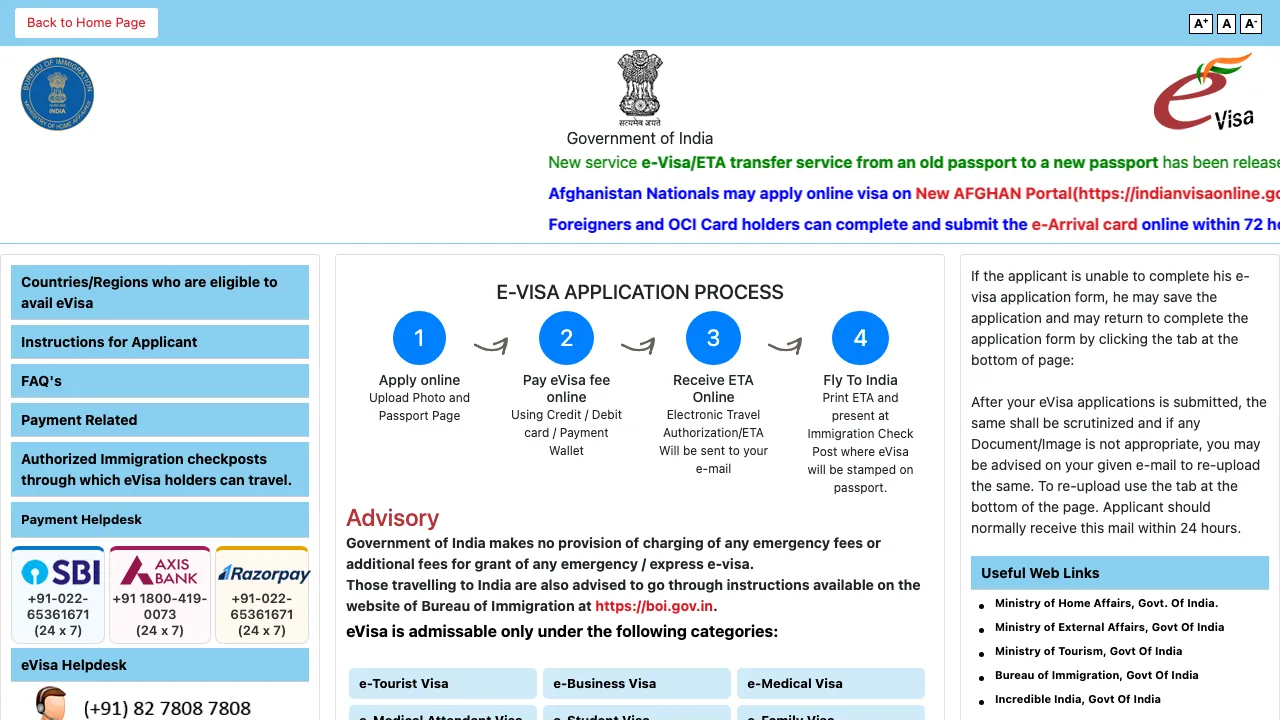
Go to indianvisaonline.gov.in/evisa. The menu on the home page (in the image at the top of this guide) has the list of eligible countries, the instructions for applicants, FAQs, payment information, and the airports and seaports where you can enter with an e-Visa. The home page also sums up the process in four steps.
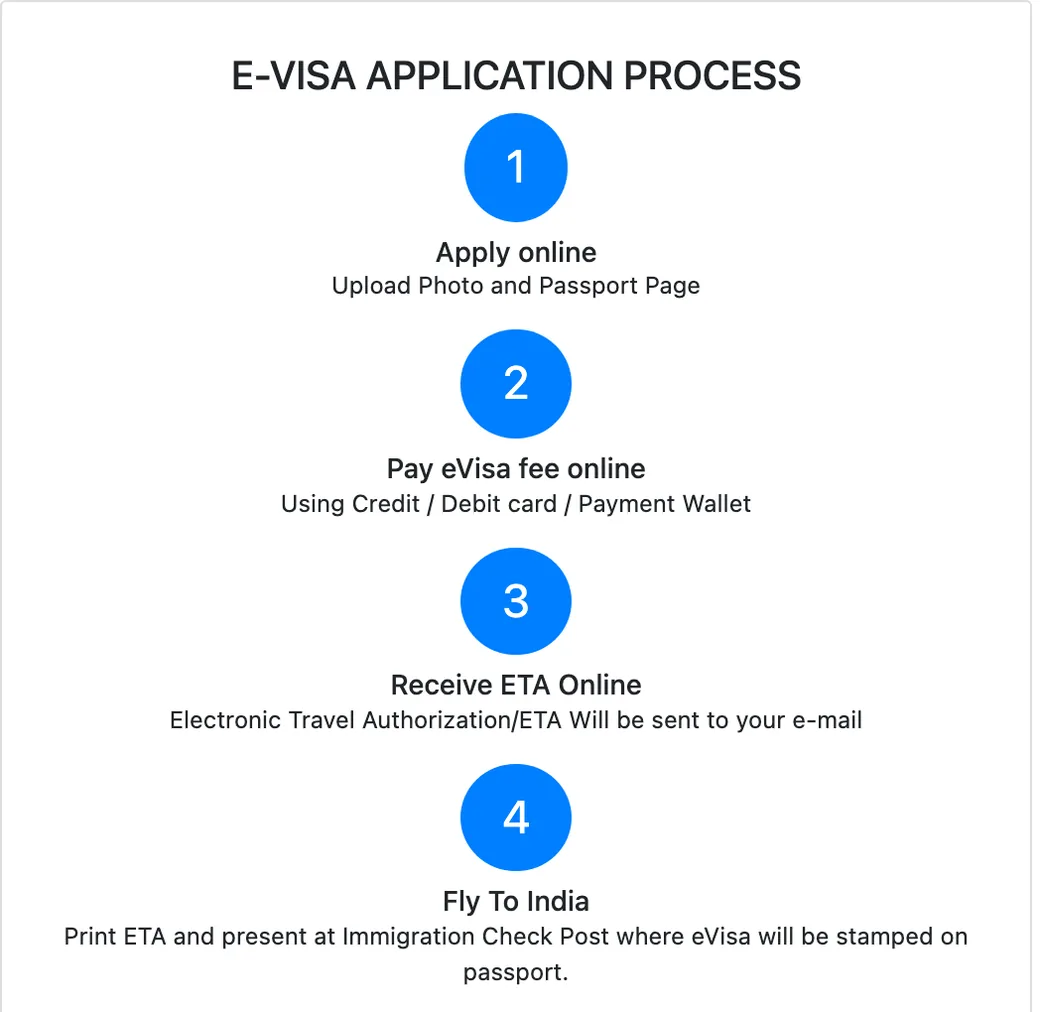
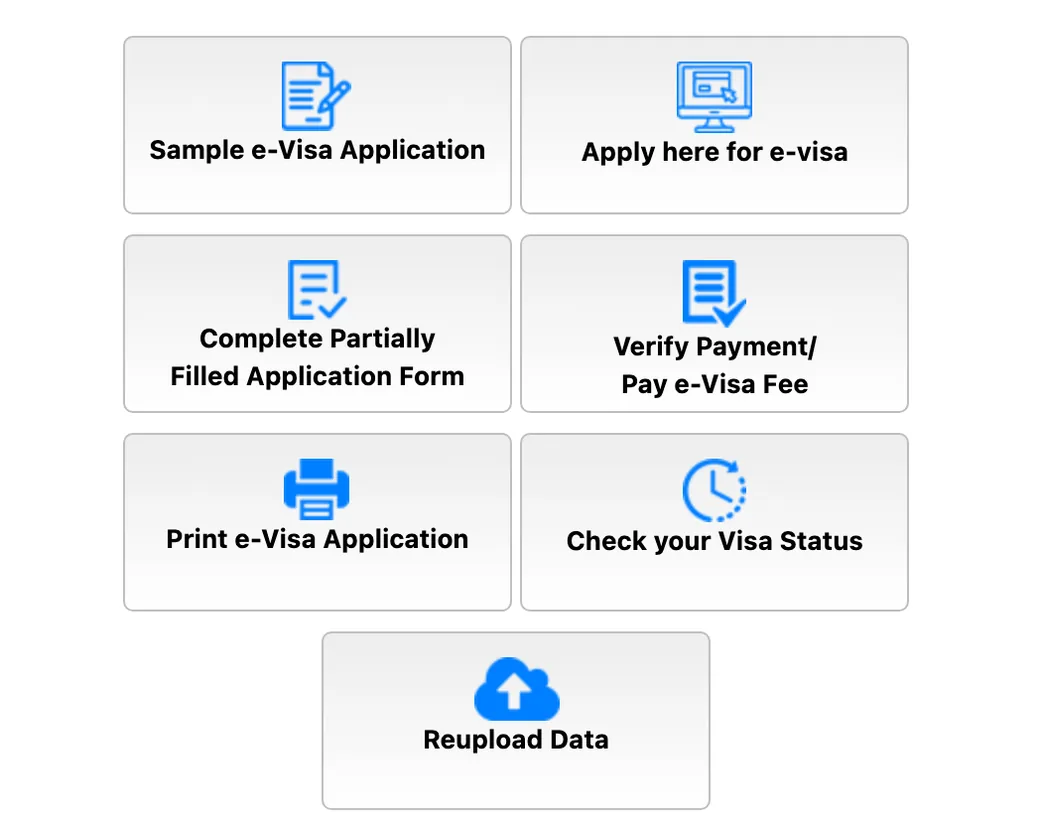
Scroll to the bottom of the page and click Apply here for e-visa. The other buttons there are the ones you’ll need later: to finish an application you saved, to pay or check a payment, to print your application, to check your visa status, and to re-upload a document if the site asks you to.
Step 2: Passport number, country, and the health questions
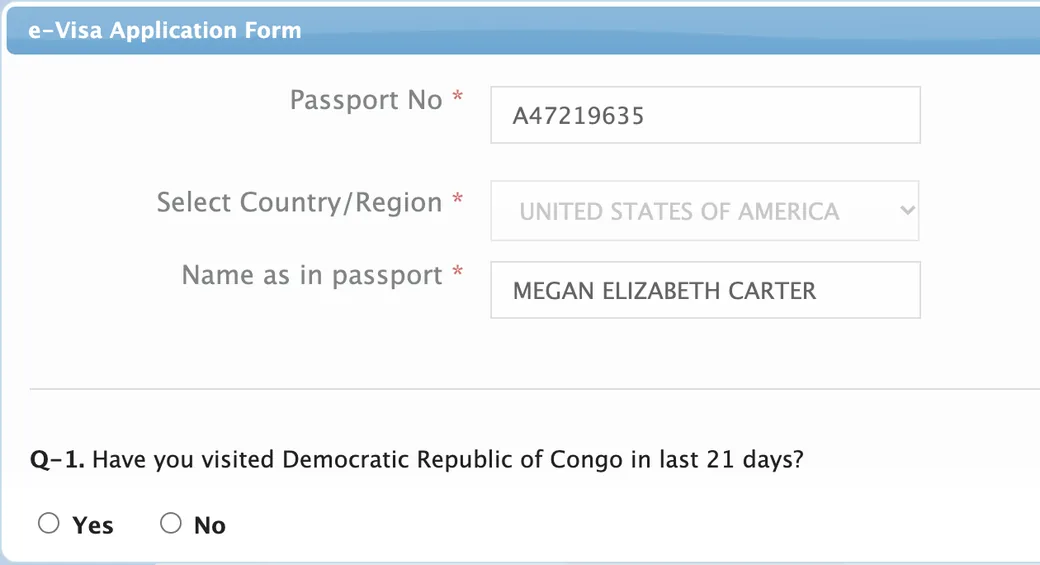
The form opens with a small window. In the screenshots, the traveler is Megan, who lives in Chicago and plans to fly into Delhi in January.
- Passport No: your passport number, with no spaces.
- Select Country/Region: UNITED STATES OF AMERICA.
- Name as in passport: your full name, letters and spaces only.
Click Continue. The site then asks whether you’ve visited the Democratic Republic of the Congo in the last 21 days. If you answer No, the window closes, and the application form opens. If you answer Yes, it asks whether 21 days have passed since you left and whether you have any symptoms of Ebola; depending on your answers, you may have to wait before you apply.
Step 3: The first page of the form
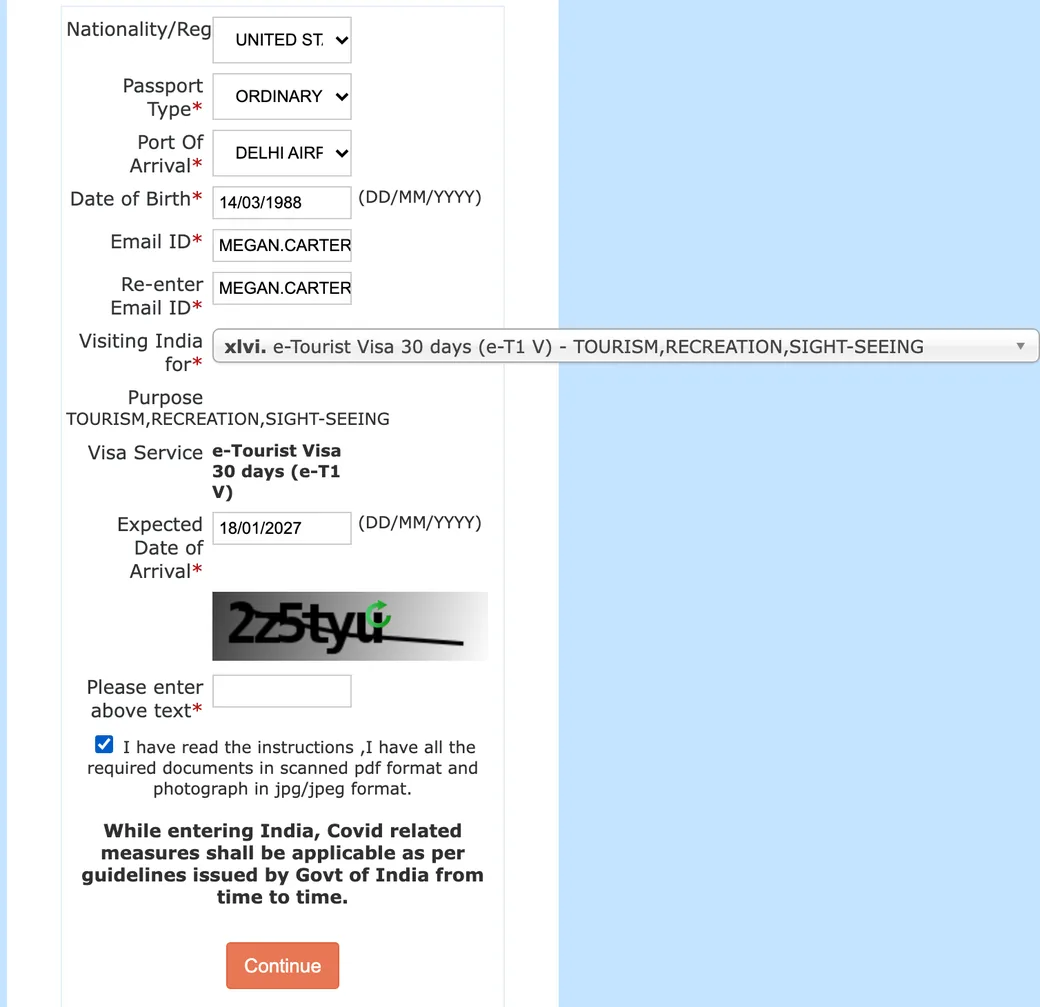
| Field | What to enter |
|---|---|
| Nationality/Region | UNITED STATES OF AMERICA. A message asks you to confirm it: click Ok |
| Passport Type | ORDINARY PASSPORT |
| Port Of Arrival | The airport or seaport where you’ll land, such as DELHI AIRPORT or MUMBAI AIRPORT. With an e-Visa, you can only enter through the airports and seaports on the official list, not by land |
| Date of Birth | DD/MM/YYYY |
| Email ID and Re-enter Email ID | An address you check often: your confirmation and your ETA are sent there |
| Visiting India for | The purpose of your trip. Your choice sets the e-Visa type: for a vacation, choose e-Tourist Visa 30 days (e-T1 V) - TOURISM,RECREATION,SIGHT-SEEING, or the 1-year or 5-year option. The page then shows the Purpose and the Visa Service you chose |
| Expected Date of Arrival | DD/MM/YYYY. At least 4 days and no more than 120 days from today |
Type the characters from the image, check the box confirming that you’ve read the instructions and have your documents ready, and click Continue.
Step 4: The rest of the form
After the first page, the site gives you a Temporary Application ID. Write it down. Each page has two buttons: Save and Continue and Save and Temporarily Exit. If you exit, you can come back later with Complete Partially Filled Application Form on the home page. If you close the page without saving, you lose what you typed.
India’s official sample application (the Sample e-Visa Application button on the home page) shows the remaining pages. The sample dates from 2019, so some fields may look a little different now:
- Applicant details: your surname and given names exactly as in your passport, any previous names, gender, city and country of birth, national ID number (the form says to type NA if it doesn’t apply), religion, visible identification marks (moles, birthmarks, or scars, for example), education, whether you became a citizen by birth or by naturalization, and whether you’ve lived in the U.S. for at least 2 years. Then your passport details: number, place of issue (as printed in your passport), date of issue, and expiration date. If you hold another passport, you list it here.
- Address and family: your home address (35 characters per line at most), at least one phone number, your father’s and mother’s names, nationalities, and places of birth, your marital status, and whether your parents or grandparents were Pakistani nationals.
- Visa details: the places you plan to visit, whether you booked a hotel through a tour operator, and the port where you expect to leave India. If you’ve been to India before, you give the address where you stayed, the cities you visited, and your last visa number; India’s FAQ says you can write NA if you don’t remember it. Then the countries you’ve visited in the last 10 years, any visits to other South Asian (SAARC) countries in the last 3 years, and the two references: one in India and one in the U.S. to contact in an emergency.
- Additional questions: six yes-or-no questions about arrests, deportations, and serious crimes, followed by a declaration that your answers are true.
- Photo upload: the photo described above.
- Document upload: the PDF of your passport’s data page. All documents must be in English.
- Confirm details: a summary of everything you entered. Check it carefully: India’s FAQ says you’re responsible for any mistake in your name, nationality, passport number, date of birth, or photo, whether your e-Visa is granted or not. Click Modify to fix something, or Verified and Continue.
Step 5: Pay the fee
The last page shows your Application ID, which you’ll need to check your status, pay, and print. On the official sample, you accept a statement that the fee is nonrefundable, then choose Pay Now or Pay Later. With Pay Later, you can pay afterward with your Application ID and date of birth, but your application isn’t submitted until you pay, and you must pay at least 4 days before your trip.
You pay with a credit or debit card or PayPal. The bank fee (3% with a card, 4% with PayPal) is added to the e-Visa fee, and the payment page shows the breakdown. Your bank may ask you to confirm the payment with a one-time code.
If the payment seems to fail, don’t pay again right away. The site says the payment status can take up to 2 hours to update. Check it with Verify Payment/Pay e-Visa Fee first. After three failed payment attempts, the Application ID is blocked, and you have to apply again. If you were charged twice, the second charge is refunded once the payments are reconciled.
After you apply
- You get a confirmation email right after you submit your application and pay.
- The site may ask you to re-upload your photo or passport scan if they don’t meet the requirements. You should normally get that email within 24 hours. Use Reupload Data on the home page.
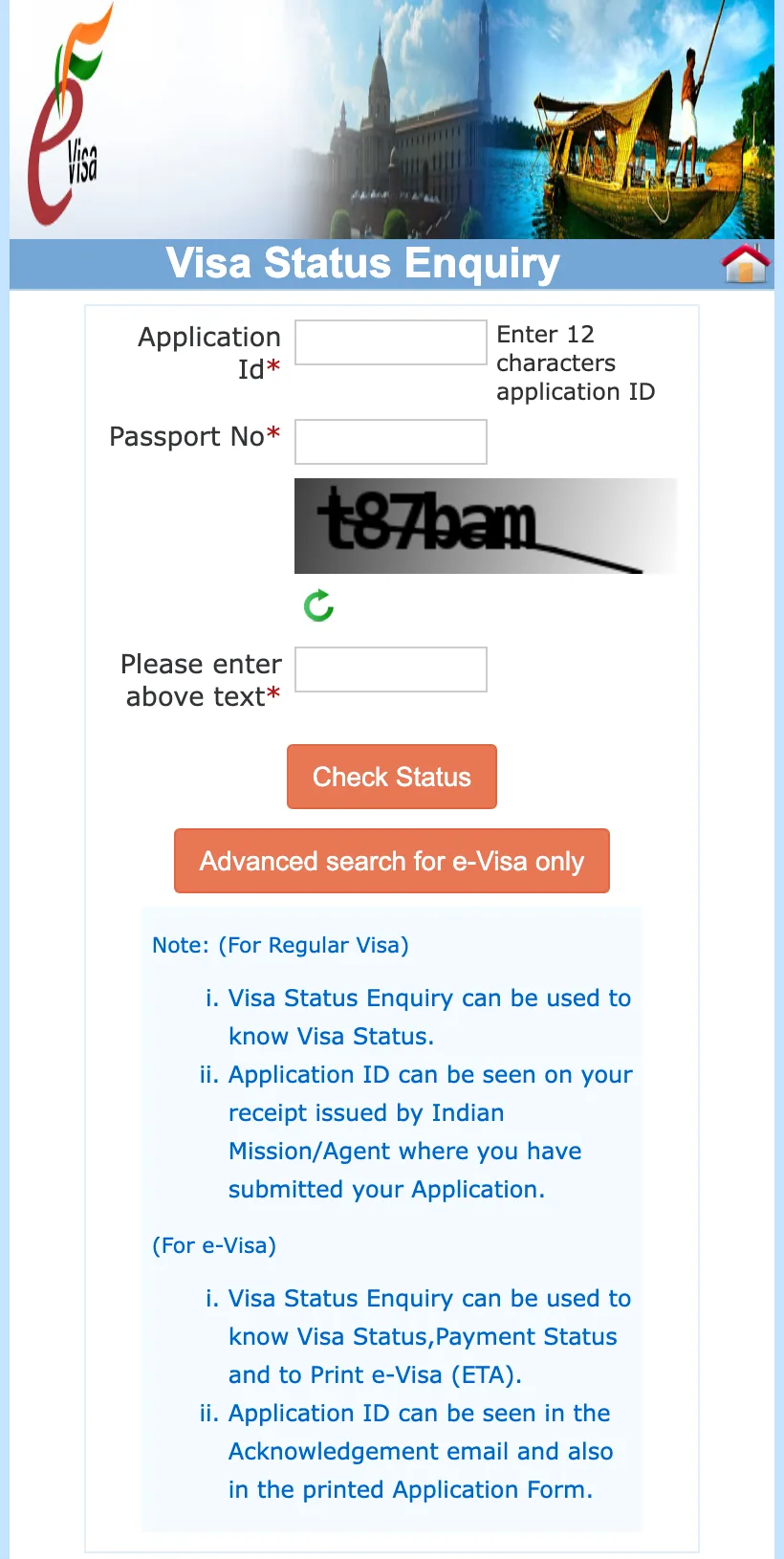
- You get the decision by email: your ETA is either granted or rejected. To check it yourself, use Check your Visa Status with your Application ID and passport number. Before you travel, make sure your status shows GRANTED.
- Print your ETA and carry it with your passport. At immigration, an officer checks it, takes your photo and fingerprints, and stamps the e-Visa in your passport. Make sure you get the entry stamp.
- Fill out the free e-Arrival Card in the 72 hours before you land, on indianvisaonline.gov.in/earrival, on boi.gov.in, or in the Indian Visa Su-Swagatam app. It only records your arrival; it isn’t a visa.
Questions about your application? The Indian embassy and consulates in the U.S., and VFS Global, can’t see e-Visa applications or give status updates. Contact the e-Visa helpdesk listed on the official site: +91 82 7808 7808 or indian-evisa@gov.in.
Do it yourself or use a visa service?
You can do it yourself: the form is long, but it’s all online, and India says no intermediary is needed. A visa service can fill out or check the application for you, and its fee is extra. Here’s what the visa services in our directory charge for the 30-day e-Tourist Visa:
- Official website (no agency)$10–251 government fee
- Atlys· OnlineIndia e-Visa (30 days, multiple entry)$74
- Sherpa· OnlineIndia e-Tourist Visa (30 days, multiple entry)$79.89
- VisaHQ· With an officeIndia e-Tourist Visa (30 days, multiple entry)$85.00
- Travel Document Systems· With an officeIndia e-Tourist Visa (30 days)$91
- eVisas· OnlineIndia e-Tourist Visa (30 days, double entry)$99
- VisaCare· With an officeIndia e-Tourist Visa (30 days)$100
- VisaHero· With an officeIndia e-Tourist Visa (30 days, double entry)$106
- Passports Visas & More· With an officeIndia e-Tourist Visa (30 days, double entry)$110
- iVisa· OnlineIndia e-Tourist Visa (30 days, multiple entry)$114.99
- Evisa Express· OnlineIndia e-Tourist Visa (30 days, multiple entry)$121
Total price per person shown by each agency on its website, government fee included, with standard processing, for a U.S. passport; checked on November 15, 2026. Prices change, so check them before you pay. Each price and its source are on the agency’s page. Everything about the visa for India.
Common mistakes
- Applying on a copycat site that looks official. Check that the address ends in .gov.in.
- Writing dates the American way. The form uses DD/MM/YYYY.
- A name that doesn’t match your passport, or swapping your surname and given names.
- Applying too early or too late: at least 4 days and no more than 120 days before you arrive.
- A photo that isn’t square, is too large, has a dark background, or shows you wearing glasses.
- A passport scan saved as an image instead of a PDF, or larger than 300 KB.
- Choosing the wrong purpose in “Visiting India for.” It sets your e-Visa type and fee.
- Paying twice because the payment status hasn’t updated. Wait 2 hours and check first.
- Planning to enter by land. The e-Visa only works at the designated airports and seaports.
- Traveling before your status shows “GRANTED.”
Frequently asked questions
Do U.S. citizens need a visa to travel to India?
Yes. U.S. citizens need a visa for India, and there’s no visa on arrival. Most travelers get the e-Visa online. If you have an OCI card, you don’t need a visa.
How much does a 30-day India e-Visa cost?
$10–25 for U.S. citizens: the lower fee applies from April through June, and the higher one the rest of the year. The bank adds 3% with a card or 4% with PayPal. The 1-year e-Tourist Visa costs $40, and the 5-year one $160.
How early should I apply for an India e-Visa?
At least 4 days before you arrive, and no more than 120 days ahead. You must also pay the fee at least 4 days before you travel, or your application won’t be processed.
How long does it take to get an India e-Visa as a U.S. citizen?
India doesn’t publish a processing time. You get a confirmation email when you apply and the decision by email later. Apply well before the 4-day minimum so you have time to fix any problem with your documents.
How do I check my India e-Visa status?
On the official site, click Check your Visa Status and enter your 12-character Application ID and your passport number. The Application ID is in your confirmation email and on your printed application.
Which is better, an e-Visa or a visa on arrival?
U.S. citizens can’t get a visa on arrival in India, so the choice is between the e-Visa and a regular visa from the embassy or a consulate. For tourism or business trips, the e-Visa is simpler: it’s all online, with no appointment.
Do I need to print the e-Visa?
Yes. The official site says you must carry a printout of your ETA, the approval sent by email.
Can I get a refund if my e-Visa is denied or I cancel my trip?
No. The fee covers processing, so it’s nonrefundable, whether you cancel your trip or your e-Visa is granted or denied.
My ETA has a mistake in my name or passport number. What can I do?
Contact the e-Visa helpdesk (indian-evisa@gov.in or +91 82 7808 7808) at least 24 hours before you travel. India’s FAQ says you’re responsible for any mistake, so check everything on the confirmation page before you pay.
I got a new passport after my e-Visa was approved. Do I need a new one?
Not necessarily. India says you may be allowed in on the new passport, as long as you also carry the old passport the ETA was issued on. The site also has a service to transfer an ETA to a new passport.
Do children need their own e-Visa?
Yes. Each child needs a separate e-Visa, and their passport must be valid for at least 6 months from the date they arrive in India.
Can I enter India by land or on a cruise ship with an e-Visa?
Not by land: you must arrive at one of the designated airports or seaports. By cruise ship, India’s FAQ names five seaports (Mumbai, Chennai, Cochin, Goa, and Mangalore), but another page of the site gives a longer list of seaports for cruise passengers, so check with your cruise line. You can leave India through any immigration checkpoint.
Do I need a visa service?
No. You can apply yourself on the official website. If you use a visa service, its fee is extra.
Apply yourself or use a visa service? Compare the government fee with what each visa service charges, online or in person, on the India visa page.
Sources
Where the information in this guide comes from, with the date we last checked it: official websites for fees and rules, and each visa service’s website or Google Maps listing when we give its prices or reviews. The numbers match the superscript numbers in the text.
- 1.e-Tourist Visa fees by country (Government of India, PDF). indianvisaonline.gov.in · checked on November 16, 2026
- 2.Indian Visa Online: official e-Visa website, with instructions, FAQs, and payment information (Government of India). indianvisaonline.gov.in · checked on November 16, 2026
- 3.Embassy of India in Washington, D.C.: visa fees for U.S. nationals. indianembassyusa.gov.in · checked on November 12, 2026
- 4.Indian Visa Online: e-Visa application form, first page (Government of India). indianvisaonline.gov.in · checked on November 16, 2026
- 5.Indian Visa Online: sample e-Visa application (Government of India, PDF). indianvisaonline.gov.in · checked on November 16, 2026
- 6.Indian Visa Online: Visa Status Enquiry (Government of India). indianvisaonline.gov.in · checked on November 16, 2026
- 7.e-Arrival Card (Bureau of Immigration, India). indianvisaonline.gov.in · checked on November 16, 2026
- 8.Embassy of India in Washington, D.C.: advisory for e-Visa applicants. indianembassyusa.gov.in · checked on November 12, 2026
- 9.Embassy of India in Washington, D.C.: OCI card. indianembassyusa.gov.in · checked on November 12, 2026
- 10.Embassy of India in Washington, D.C.: surrender of Indian passport. indianembassyusa.gov.in · checked on November 12, 2026
- 11.U.S. Department of State: India Travel Advisory and Country Information. travel.state.gov · checked on November 12, 2026